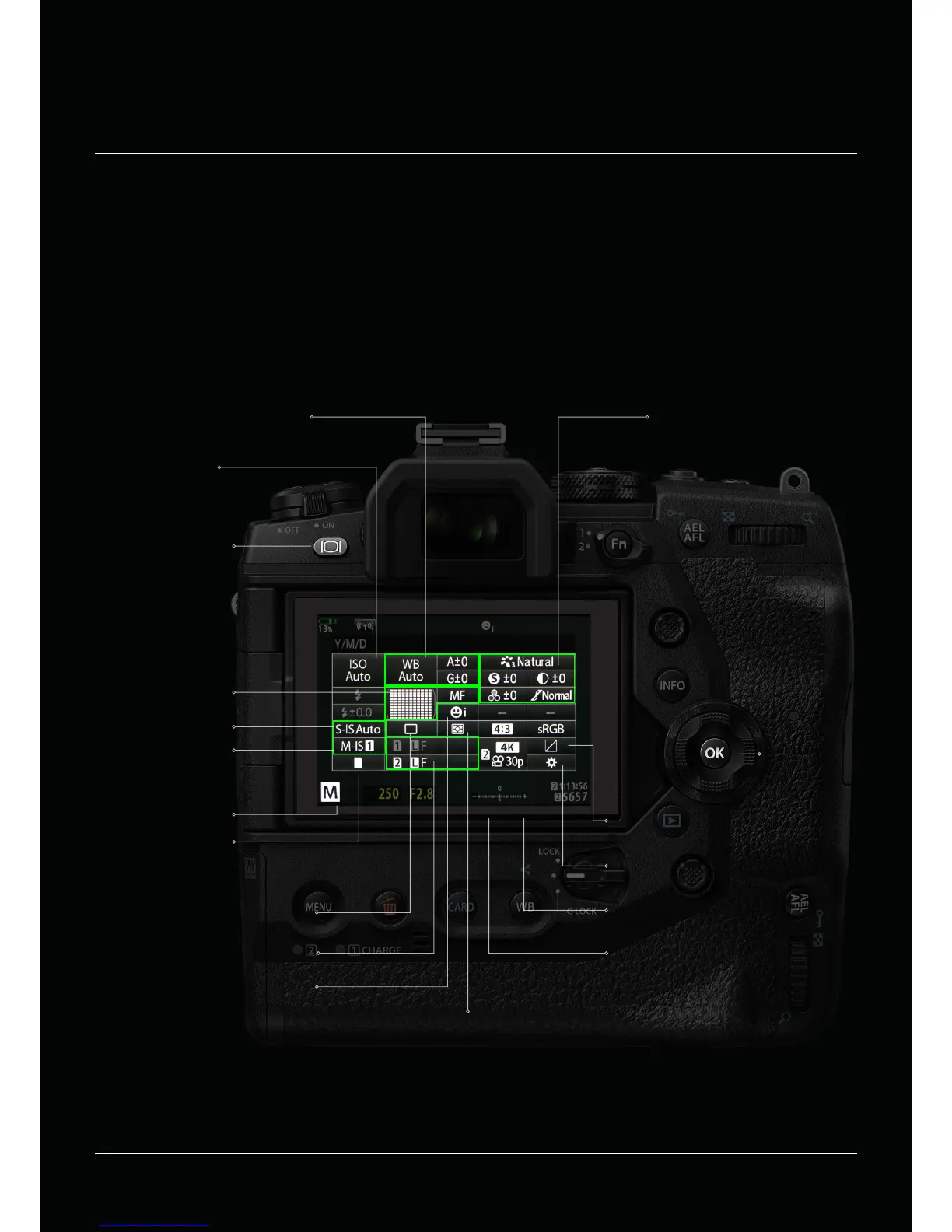
ISO Sensitivity
White Balance
Autofocus FIield
Selection
OK BUTTON
LIVE VIEW
(switch to static SCP)
Image Stabilisation Photo
Image Stabilisation Video
Picture Settings
Button function assignment
Highlight & Shadow Control
Storage Options
Shooting Modes
Metering Mode
Aspect ratio
Movie Image Quality
Sequential Shooting/Self-Timer
(drive Mode)
Face Priority
File Format / Size
Super Control Panel
All shooting options can be accessed via the Super Control Panel (SCP). It enables a quick and comfortable way to get
an overview of all settings and an easy way to adjust them. You activate the SCP as an overlay by pressing the OK Button.
If you shoot with viewnder you can display the SCP at all time by pressing the Live View Button. That allows you to take
easily control over all your camera settings. The touchscreen makes the operation easy, quick and compfortable.


 To Next Page