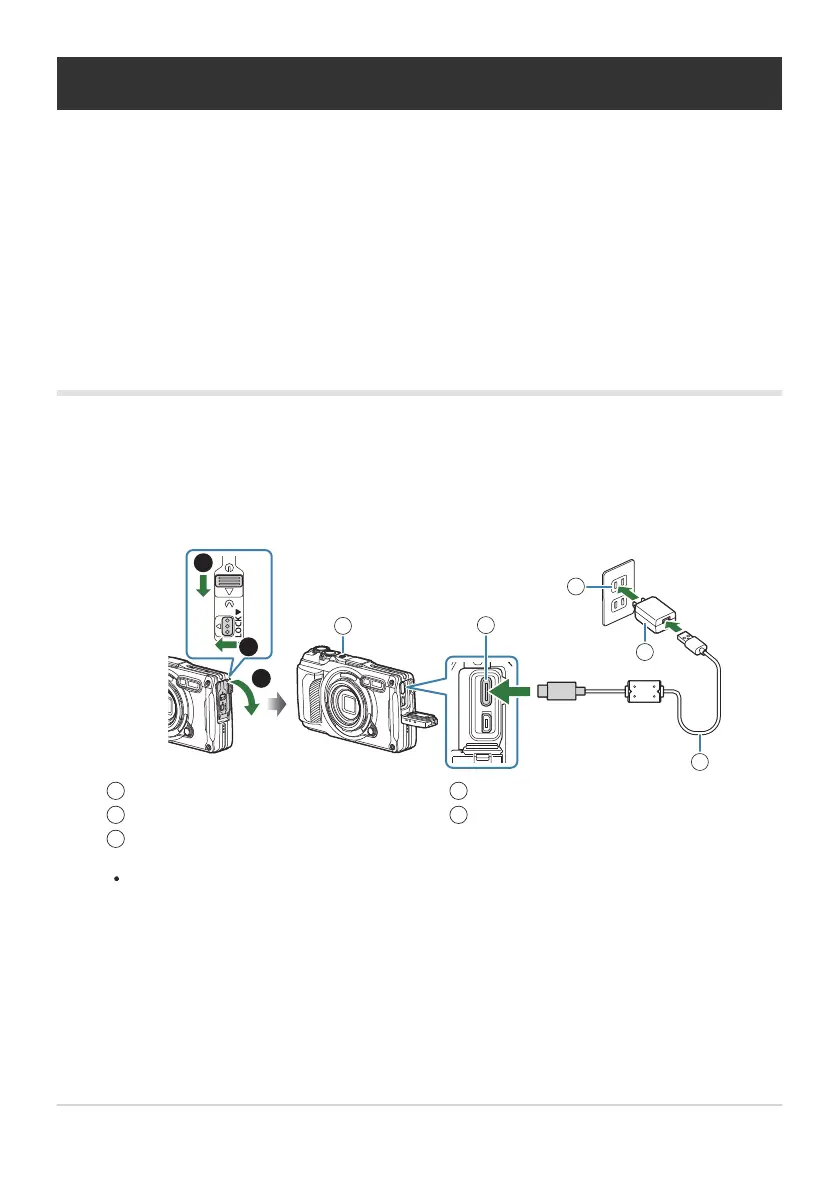
USB-AC adapter F‑5AC (sold separately)
AC outlet
USB cable (supplied)
1
2
3
USB connector (Type-C)
Indicator lamp
4
5
Charging the Battery
The battery will not be fully charged at the time of purchase. Charge the battery before use.
The ambient temperature for charging is 0°C to 40°C.
The camera can be charged using the following methods.
Using the F-5AC (sold separately) (P.23)
Connecting the camera to a computer (P.182)
Using a commercially available USB device (P.25)
Charging the battery using an optional USB-AC
adapter
Check that the battery is in the camera, and connect the USB cable and USB-AC adapter.
Do not use any USB cable other than the USB cable supplied with the camera (CB-USB14) or
an optional USB cable (CB-USB11).
The menu will be displayed on the monitor.
23
Charging the Battery
C
C
C
-
-
-
1.
B



 To Next Page