EasyManua.ls Logo

Omer OMR-1 User Manual

Omer OMR-1
70 pages
To Next Page IconTo Next Page
Page #1 background imageLoading...
Page #1 background image
1.0 Introduction
Read this instruction manual entirely, making sure you
fully understand the use and limitations of this
instrument. Improper use may cause serious injury or
death.
!IMPORTANT WARNINGS!
WARNING! OMERSUB recommends you get
proper certified training before attempting
breath holding diving and spearfishing. You are
the sole responsible for your own safety.
WARNING! This computer is a supplementary
device for properly trained free divers. The
information provided by this watch is FOR
REFERENCE ONLY and should never be used
as a primary source of information in planning
and/or executing sport dives.
WARNING! This computer, and the information
it provides, should in no case be considered a
substitute for certified freediving instruction or
training. Insufficient or improper training may
cause serious injury or death.
WARNING! This computer is solely intended to
provide secondary information for the free
diving activity. It should never be used for
scuba diving with tanks, or any other activity in
connection with commercial or professional
diving.
WARNING! Always use back-up instruments
such as a depth gauge, timer or watch.
If you have any questions about this manual, the above
warnings or the OMR1 freediving computer, contact
your OMERSUB dealer before attempting to use this
computer inside or outside the water.
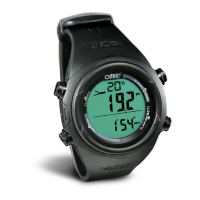
2.0 Button and its Function
[EL] [U]
auto backlight
indicator
[M] [D]
DISPLAY
Current Time Mode Auto Backlight
Mode Button [M]
To select among the Current Time, Dive Recall, Chronograph,
Countdown Timer and Dual Time Mode.
Hold to enter Setting Mode
Up/Start/Stop Button [U]
To change the setting value or increase the set value
during Setting Mode.
To activate the 'start' or 'stop' function during Chronograph and
Countdown Timer Mode.
To change the sub-function display of Current Time Mode.
To select dive record in Dive Recall Mode.
Down/Reset Button [D]
To show the Daily Alarm.
To change the setting value or decrease the set value during
setting display.
To clear the value for the Chronograph and Countdown Timer.
To select dive record in Dive Recall Mode.
EL Button [EL]
Hold the [EL] button for 2 seconds to set the auto backlight
between ON and OFF.
To turn on the EL back light for about 3 seconds.
Auto Backlight
When Auto Backlight is set ON, the EL backlight will turn on for
3 seconds automatically when a key is pressed.
NOTE: The major key operations are summarized on the above
paragraphs, however please read the coming chapters for the detail
operations.
Question and Answer IconNeed help?

Do you have a question about the Omer OMR-1 and is the answer not in the manual?

Omer OMR-1 Specifications

General IconGeneral
ModelOMR-1
Diameter60 mm
Weight120 g
Luminous MarkingsYes
UserRecreational Divers
Depth Rating100 meters
MountingWrist
VisibilityHigh

Summary

Introduction and Warnings

Button and its Function

Core Button Operations

Details the functions of the Mode, Up/Start/Stop, Down/Reset, and EL buttons for navigation and control.

Auto Backlight Feature

Explains how the auto backlight activates automatically when a key is pressed.

Major Function Modes Overview

Dive and Recall Modes

Overview of Dive Mode activation and Dive Recall Mode for reviewing dive history.

Timekeeping Modes

Covers Current Time, Dual Time, and Surface Modes for time display.

Timer and Stopwatch Modes

Details Countdown Timer and Chronograph modes for timed events.

Current Time Mode Details

Current Time Sub-function Display

Details how to cycle through Date, Day of Week, Temperature, and Second displays.

Daily Alarm Display

Explains how to view the set alarm time by pressing the [D] button.

Setting the Current Time Mode

The Setting Display

Guides on setting time, date, and other parameters using the buttons.

Setting the Daily Alarm

How to Set the Daily Alarm

Provides step-by-step instructions for setting the daily alarm time and activating/deactivating it.

Using the Chronograph

Chronograph Mode Description

Describes the stopwatch function, its resolution, and measuring range.

Chronograph Operation Guide

Explains how to start, stop, freeze, resume, and reset the chronograph.

Countdown Timer Mode

Countdown Timer Display and Reload

Details the timer's resolution, range, and instructions on reloading.

Setting the Countdown Timer

Countdown Timer Setting Procedure

Guides on setting the hour, minute, and second values for the countdown timer.

Setting the Dual Time

Dual Time Mode Explanation

Explains the Dual Time Mode for tracking overseas time.

Dual Time Setting Procedure

Instructions on setting the minute and hour for the dual time display.

Dive Mode Precautions and Activation

Dive Mode Precaution

Advises on keeping the water sensor clean to prevent unintentional Dive Mode activation.

Dive Mode Activation and Display

Describes automatic activation to Dive Mode at 1.5m depth and displayed information.

Depth Alarm Function

Explains the depth alarm feature, its activation, and alerts.

Dive Mode Status and Site Selection

Surface Mode Operation

Details automatic switching to Surface Mode when diving shallower than 1.5m.

Dive Site Selection (Sea/Lake)

Explains the selection between Sea or Lake dive site settings.

Dive Record Details

Dive Records Information

Lists information stored for each dive, including duration, depth, and temperature.

Dive Mode Settings

Setting Dive Mode Parameters

Guides on setting temperature unit, depth unit, and dive site type.

Setting the Depth Alarm

Instructions on setting the depth alarm threshold and activating/deactivating it.

Dive Recall Mode and Record Management

Dive Record Recall Mode

Explains how to enter Dive Record Recall Mode and navigate records.

Dive Record Display Information

Details the information displayed for each dive record, split into two displays.

Resetting Dive Records

Instructions for deleting current, previous, or all dive records.

Watch Reset Function

RESET Function Procedure

Describes how to use the RESET function to clear error messages and reset the watch.

Watch Specifications

Time and Timer Specifications

Details specifications for Current Time, Chronograph, and Countdown Timer modes.

Dive Mode Specifications

Covers dive site selection, auto activation, data display, and depth limits.

Display and Battery Specifications

Lists specifications for temperature display, dive recall, and battery.

Battery Recharge

Recharging Procedure

Illustrates the connection of a USB cable for battery recharge.

Maintenance and Warranty

General Maintenance Guidelines

Advises on avoiding extreme conditions, rough use, and proper cleaning.

Battery Replacement Policy

States that battery changes must be done by authorized dealers to maintain warranty.

Product Warranty Terms

Outlines the warranty period, coverage for defects, and exclusions.

Environmental Disposal Instructions

Responsible E-waste Disposal

Provides instructions for responsible disposal of electronic equipment according to EU regulations.