
 Need help?
Do you have a question about the Omix-Ada 13551.23 and is the answer not in the manual?
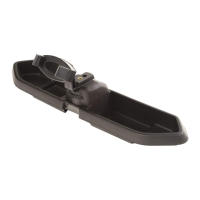
The primary tray component of the dash multi-mount system for the Wrangler JL.
An adjustable ball mount designed for attaching various accessories to the system.
A functional or aesthetic cap piece for the multi-mount system.
A specific mount adapter designed for phones with a 17mm ball interface.
The dash multi-mount system shown installed without any additional accessories attached.
The dash multi-mount system configured to hold a phone or GPS device.
The dash multi-mount system configured to hold a camera or tripod.
The dash multi-mount system configured to hold both a phone and a camera simultaneously.
Remove the interior rubber liner from the dash compartment, possibly by prying a corner.
Locate and remove two Phillips screws from the inside of the compartment.
Place the multi-mount system into position, ensuring the area is clean before installation.
Reinsert the Phillips screws removed in Step 2 through the multi-mount system into the dash.
Place the outer ring over the end of the ball mount for initial connection.
Press the phone mount adapter piece into the ball mount.
Pull the outer ring over the phone mount adapter and twist to secure the connection.
 General
| Part Number | 13551.23 |
|---|---|
| Manufacturer | Omix-Ada |
| Category | Automobile Accessories |
| Color | Black |
| Material | Plastic |

 To Next Page


