EasyManua.ls Logo

Omnia OSS8839 - Page 4

Omnia OSS8839
12 pages
Print Icon
To Next Page IconTo Next Page
To Previous Page IconTo Previous Page
Loading...
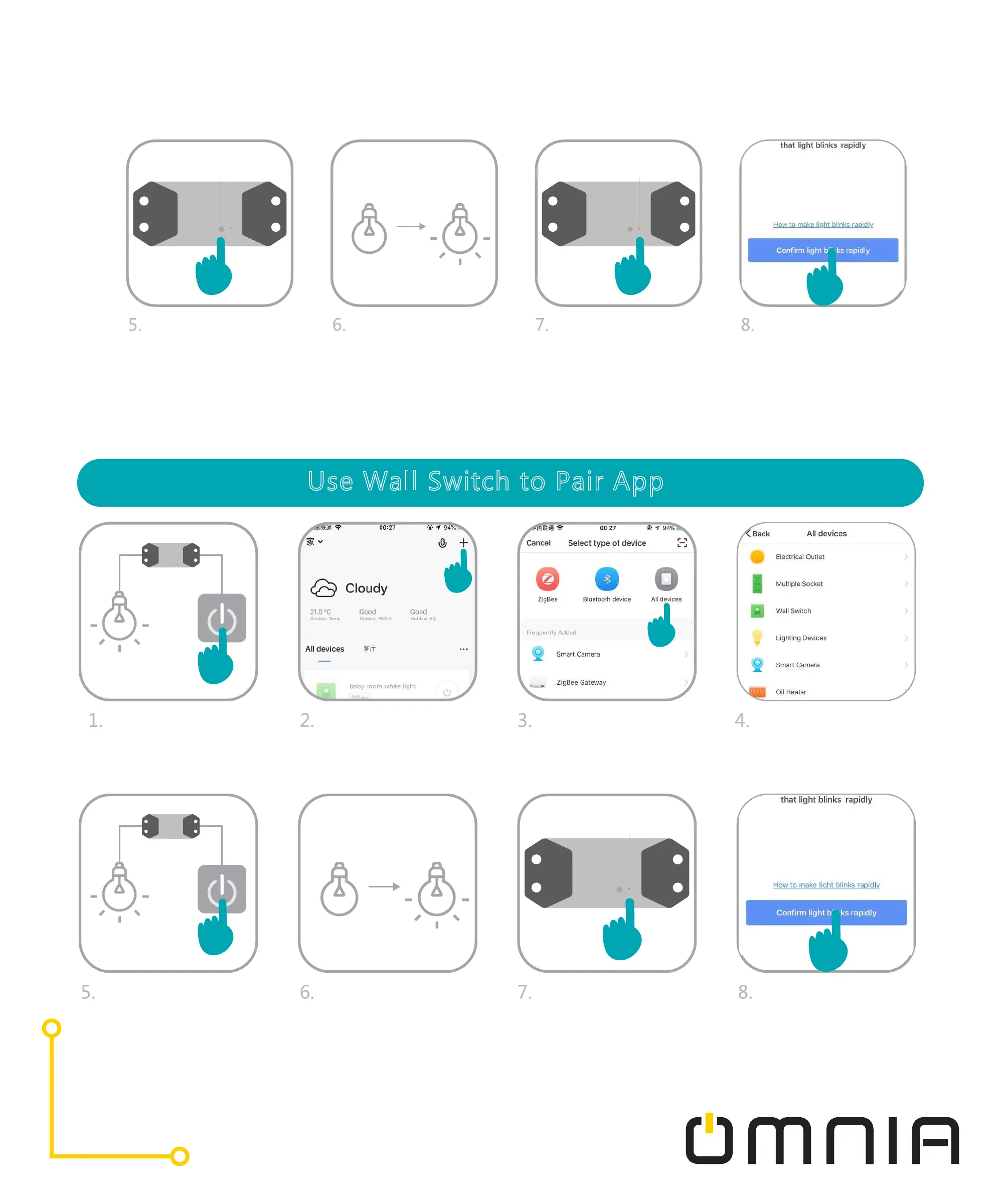
Long press the Wait a second, the
Button Indicate Light
light will turn on
Ensure that the Click “Confirm”
light rapidly blinks
and enter WiF pass-
word.
indicator light in the
Smart Switch is
blinking
button in the WiFi
Smart Switch and
release button until
the light is off.
Use Wall Switch to Pair App
Turn on the light
Click the “+”sign
Click “electrician”
devices
Choose Breaker WiFi
in the top right corner
Indicate Light
Turn off and on After the sixth
turning on, the light
will turn off, wait a
second, it’ll turn on
by itself
Ensure that the Click “Confirm”
light rapid blink”
and enter WiFi pass-
word.
light in the Smart
Switch is blinking
six times, (Do not
turn off the light
until the light is on)