00068724.DOC, Version 1.0
10/12
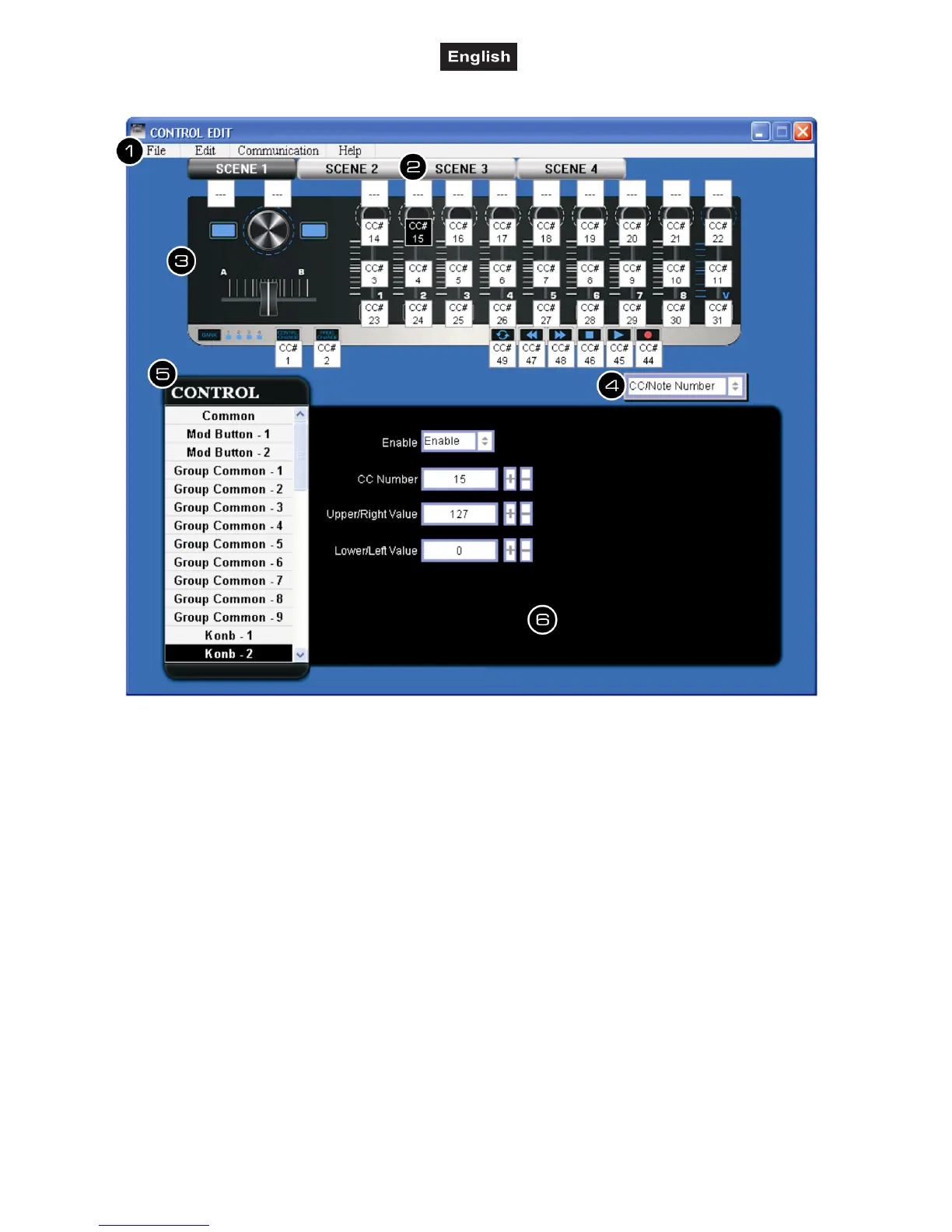
5. SOFTWARE EDITOR
The software editor will let you customize all
editable controllers, and create, save and load
presets.
1 Menu bar
• File: For selecting a device and creating,
saving and loading a data file.
• Edit: Functions for editing parameters.
• Communication: For reading data from your
controller and for transferring settings to your
controller.
• Help: Displays the software version of the
editor.
2 Scene 1 to 4
Click the Scene button of the scene you would
like to edit.
3 Device
This area shows an image of the device
selected in the device select screen.
4 Parameter display switch
Switches the parameters that are shown over
each control in the device image.
5 Control menu
For selecting the control elements whose
parameters you would like to edit.
6 Parameter edit area
This area enables you to view and edit the
parameters of the selected control.


 To Next Page