IC-3USB Interface Kit
Installation Guide
Unpacking
You should find the following items:
• 9-to-15-Pin Adapter (61-000043-03)
• USB-to-Serial Cable (61-000044-02)
You will also need:
• An Omron Microscan reader
•
A host computer with Windows 7, Vista, XP, or 2000
• Omron Microscan Tools Drive (37-000010-01)
Important: Do not use the IC-3USB with Quadrus
MINI Series imagers or MS-4 imagers.
Step 2 — Install IC-3USB Driver
(Windows 7 and Vista – cont.)
5. When you are ready to install the program,
click Install.
6. The Setup Wizard will display a progress bar
during installation. At the end of installation, the
Setup Wizard will display a screen stating that
installation is complete. Click Finish to close
the Setup Wizard.
Step 2 — Install IC-3USB Driver
(Windows XP and 2000)
1.
Insert the
Tools Drive
and click
Accessories
in the navigation column
at the left of the screen.
2. Click IC-3USB Driver (Windows XP) or IC-3USB
Driver (Windows 2000) to open the driver folder.
3. Open the zip file to launch the Setup Wizard.
4. Click Next when the Setup Wizard’s welcome
screen appears.
Step 2 — Install IC-3USB Driver
(Windows XP and 2000 –
cont.)
5. If you are using Windows XP, a compatibility
warning may appear. Click Continue Anyway to
begin installation.
6. When installation is complete, the InstallShield
Wizard Complete
screen will appear. Click
Finish
to close the wizard.
Step 2 — Install IC-3USB Driver
(Windows 7 and Vista)
1. Insert the Omron Microscan Tools Drive and
click Accessories in the navigation column at
the left of the screen.
2. Click IC-3USB Driver (Windows 7) or IC-3USB
Driver (Windows Vista) to open the driver folder.
3. Open the zip file and double-click the
UC232A_Setup_V1.0.074.exe (Windows 7) or
UC232A_windows vista.exe (Vista) file to
launch the Setup Wizard.
4. Click Next when the Setup Wizard’s welcome
screen appears.
83-210029 Rev F

 Need help?
 General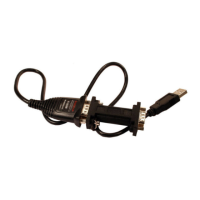

 To Next Page