Prima a tecla à qual
a função será atribuída
(por ex., tecla vermelha).
Macro
4
7
8
9
Parabéns! Programou com sucesso uma macro na tecla “vermelha”.
AGORA, quando premir a tecla vermelha: 1.º: o dvd irá PARAR, 2.º: o dvd irá
DESLIGAR-SE, 3.º: a tv irá DESLIGAR-SE. O telecomando fará isto em todos os
modos de dispositivo sempre que premir a tecla vermelha.
OFF
Comando 1: dvd STOP
Comando 2: dvd OFF
Comando 3: tv OFF
STOP
& OFF
Prima a tecla vermelha
Pode programar o seu ONE FOR ALL para enviar uma sequência de comandos premindo apenas uma tecla.. Para sua comodidade, qualquer sequência de comandos que utilize regular-
mente pode ser reduzida a uma única tecla.
Por exemplo, pode ser útil criar a seguinte macro:
1.º comando: dvd --> STOP
2.º comando: dvd --> OFF
3.º comando: tv --> OFF
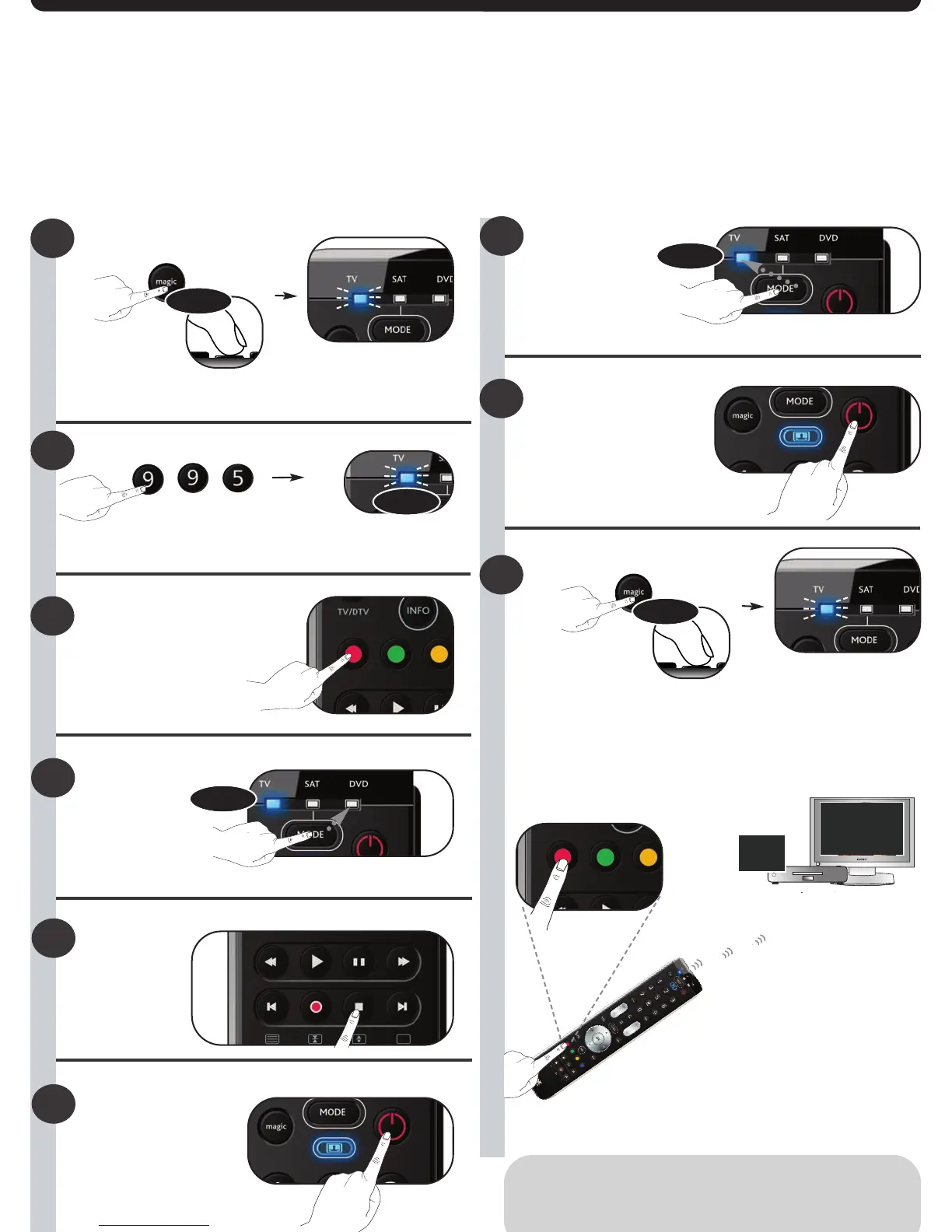
Para configurar a Macro anteriormente referida, por exemplo, na tecla "Vermelha” do seu ONE FOR ALL:
1
2
Prima sem largar MAGIC durante 3 segundos até que um sinal luminoso
(LED azul) se acenda.
Prima 9 9 5.
--> O LED azul pisca duas vezes
3
4
5
6
Prima a tecla PARAR.
Comando 1
Comando 2
Comando 3
Como repor a função original da tecla da macro?
1) Prima sem largar MAGIC durante 3 segundos até que um sinal luminoso
(LED azul) se acenda.
2) Prima 9 9 5.
3) Prima a tecla da macro correspondente (por ex., a tecla vermelha).
4) Prima sem largar a tecla magic durante 3 seg. --> O LED azul pisca duas vezes
Prima a tecla
LIGAR/DESLIGAR.
x2
3 sec.
< select >
3 sec.
Prima a tecla
LIGAR/DESLIGAR.
Seleccione o dispositivo
correspondente,
por ex., dvd
< select >
Seleccione o dispositivo
correspondente,
por ex., tv
Prima sem largar magicdurante
3 segundos
--> O LED azul pisca duas vezes e depois
apaga-se.



 To Next Page
 Loading...