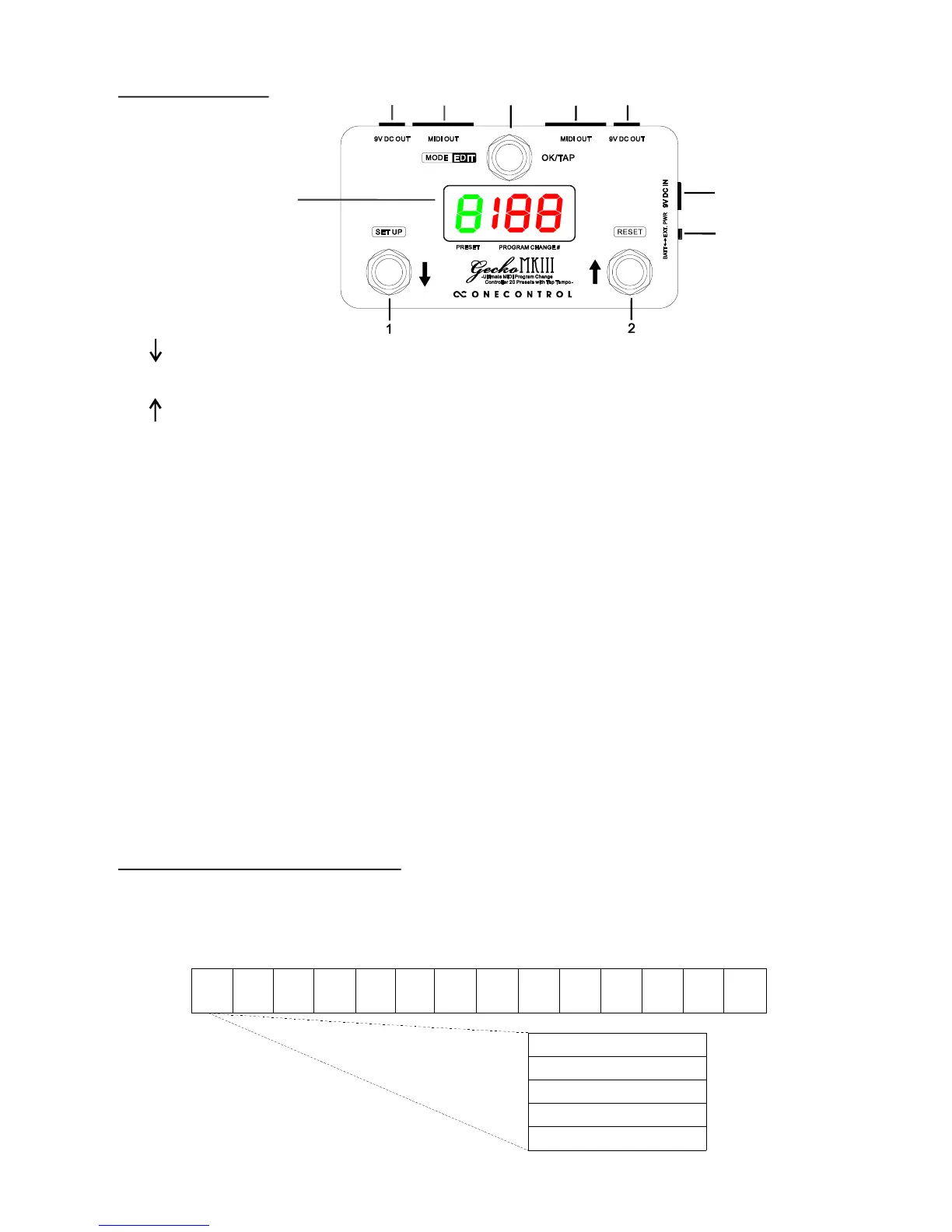
Press this switch to recall a preset or send midi tap tempo messages.
DC input jack, connect external 9V DC power supply here, negative center type.
1- Overview
5
7
6
3
(5) Power supply select
The switch selects the power supply source, external power supply or battery.
(7) 9V DC Output
The two DC output jacks are internally connected to DC input jack. I
the power supply select switch must be at EXT. DC position.
f they are used to
supply other devices,
7
8
8
4
This switch scroll up the presets or midi numbers.
(8) MIDI Output
The midi messages are sent via 5 pin midi jacks, the two midi jacks are in parallel.
(4) Screen display
The screen shows the preset and midi messages.
2- Preset organization
1 2 3 ... 8 9 0
There are total 20 presets in Gecko, “1",”2",”3"...”0" are preset 1~10,
“1.”,”2.”,”3.” ...”0.” are preset 11~20, each preset contain 16 program change (PC)
numbers on 16 midi channels.
1. 2. 3. ... 8. 9. 0.
PC1 (on midi channel 1)
PC2 (on midi channel 2)
PC15 (on midi channel 15)
......
PC16 (on midi channel 16)


 To Next Page
 Loading...