
 Need help?
Do you have a question about the OnePlus Band and is the answer not in the manual?
Instructions for detaching the main tracker unit from the band strap.
Steps to attach the main tracker unit into the band strap slots securely.
Guide on how to connect the tracker to the charging dock and power supply.
Instructions for downloading the OnePlus Health app from the Play Store.
Steps for pairing the band with your phone via the OnePlus Health app.
How to swipe up/down for functions and left/right for watchfaces.
How to swipe right to go back or long press to return to the main interface.
Methods to turn the screen on by tapping/raising wrist and off by covering/lowering wrist.
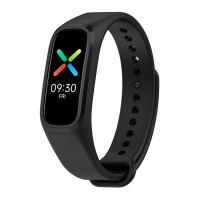
The OnePlus Band is a wearable fitness tracker designed to help users monitor their health and fitness activities. It features a main tracker unit that houses the display, sensors, and charging port, and is designed to be worn on the wrist using a comfortable band strap.
The primary function of the OnePlus Band is to track various health and fitness metrics. It is equipped with an AMOLED Touch Display, which allows for interactive navigation through its features. The band includes SpO2 and Heart Rate Sensors, enabling it to measure peripheral blood oxygen saturation and heart rate. These measurements are crucial for understanding a user's overall well-being and performance during physical activities.
The band connects to a smartphone via Bluetooth, allowing users to sync their data with the OnePlus Health app. This app serves as a central hub for viewing health information, managing the band's settings, and customizing its interface. Through the app, users can check their connection status, manage different screens or watchfaces on the band, and access detailed health insights. The band is designed to be paired with devices running Android 6.0 or iOS 10.0 and above, ensuring broad compatibility with modern smartphones.
For fitness tracking, the band likely monitors activities such as steps taken, distance covered, and calories burned, although these specific features are not explicitly detailed in the provided pages. The presence of a three-axis acceleration sensor suggests its capability to detect movement and activity levels. The integration of heart rate and SpO2 sensors indicates its utility for monitoring cardiovascular health and oxygen levels, which are particularly relevant during exercise or for individuals with certain health conditions.
The band's display allows users to quickly access information and navigate through different functions. Swiping up and down on the main interface enables function selection, while swiping left and right allows users to switch between various watchfaces, offering a degree of personalization. When on a function page, a swipe to the right will return the user to the previous level, and a long press will bring them back to the main interface. This intuitive navigation system ensures ease of use for quick checks and adjustments on the go.
To begin using the OnePlus Band, it must first be charged. The main tracker powers on automatically when charged for the first time. Charging is facilitated by a dedicated Charging Dock, which connects to a power supply via a USB cable. The main tracker's charging port aligns with the charging pins on the dock, and they snap into place securely. A charging indicator lights up to confirm that the device is receiving power.
Once charged, the band needs to be paired with a smartphone. Upon its initial power-on, the band will display a pairing page. Users then need to download and install the OnePlus Health app from the Play Store (for Android) or App Store (for iOS). Within the app, users register or log in to their account, then navigate to "Manage > Add device" to complete the connection process following the on-screen instructions. This setup allows the band to synchronize data and receive settings from the smartphone.
Wearing the band correctly is important for accurate data acquisition. It should be placed on the wrist approximately one finger's width away from the wrist bone. The band strap should be adjusted for a comfortable fit, ensuring it is not too loose. Wearing the band too loosely can affect the accuracy of heart rate (HR) and peripheral blood oxygen saturation (SpO2) measurements, highlighting the importance of proper fit for reliable health monitoring.
The AMOLED touch display offers several interactive features. To turn on the screen, users can either tap the display or raise their wrist, which activates the screen for quick viewing. Conversely, to turn off the screen and conserve battery, users can cover the display with their palm or lower their wrist. This gesture-based control enhances convenience and efficiency in daily use.
The OnePlus Band is designed with user-replaceable band straps, offering flexibility for customization and maintenance. To remove the band strap, the main tracker screen should be facing up. Users hold down both ends of the band strap and push the tracker downwards to detach it from the strap. This mechanism allows for easy replacement of worn-out straps or switching to different styles.
Mounting the main tracker back into a band strap is also straightforward. One end of the main tracker is inserted into the band strap slots from the back of the band. The other end is then pressed into place, locking the tracker securely into the strap. This design ensures that users can easily manage and replace their band straps without needing specialized tools or assistance.
The device's waterproof rating of 5 ATM and IP68 suggests it is resistant to water and dust, making it suitable for various activities, including swimming (within specified depths) and use in dusty environments. This durability reduces the need for constant vigilance against water exposure during daily activities or workouts.
Software updates are managed through the connected smartphone app, ensuring the band's features and performance remain current. Users can check the software version by navigating to [Settings]-[About Band] on the device. Regulatory information, including product certification details, can also be accessed on the band via "Settings > Regulatory information." This allows users to stay informed about their device's compliance and specifications.
The user guide emphasizes that the manual is for reference only and that specific functions and product pictures may vary slightly from the actual product. This disclaimer encourages users to refer to their actual device for the most accurate information, acknowledging potential minor differences in product iterations or regional versions.
 General
| Display Type | AMOLED |
|---|---|
| Display Size | 1.1 inches |
| Resolution | 126 x 294 pixels |
| Battery Capacity | 100 mAh |
| Battery Life | Up to 14 days |
| Water Resistance | 5 ATM |
| Connectivity | Bluetooth 5.0 |
| Compatibility | Android 6.0 and above |
| Sleep Tracking | Yes |
| Activity Tracking | Yes |
| Sensors | 3-axis accelerometer, gyroscope, heart rate sensor, SpO2 sensor |
| Weight | 22.6 grams |
| Operating System | Proprietary |

 To Next Page