119
Zone 2 and Zone 3—Continued
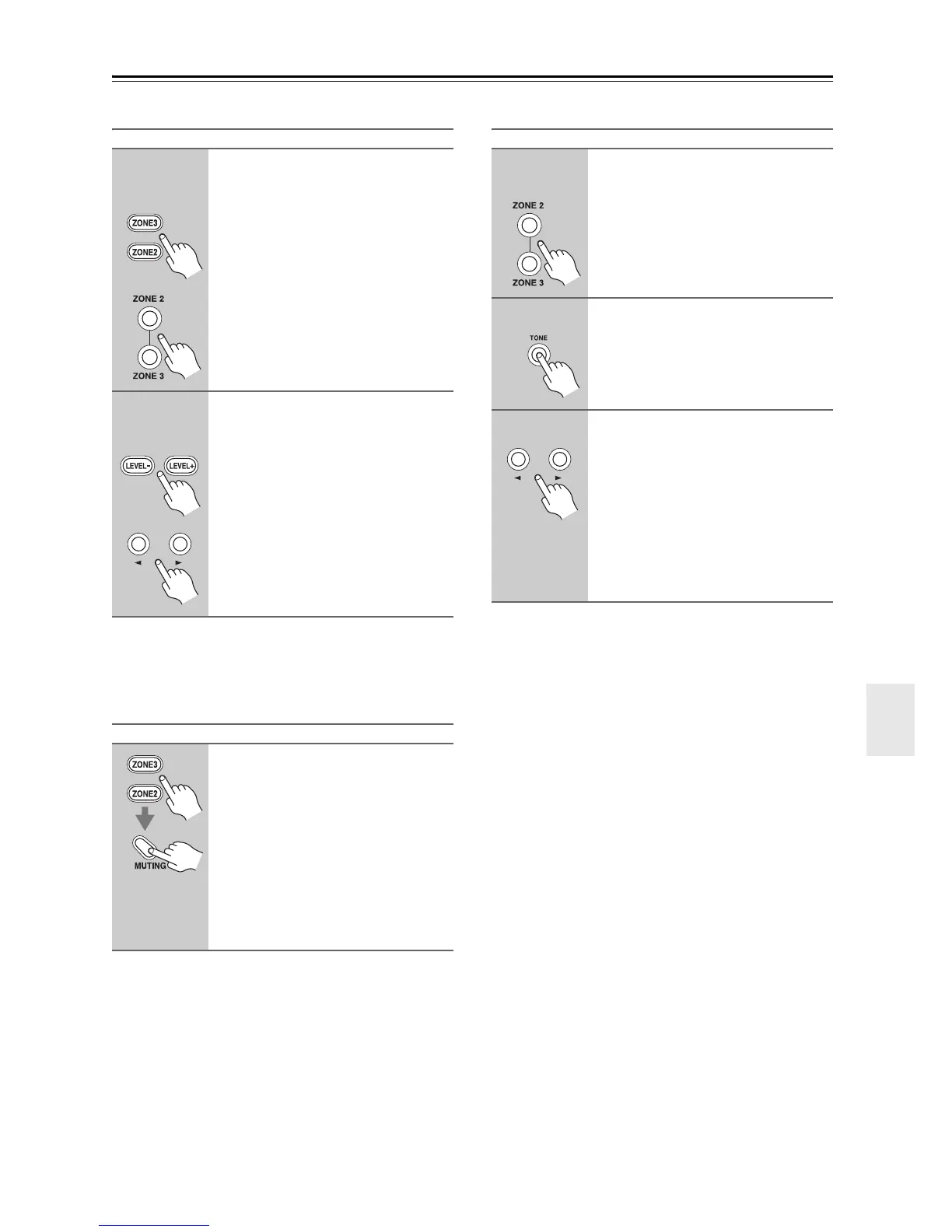
Adjusting the Volume of Zones
Note:
Zones can also be unmuted by adjusting the volume.
Muting Zones
Adjusting the Tone and Balance of Zones
Notes:
• The tone cannot be adjusted for Zone 3.
• The Zone 2 level, balance, and tone functions have no
effect on the ZONE 2 PRE OUT when the “Zone2
Out” setting is set to “Fixed” (page 117).
• The Zone 3 level and balance functions have no effect
on the ZONE 3 PRE OUT when the “Zone3 Out” set-
ting is set to “Fixed” (page 117).
1
Remote
controller
AV controller
On the remote controller, press
the [ZONE2] or [ZONE3] REMOTE
MODE button.
On the AV controller, press the
[ZONE 2] or [ZONE 3] button.
The ZONE 2 or ZONE 3 indicator
flashes.
2
Remote
controller
AV controller
On the remote controller, press
the [LEVEL–] and [LEVEL+] but-
ton.
On the AV controller, press Up
[r] and Down [e] button.
On the remote controller, press
the [ZONE2] or [ZONE3] REMOTE
MODE button, and then press the
[MUTING] button.
To unmute a zone, on the remote
controller, press the [ZONE2] or
[ZONE3] REMOTE MODE button,
and then press the [MUTING] but-
ton again.
1
AV controller
On the AV controller, press the
[ZONE 2] or [ZONE 3] button.
2
Press the AV controller’s [TONE]
button repeatedly to select
“Bass” “Treble” or “Balance”.
3
Use the Up [r] and Down [e]
buttons to adjust the Bass, Tre-
ble or Balance.
• You can boost or cut the Bass or Tre-
ble from –10 dB to +10 dB in 2 dB
steps.
• You can adjust the balance from 0 in
the center to +10 dB to the right or
+10 dB to the left in 2 dB steps.



 To Next Page