8
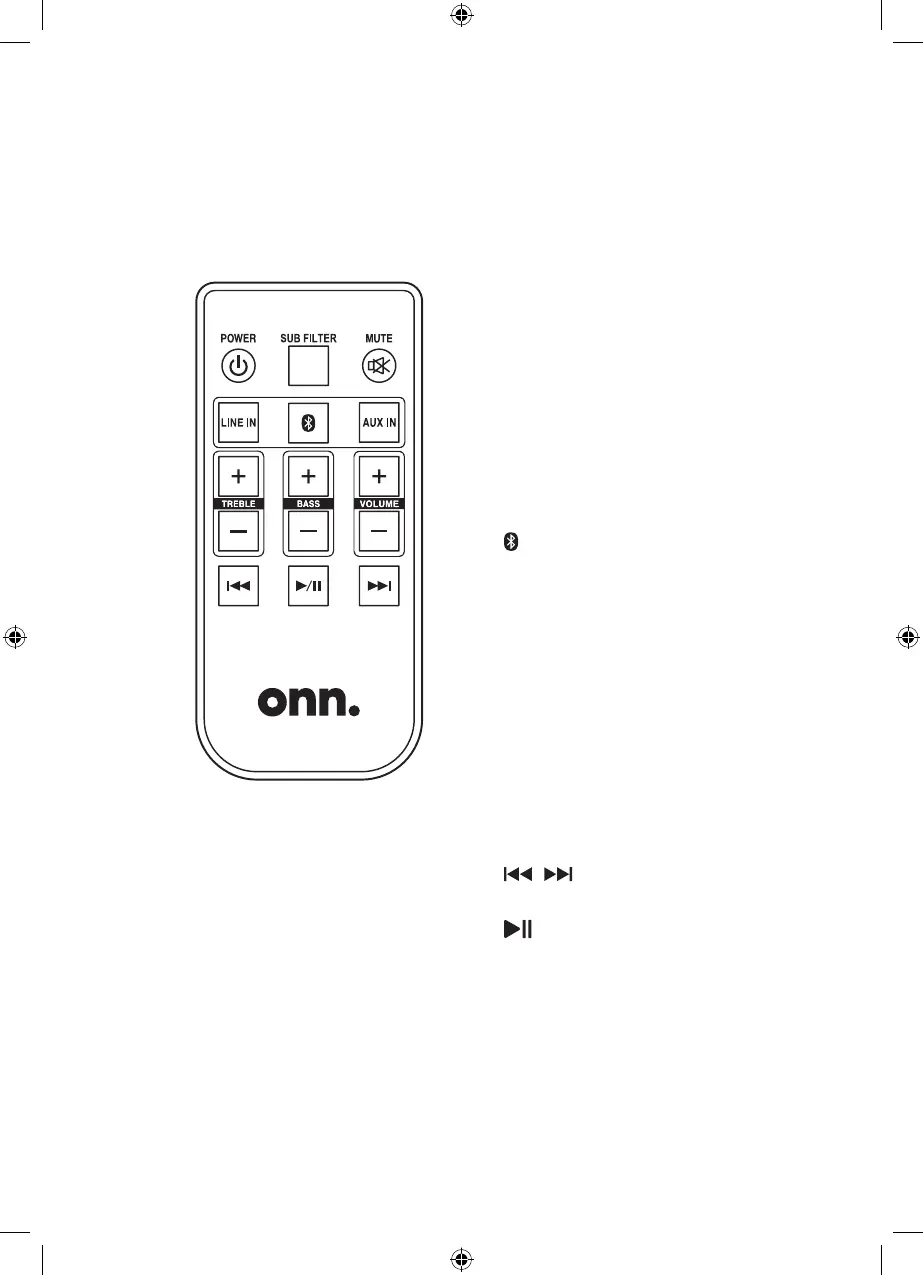
Remote
Power: Press to power ON or OFF.
Sub Filter: Press to filter out low
level audio interference, such as
imperfections on vinyl record playing
from a turntable.
Mute: Press to mute the volume.
Line In: Press to select Line In Mode,
indicated by a green LED on the front
of the speaker.
: Press to select Bluetooth Mode,
indicated by a blue LED on the front
of the speaker.
Aux In: Press to select Aux Mode,
indicated by a white LED on the front
of the speaker.
Treble -/+: Press to adjust the treble
level of the speakers.
Bass -/+: Press to adjust the bass
level of the speakers.
Volume -/+: Press to adjust the
volume level of the speakers.
: Press to skip audio tracks
(Bluetooth Mode).
: Press to play or pause audio
tracks (Bluetooth Mode).
Get to Know Your Speakers
onn_100008403-BT Speakers-IB-01.indd 8 6/08/2019 4:46:00 PM


 To Next Page