January 16, 2020_V1
Connecting Devices to Your Stereo
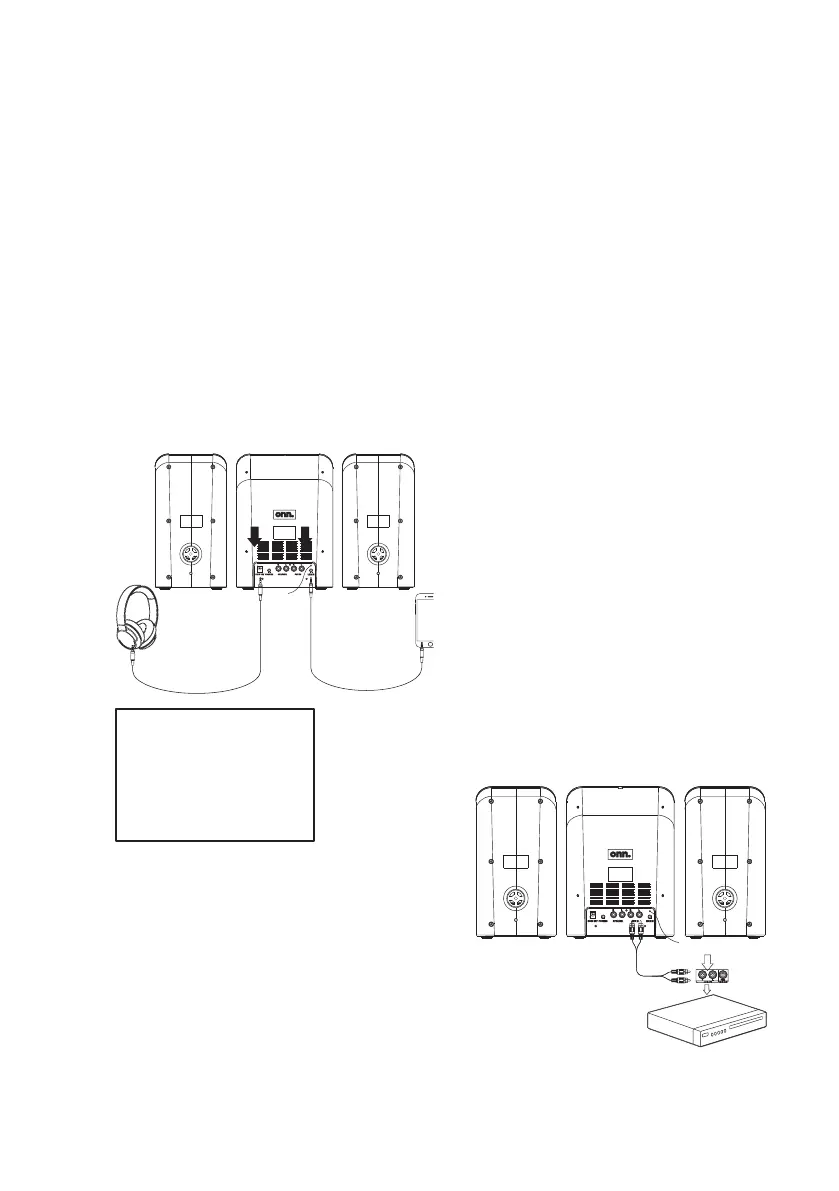
Connecting to Line In
Requires a 3.5mm audio cable (not included).
1. Connect a 3.5mm audio cable to the
Line In on the unit and the audio output/
headphone jack on a smartphone or other
media player.
2. Press the Source button to switch to Line
Mode.
3. Use the controls on the connected device
to select and play audio.
Connecting to a DVD/Blu-Ray
Player, Gaming Console, etc.
Requires an RCA stereo audio cable (not included).
1. Connect an RCA stereo audio cable to
the Aux In (RCA stereo) inputs on the unit
and the RCA stereo outputs on the media
player.
2. On the speaker, press the Source button to
switch to Aux Mode.
3. Audio from the connected media player will
now be heard through the speaker. Use the
speaker controls to adjust the volume level.
Headphone Jack
Requires a 3.5 mm audio cable (not included).
• Connect headphones to the Headphone
Jack on the rear of the unit.
To avoid hearing damage,
be sure the volume on
the stereo is turned
down before connecting
headphones, then gradually
increase the volume to a
comfortable level.
Connecting to a Bluetooth Device
1. Press the Source button to switch to
Bluetooth Mode. The letters “bt”will flash
on the display.
2. To pair to a new device, press and hold
the Play/Pause/Pair button until the “bt”
on the display begins flashing again, then
repeat steps 3 and 4.
3. Using the native controls on your Bluetooth
device, select the onn. Mini Stereo in your
Bluetooth settings to pair.
4. When successfully paired, a chime will
sound and the “bt” on the display will
stop flashing. Audio from the connected
Bluetooth device will now be heard through
the speakers. Play, pause, or skip audio
using the controls on the connected
Bluetooth device or the speaker’s remote.
5. The speaker will always try to reconnect to
the last device to which it was connected.


 To Previous Page
 Loading...