2
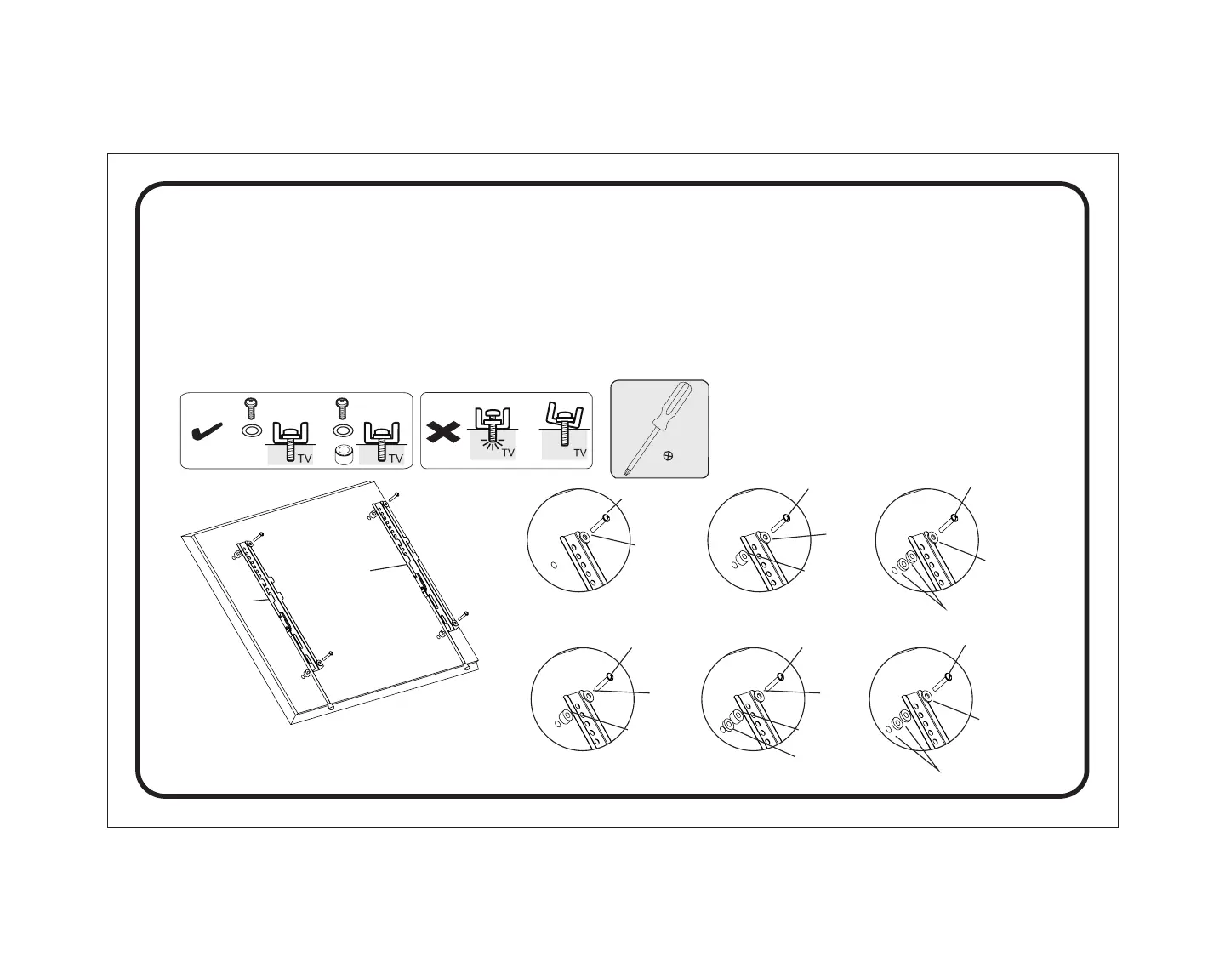
With a Phillips screwdriver, attach the left TV
bracket (B) and right TV bracket (C) to the back
of the TV where shown. Choose the appropriate
bolts, washer, and spacers for your TV. Make
sure that the pull straps are nearest to the left (B)
or right (C) edges of the TV respectively.
6
Con un destornillador Phillips, fije el soporte
izquierdo del televisor (B) y el soporte derecho del
televisor (C) en la parte posterior del televisor donde
se muestra. Elija los pernos, la arandela y los
espaciadores adecuados para su televisor.
Asegúrese de que las correas de tracción estén más
cercanas a los bordes izquierdo (B) o derecho (C)
del televisor, respectivamente.
M-L
C
B
M-A/C/E
M-A/C/E/G
M-B/D/F/HM-B/D/F/G/H
M-B/D/F/G/H
M-I
M-I/J
M-I/J
M-I/JM-I/J
M-I/J
M-I/J
M-K
M-K
M-L
M-M
M-L
November 23, 2019_V1


 To Next Page