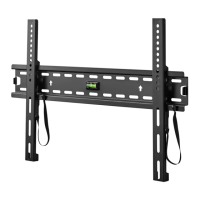
Need help?
Do you have a question about the Onn ONA16TM009 and is the answer not in the manual?
Verify TV weight limit and wall type suitability before installation.
Gather required tools and review pre-installation guidelines.
Details VESA compatibility, TV size, and mounting hole patterns.
Specifies the TV's tilt angle and retracted profile from the wall.
Lists TV brackets, screws, washers, and spacers for attaching to the TV.
Details lag bolts, washers for wood studs, and anchors for concrete.
Information and components for the optional concrete mounting kit.
Select correct screws and attach mounting brackets to the TV.
Mount the wall plate securely to wooden wall studs.
Mount the wall plate securely to concrete or block walls.
Securely hang the TV onto the installed wall plate.
How to adjust the TV's tilt angle and slide it horizontally.
Instructions for safely detaching the TV from the wall mount.
 General
| Product Name | Onn ONA16TM009 |
|---|---|
| Category | Racks & Stands |
| Color | Black |
| Assembly Required | Yes |
| Material | Metal |
| Adjustable Height | No |

 To Next Page