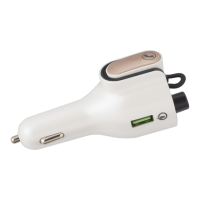
This document describes the onn. Wireless FM transmitter with Headset with Bluetooth® Wireless Technology, Model: 100014268. It functions as a wireless FM transmitter for playing music from a Bluetooth-enabled device through a car radio, and also includes a detachable Bluetooth headset for calls and private listening.
Function Description
The primary function of this device is to transmit audio wirelessly from a Bluetooth-enabled source (such as a smartphone or tablet) to a car's FM radio. It plugs into the car's cigarette lighter socket for power. The device also features a detachable Bluetooth headset, allowing users to take calls or listen to music privately. Additionally, it includes built-in USB QC3.0 Fast Charger and USB Type-C Charger ports for charging external devices.
Important Technical Specifications
FM Transmitter:
- Power Source: DC 12 or 24 V, 1300 mAh (Max.) from car cigarette lighter socket.
- FM Transmitting Frequency: 88.1-107.9 MHz.
Headset:
- Power Source: DC 3.7V, 30mAh (0.111 WH) Built-in rechargeable Li-ion Battery.
- Recharge: By the FM Transmitter base.
Bluetooth:
- BT Version: 5.0.
- BT Operation Distance: 32 Feet in open area.
Chargers:
- Built-in USB QC3.0 Fast Charger Output: DC 5 V, 3A or 9V / 2A or 12V / 1.5A.
- Built-in USB Type-C Charger Output: DC 5 V, 3A.
Package Includes:
- Wireless FM Transmitter with Headset.
- User Manual.
- Quick Start Guide.
Usage Features
Controls:
The device features an LED Display, various buttons for control, a Volume Control/Knob, USB Type-C Port, USB QC3.0 Port, a detachable Headset, Headset Base, FM Transmitter, and a Car Cigarette Plug.
Pairing to Car Radio (Step 1):
- Connect the unit to the car cigarette lighter socket.
- The LED Display will illuminate, blink, and show the car battery voltage, then a default FM channel (e.g., 88.1 MHz).
- The Headset on the unit will begin charging, indicated by a red light.
- Turn on your car radio and enter FM mode, searching for a blank FM channel (e.g., 107.0 MHz).
- Press and hold the Volume Control/Knob until the LED Display blinks.
- Press the forward/backward buttons or turn the Volume Control/Knob to match the unit's FM frequency to the blank FM channel on your car radio.
Pairing BT Device to FM Transmitter (Step 2):
- Ensure the unit is paired to the car radio (Step 1).
- Power on your external Bluetooth device and enter BT mode.
- Search for "Onn BT/FM" on your Bluetooth device and pair with it.
- Upon successful pairing, you will hear an audible prompt "Paired" from the car radio.
Pairing BT Device to Headset (Step 3):
- Ensure the unit is paired to the car radio (Step 1) and the BT device is paired to the FM Transmitter (Step 2).
- Pick up the Headset from the unit; its blue and red LED indicator will illuminate and blink.
- Power on your external Bluetooth device and enter BT mode.
- Search for "Onn BT/Headset" on your Bluetooth device and pair with it.
- Upon successful pairing, you will hear "Connected" from the headset, the red LED will turn off, and the blue LED will slow blink.
Note: Steps 2 and 3 can be reversed.
Listening to Music and Answering Calls:
- After successful pairing, music can be played from the paired BT device.
- Volume Adjustment: Use the Volume Control/Knob on the unit, or the car radio's volume controls, or the paired BT device's volume controls.
- Pause/Resume: Press the Volume Control/Knob to pause, press again to resume.
- Skip Tracks: Press the forward/backward buttons.
- Incoming Calls (with Cell Phone paired):
- Pick up the Headset from the unit and place it on your ear to answer.
- Press the button on the Headset or return the Headset to its base to disconnect/end the call.
- To decline an incoming call, pick up the Headset and return it to the base within 2-3 seconds.
- Redial: Quick press the button on the Headset twice to redial the last number.
- Listening Options: If the Headset remains on the unit, music plays through the car radio. If the Headset is removed, music plays through the Headset.
Normal Operation After Pairing:
- Power on the external BT Device and enter BT mode.
- Power on the Car Radio and set it to the preset FM frequency (e.g., 107.0 MHz).
- Connect the unit to the car cigarette lighter socket. The LED Display will illuminate and blink until the preset FM frequency appears.
- The unit will automatically pair to the external BT Device after a few seconds, and you will hear "Paired" from the car radio.
- Once paired, you can play music and answer calls.
Charging External Devices:
- USB QC3.0 Fast Charger: Connect the unit to the car cigarette lighter. Use a fast charging USB cable (not included) from the USB QC3.0 Port to your external device. Charging starts automatically.
- USB Type-C Charger: Connect the unit to the car cigarette lighter. Use a USB Type-C charging cable (not included) from the USB Type-C Port to your external device. Charging starts automatically.
Maintenance Features
Troubleshooting:
The manual provides a troubleshooting guide for common issues:
- Car Radio no sound: Check for FM frequency mismatch between the unit and car radio. Solution: Match frequencies.
- No sound or sound weak: Unit volume too low or paired device volume too low. Solution: Increase volume on unit or paired device.
- Sound distortion: Volume level too high on unit or paired device. Solution: Reduce volume.
- BT not functioning: External BT device not paired or too far from the unit. Solution: Pair the device or move it closer.
Safety and Compliance:
- FCC Notice: The device complies with Part 15 of FCC Rules. It is designed to provide reasonable protection against harmful interference. Users are advised to reorient/relocate the receiving antenna, increase separation, connect to a different circuit, or consult a technician if interference occurs.
- FCC Warning: Changes or modifications not expressly approved by the manufacturer may void user's authority to operate the device.
- RF Exposure: Equipment should be installed and operated with a minimum distance of 20cm between the radiator and your body. Only the supplied antenna should be used.
Overload/Overheat Protection:
The unit has a built-in overload/overheats protector. If the output is overloaded or short-circuited, the charger will automatically shut off. Unplug the external device from the USB QC3.0 or Type-C Port, and the charger will auto-reset.
Power Off:
To shut off the unit, unplug it from the car cigarette lighter socket.


 To Next Page
 General