Need help?
Do you have a question about the Onn AAABLK1000009771 and is the answer not in the manual?
Key safety guidelines for operating the apparatus safely and preventing hazards.
Compliance information and warnings regarding FCC regulations for digital devices.
Further safety advice including electric shock, fire, battery, and laser exposure risks.
Lists the main features and specifications of the CD/Bluetooth Boombox.
Step-by-step guide to connect your Bluetooth audio device wirelessly to the boombox.
How to control playback and audio streaming from a connected Bluetooth device.
Instructions on how to insert and play audio CDs on the boombox.
Steps to create a custom playback sequence for tracks on a CD.
Guide to connecting external audio devices via the 3.5mm audio input jack.
Instructions for tuning and listening to FM radio stations on the boombox.
This document is a product guide for the onn. CD/Bluetooth Boombox, model AAABLK100009771. It provides essential information regarding the device's features, setup, operation, and safety guidelines.
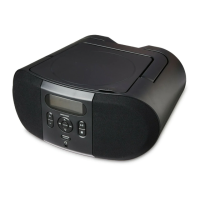
The onn. CD/Bluetooth Boombox is a versatile audio device designed for playing CDs, listening to FM radio, and streaming audio wirelessly via Bluetooth. It features a top-load disc player for CDs, CD-R/RW discs, and supports programmable tracks, allowing users to customize their listening experience. The boombox includes built-in stereo speakers for audio output and an analog volume control for easy adjustment. A negative LCD display with a white backlight provides clear visual feedback for various functions.
For audio input, the boombox offers a 3.5mm audio line input, enabling connection to external audio sources such as smartphones, MP3 players, tablets, and computers. It's important to note that this unit has an aux input only and does not have an aux output, meaning headphones or earbuds cannot be connected via the Line In input.
The device can be powered in two ways: via a built-in AC power cable for standard power outlets or through DC battery power, requiring six C batteries (not included) for portable use.
The boombox features a Source Switch that allows users to toggle between different modes: CD/Line In, OFF, FM radio, and Bluetooth.
To play a CD, open the CD door, place the CD with the label side facing up, and close the door. Slide the Source Switch to CD mode, then press the Play/Pause button to start playback. The boombox supports programmable tracks. To program a CD, stop the loaded CD, press the Program button (which will make "01" blink on the display), use the Skip/Search buttons to select a track, and press Program again to add it to the program. This process can be repeated for up to 20 tracks. To cancel a program, press the Stop button. The Repeat function allows users to repeat the current track by pressing it once, or repeat the entire album by pressing it twice.
The boombox has a Bluetooth receiver, enabling wireless audio streaming from Bluetooth-enabled devices like smartphones, MP3 players, tablets, and computers. To pair a Bluetooth device for the first time, slide the Source Switch to Bluetooth Mode. The letters "bt" will flash on the display. If pairing doesn't start automatically, press and hold the Pair button. On your Bluetooth device, select "onn. CD Boombox" from the Bluetooth settings. During pairing, remain within 3 feet of the unit. If a password is requested, enter "0000." Once successfully paired, the display will stop flashing. The unit will remain paired unless manually unpaired or erased due to a device reset. If pairing issues occur, unpair the unit on your Bluetooth device and repeat the pairing steps. Once connected, audio can be controlled using the native controls on the Bluetooth device or the boombox's Pair/Play/Pause or Tun/Skip/Search buttons.
The boombox includes a built-in FM wire antenna. To improve radio reception, adjust the antenna on the boombox. To play the radio, slide the Source Switch to FM radio mode and adjust the Tuning dial to tune to the desired AM or FM radio station.
To use the 3.5mm audio input, connect one end of a 3.5mm audio input cable (not included) to the Line In input on the side of the unit. Connect the other end of the cable to the audio output/headphone jack of your external audio source (e.g., MP3 player, smartphone). Turn on the boombox and the connected audio device. Slide the Source Switch to Line In, then select and begin playing audio on the connected device. The audio will be heard through the boombox's speakers.
The boombox features dedicated controls for various functions:
The device should be cleaned only with a dry cloth. Avoid using water or other liquids, especially near the apparatus.
When using DC battery power, ensure that six C batteries are correctly installed. If the battery compartment does not close securely, stop using the product and keep it away from children. Replace all old batteries with new ones. Batteries should be recycled or disposed of according to state and local guidelines.
If the equipment causes harmful interference to radio or television reception, try the following measures:
 General
| Brand | Onn |
|---|---|
| Model | AAABLK1000009771 |
| Category | Portable Stereo System |
| Connectivity | Bluetooth |
| Speaker Type | Stereo |
| Battery Life | Up to 10 hours |
| Power Source | Battery |

 To Next Page