Getting Started with the Studio 64X 7
CHAPTER 4: Quick Start Guide for Mac
MACINTOSH CONFIGURATION
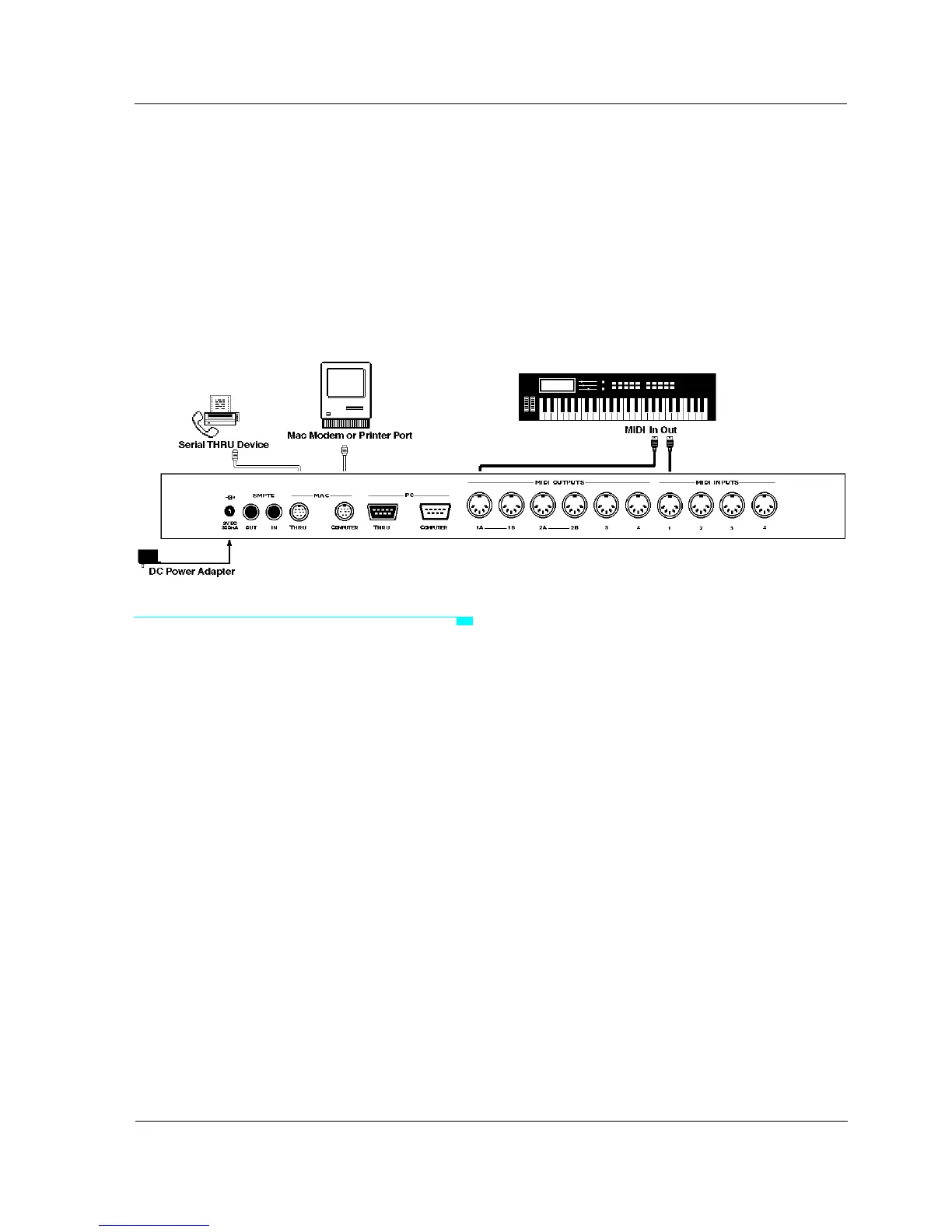
Connect Hardware
a Turn off your computer, peripherals,
and MIDI instruments.
b Plug one end of the provided serial
cable into the MAC COMPUTER port
of your Studio 64X.
c Plug the other end of the serial cable
into your computer’s modem or
printer port.
d If you have an extra serial device (and
no available ports), connect it to the
MAC THRU port of the Studio 64X.
e Using standard MIDI cables, connect
the MIDI OUTs of your instruments to
the MIDI INs of the Studio 64X; then
connect the MIDI INs of your
instruments to the MIDI OUTs of the
Studio 64X.
f Plug the small end of the provided
power adapter into the Studio 64X’s
9V DC 300MA jack; plug the other end
into an AC power source.
Make sure your power adapter is set to
or compatible with the AC voltage in your
area.
g Turn on your computer, peripherals,
Studio 64X, and MIDI instruments—in
that order.
For best results, use a power strip to turn
on/off all equipment simultaneously.
Figure 4.1: Dummy Figure Counter (White)


 To Next Page