Introduction 9
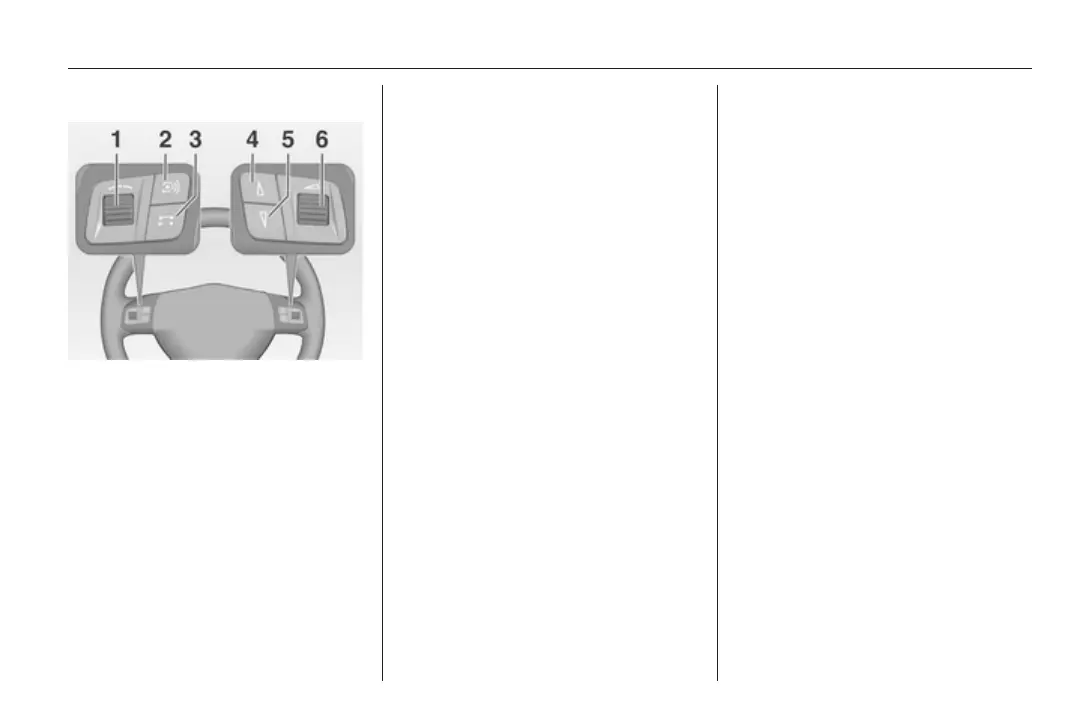
Steering wheel audio controls
1 Thumbwheel: manual time
setting (see vehicle
owner's manual) ...................... 7
2 q button ................................. 9
Change audio source
(radio, CD, AUX etc.) .............. 9
3 p button .............................. 77
Phone connected, no call
active: 1st press: open
phone menu; 2nd press:
redial (if redial number
available) ............................... 77
Short press: accept
incoming call; long press:
reject incoming call ............... 77
4 d button ................................. 19
Radio: scroll up in station
memory ................................. 19
CD/MP3: skip track
forwards ................................ 24
5 c button ................................. 19
Radio: scroll down in
station memory ..................... 19
CD/MP3: skip track
backwards ............................. 24
6 o thumbwheel ................... 9
Turn: adjust volume ................ 9
Operation
Control elements
The Infotainment system is operated
via function buttons, multifunctional
knobs, a touch screen and menus
that are shown on the display.
Inputs are made optionally via:
■ the central control unit in the
instrument panel 3 7
■ controls on the steering wheel 3 7
Switching the Infotainment
system on or off
Press the X knob briefly. After
switching on the last selected
Infotainment source is active.
Automatic switch-off
If the Infotainment system has been
switched on using the X knob when
the ignition was switched off, it will
switch off again automatically 1 hour
after the last user input.
Setting the volume
Turn the X knob. The current setting
is shown on the display.









 To Next Page