140 Introduction
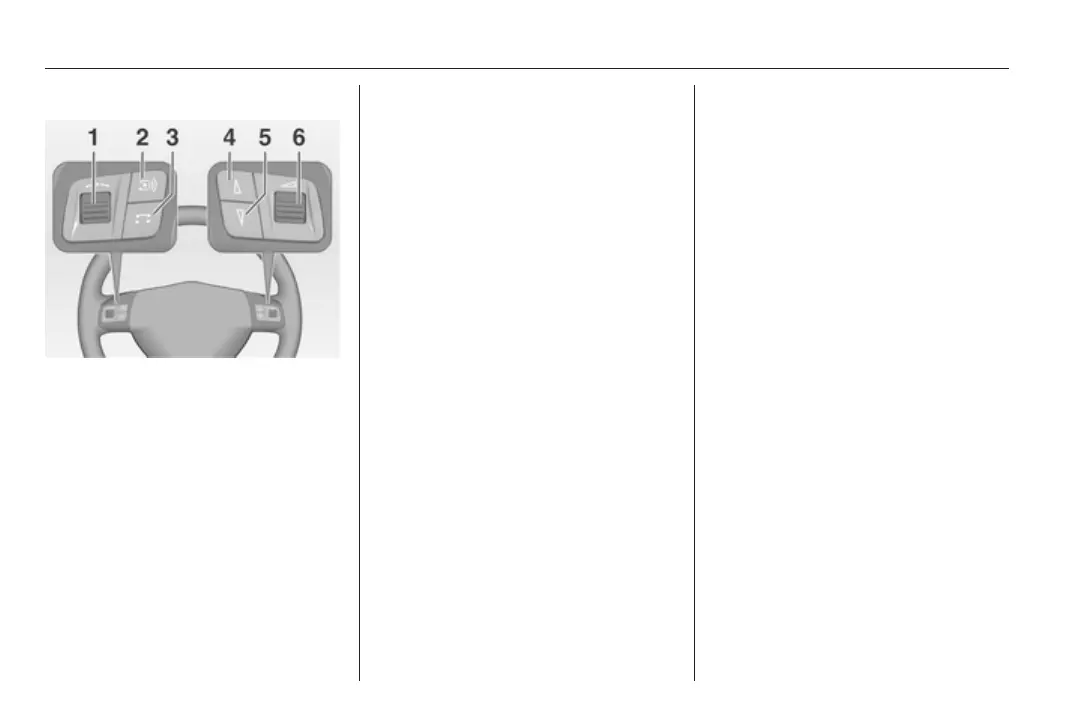
Steering wheel audio controls
1 Thumbwheel ....................... 140
Turn: Manual station
search ................................. 140
2 q button ............................. 146
Radio: Next stored station ..146
CD: Start CD playback ........ 153
MP3: Next album ................ 153
3 p button ............................ 153
Switch between radio/CD/
MP3 and AUX mode mode . 153
4 c button ............................... 146
Radio: search down, scroll
back through station
memory ............................... 146
CD: Short press: Skip one
track backwards .................. 153
CD: Long press: fast
backwards ........................... 153
5 d button ............................... 146
Radio: search up, scroll
forwards through station
memory ............................... 146
CD: Short press: Skip one
track forwards ..................... 153
CD: Long press: fast
forward ................................ 153
6 o ................................... 140
Turn: adjust volume ............ 140
Hold: adjust volume
continously .......................... 140
Operation
Control elements
The Infotainment system is operated
optionally via:
■ the central control unit in the
instrument panel 3 138
■ controls on the steering wheel
3 138.
Switching the Infotainment
system on or off
Press the e knob.
The audio source last set is played.
Switching on and off with the ignition
key (automatic switch-on)
If the automatic switch-on is enabled,
the Infotainment system can also be
switched off and on again via the
ignition.
This link between the radio and
ignition is preset in the factory, but this
can be disabled.









 To Next Page