
EasyManua.ls Logo

OPGAL EyeCGas 2.0 - User Manual

OPGAL EyeCGas 2.0
91 pages
Print Icon
To Next Page IconTo Next Page
Loading...
Rev 01 | Doc P/N: UM-8G9A0000BCopyright © 2018 Opgal, all rights reserved.
OGI – Optical Gas Imager, Camera
User Manual

Questions and Answers

  • B
    Brian CookAug 3, 2025
    Why does the recording process stop without pressing the Record button on my OPGAL EyeCGas 2.0?
    • L
      Linda WelchAug 3, 2025
      If the recording process on your OPGAL Digital Camera stops unexpectedly, it could be due to two main reasons. First, the internal memory might be full; try transferring files to your computer or tablet before recording again. Second, the battery might be running low; the camera will stop recording if the battery level drops below 3%. Try switching to a different battery.
  • C
    Cheryl PowellAug 9, 2025
    What to do if the power-up sequence does not start on OPGAL EyeCGas 2.0 Digital Camera?
    • J
      James DuncanAug 10, 2025
      If the power-up sequence doesn't start on your OPGAL Digital Camera after pressing the power button, it could be due to the following reasons: the battery may not be connected properly, so disconnect and reconnect it, ensuring it's securely in place. Alternatively, the battery might be empty, in which case you should switch to a different battery.
  • B
    Bill GonzalezAug 15, 2025
    What to do if message 'Scan and Fix' appears on the computer after connecting OPGAL EyeCGas 2.0 Digital Camera?
    • A
      April ReedAug 15, 2025
      If you see the message 'Scan and Fix' on your computer after connecting your OPGAL Digital Camera, follow the Windows prompts to perform the disk scan. This is a standard Windows warning, and the causes can vary.
  • L
    Lucas SmithAug 21, 2025
    How to fix ghost video that appears with the real video on OPGAL EyeCGas 2.0 Digital Camera?
    • A
      Anna SmithAug 21, 2025
      If a ghost video appears with the real video on your OPGAL Digital Camera, it is caused by NUC on scenery. Mount the lens cover on the lens and perform the NUC sequence.
  • C
    Cassidy MartinAug 27, 2025
    Why IR video doesn't appear after power-up sequence ends on OPGAL Digital Camera?
    • J
      julieeverettAug 27, 2025
      If the IR video doesn't appear after the power-up sequence ends on your OPGAL Digital Camera, it's likely that the lens cover is still on. Remove the lens cover from the lens.

Summary

Safety

Battery Warnings and Cautions

Warnings and cautions related to the lithium polymer and lithium-ion batteries.

General Warnings

General safety warnings, including explosion hazards and connection precautions.

Overview

Camera Overview

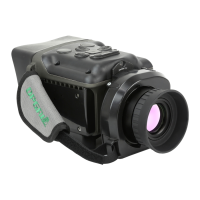
Introduction to the EyeCGas® 2.0 camera and its major components.

Keypad Buttons Overview

Explanation of keypad button functionality and their usage in different modes.

Operation

Preparation for Use

Steps and information for preparing the camera for initial use.

Camera Startup

Details on the camera's power-on sequence and initial setup.

Troubleshooting

Technical Support

Information on how to obtain technical support and assistance from Opgal.

Contact Information

Contact details for Opgal, including website, email, phone, and address.

OPGAL EyeCGas 2.0 Specifications

General IconGeneral
Spectral Range3.2 - 3.4 μm
Frame Rate30 Hz
Operating Temperature-15°C to +50°C
FocusManual
Power Supply12 VDC
Field of View25° x 19°
Video OutputHDMI