10
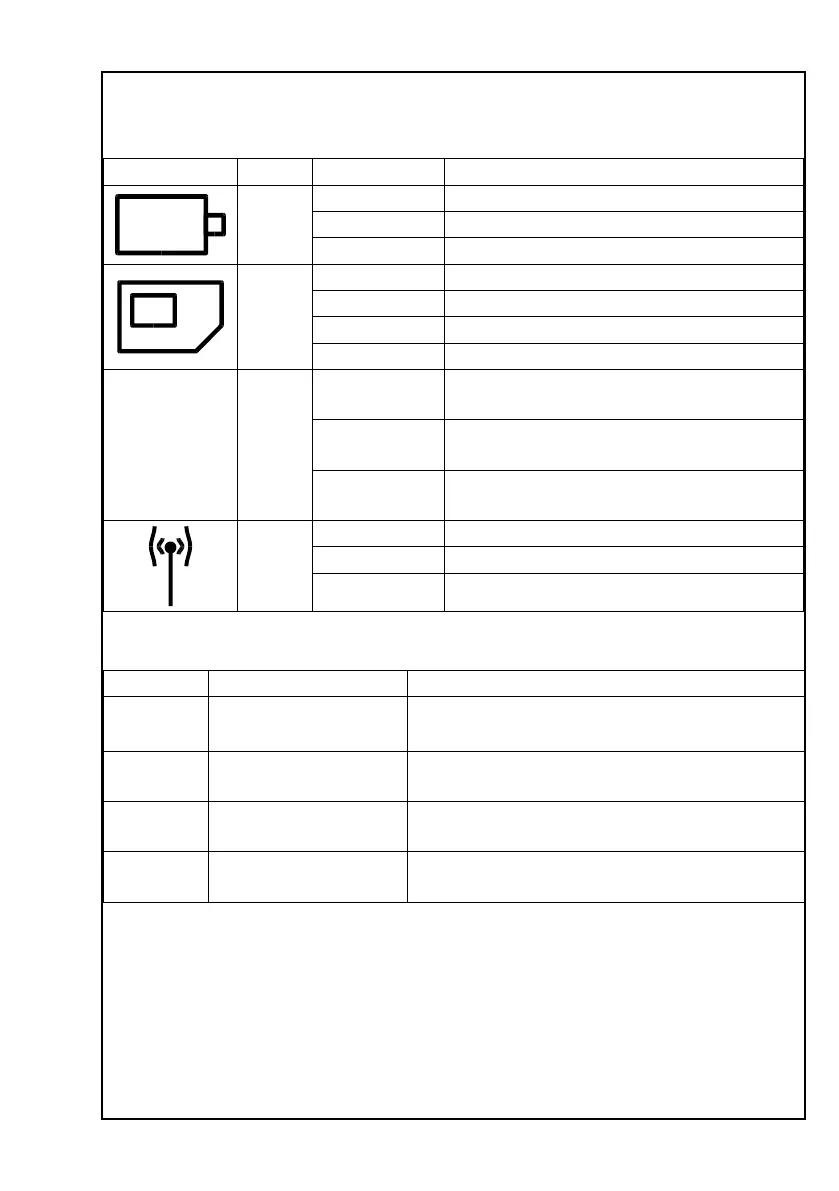
Status lights
There are 3 dierent status lights in the boom of your Opis 60s mobile or PushMe-
Fon mobile (4). Please see the following table for details.
Light symbol Colour Indicaon Meaning
Orange
O Normal operaon or phone switched-o.
On Baery charging.
Flashing Baery crically low.
Red
O All is ne.
On No SIM card is present.
Flashing SIM card requires PIN-entry.
Flashing fast SIM card requires PUK-entry.
&
Red
Flashing alter-
nately
The phone is busy. Please wait.
Both On Aer alternang ashing: The telephone
has successfully completed the task.
Flashing simul-
taneously
Aer alternang ashing: The telephone
has completed the task with an error.
Red
O All is ne.
On Phone is not connected to a network.
Flashing Acve roaming lock prevents connecon.
Ring signals
Type Signal Meaning
OK 1 long ring Phone has accepted your last input.
Failure 2 short rings Phone has rejected your input, but you can try
again now.
Low power 3 short rings Phone baery is low. Connect to charger. See
also secon Status lights .
Call Connuous ring pause
alternaon
Incoming call.
Baery Policy
Baeries shouldn’t just be thrown away. Please visit our website at www.opis-tech.
com/baery-policy to learn how to dispose the baery included in your Opis Technol-
ogy telephone safely.
Technical Specicaons
• desktop mobile


 To Next Page