3
ENGLISH
Introducon
Welcome to the 4G version of your Opis Technology desktop mobile, your new retro-
styled mobile phone, resembling a classic xed-line phone. This short manual provides
you with quick start guide, list of special features, and troubleshoong ps.
Quick Start
❶ Assembly
Unpack phone, charger and receiver from the box. Plug the receiver into the boom
of the phone (1). Connect the charger to the back of the phone and plug it into any
standard household A/C power outlet.
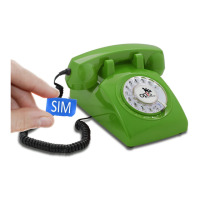
❷ Install a SIM card
Slide your SIM card (not included) into the boom of the phone oriented as shown (3).
For simplied operaon, use a card that is not PIN locked (see ⓫)
❸ Switch it on
Slide the main switch on the base from the 0 to the 1 posion as shown in (2). The two
red status lights (network and SIM card) ash alternately for about 30 seconds. The al-
ternate ashing indicates that the phone is busy. Please just wait. Aer some me, all
three status lights should light up briey. (Please note that the baery light will remain
on if the phone is charging.) Aerwards the lights provide informaon on the phone’s
status as described in secon Status lights.
❹ Enter a PIN
This step is only required for a PIN-locked SIM card. Please check the status lights at
the boom of your phone to nd out if this is the case (see secon Status lights). Pick
up the receiver, wait for the busy tone (see secon Receiver Tones) and dial:
Format: <PIN (4 digits)>
Example: if the PIN is 1234: 1234
⇒ if the PIN is accepted the phone rings once.
Note: Aer 3 failed aempts your SIM card will be locked and it is necessary to dial
the PUK and a new PIN:
Format: <PUK (8 digits)>#<new PIN (4 digits)>
Example: if the PUK is 88888888 and the PIN is 1234: 88888888#1234
⇒ if the PIN is accepted the phone rings once.
The phone is now ready for normal operaon. (If a PIN or PUK is not accepted the


 To Next Page