EasyManua.ls Logo

Opis Purofon Mobile 4G - User Manual

Opis Purofon Mobile 4G
54 pages
Print Icon
To Next Page IconTo Next Page
Loading...
1
Manual, Handbuch, mode d’emploi, manual de uso,
manuale d’uso
Phone index, Telefonregister, registre téléphonique, agenda
telefónica, registro numeri di telefono
Purofon
Mobile
Question and Answer IconNeed help?

Do you have a question about the Opis Purofon Mobile 4G and is the answer not in the manual?

Summary

Introduction and Quick Start

Assembly

Unpack phone, charger, antenna, receiver, and cable. Connect cable, tighten antenna.

Install a SIM card

Slide SIM card into the bottom slot (11) after removing the cover.

Charging

Connect battery (9) to socket (10), replace cover, plug charger into outlet.

Switch it on

Press ON/OFF button (6) for 5 seconds to power on the phone.

Enter a PIN

Enter PIN for PIN-locked SIM card; use OK and Clear buttons.

Make a call

Pick up receiver, wait for dial-tone, dial number, or use TALK/RD button.

Receive a call

Pick up the receiver when the phone rings to accept a call.

Switch it off

Press and hold the ON/OFF button (6) for 5 seconds to switch off.

Advanced Features

Hands Free Operation

Use phone hands-free by leaving handset in place and using H-F button (7).

Quick Dials Programming

Set up speed dial numbers (2-8, M1) via the menu.

Quick Dials Modification

Edit or delete existing quick dial numbers via the Options menu.

Dialing Quick Dials

Dial a quick dial by selecting it from the menu and pressing TALK/RD button.

Menu Navigation and Features

Main Menu Navigation

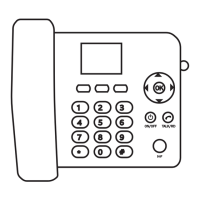
Navigate main menu using directional keys (5) and OK key (5).

Call Logs

View call history including missed, dialled, and received calls.

Message Menu

View, delete, or call back originating numbers for received text messages.

Settings and Profiles

Settings Menu

Configure phone settings like language, security, and post-dialing delay.

Profiles Menu

Adjust ringtone, volume, and enable silent mode.
Summary

Introduction and Quick Start

Assembly

Unpack phone, charger, antenna, receiver, and cable. Connect cable, tighten antenna.

Install a SIM card

Slide SIM card into the bottom slot (11) after removing the cover.

Charging

Connect battery (9) to socket (10), replace cover, plug charger into outlet.

Switch it on

Press ON/OFF button (6) for 5 seconds to power on the phone.

Enter a PIN

Enter PIN for PIN-locked SIM card; use OK and Clear buttons.

Make a call

Pick up receiver, wait for dial-tone, dial number, or use TALK/RD button.

Receive a call

Pick up the receiver when the phone rings to accept a call.

Switch it off

Press and hold the ON/OFF button (6) for 5 seconds to switch off.

Advanced Features

Hands Free Operation

Use phone hands-free by leaving handset in place and using H-F button (7).

Quick Dials Programming

Set up speed dial numbers (2-8, M1) via the menu.

Quick Dials Modification

Edit or delete existing quick dial numbers via the Options menu.

Dialing Quick Dials

Dial a quick dial by selecting it from the menu and pressing TALK/RD button.

Menu Navigation and Features

Main Menu Navigation

Navigate main menu using directional keys (5) and OK key (5).

Call Logs

View call history including missed, dialled, and received calls.

Message Menu

View, delete, or call back originating numbers for received text messages.

Settings and Profiles

Settings Menu

Configure phone settings like language, security, and post-dialing delay.

Profiles Menu

Adjust ringtone, volume, and enable silent mode.

Opis Purofon Mobile 4G Specifications

General IconGeneral
BrandOpis
ModelPurofon Mobile 4G
CategoryTelephone
LanguageEnglish

Related product manuals