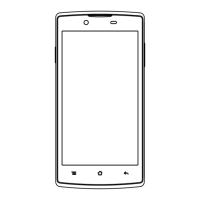
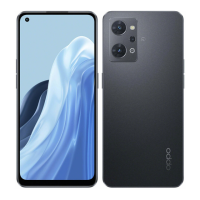
Names of parts
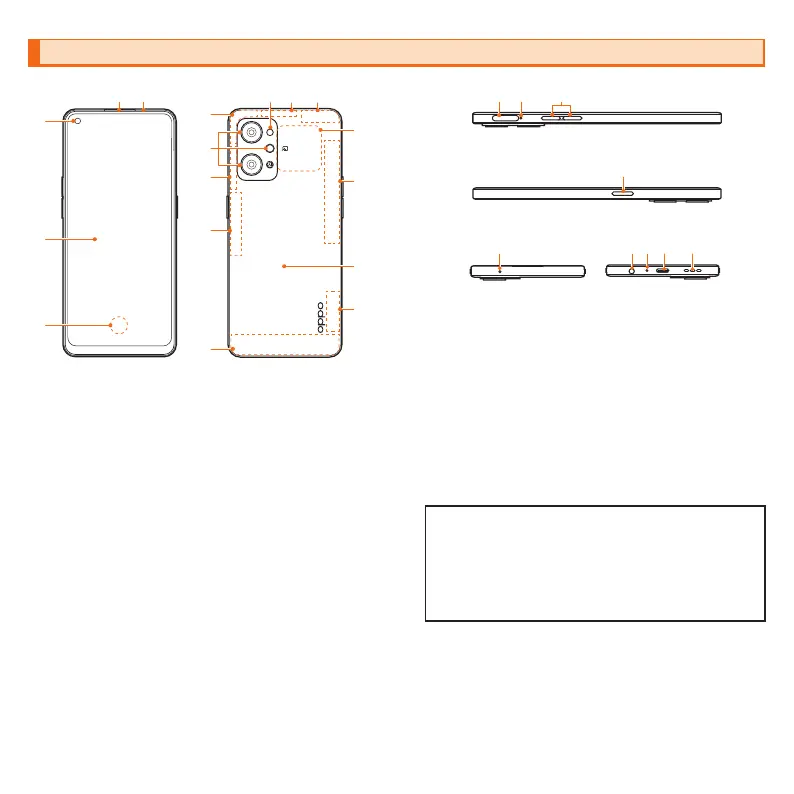
a
Receiver
*1
b
Proximity sensor/Light sensor
*2
c
In-camera
d
Display (touch panel)
e
On-screen fingerprint sensor
f
Flashlight
g
5G antenna
*3
h
4G/5G antenna
*3
i
GPS/Wi-Fi
®
/Bluetooth
®
antenna
*3
j
Out-camera
k
NFC detector area
l
Rear cover
*4
m
SIM card/microSD memory card tray
n
Hole for tray removal
o
Volume button (up/down)
p
Power button/Screen-lock button
q
Sub-microphone
*1
r
Earphone jack
*1
s
Mouthpiece/Main microphone
*1
《Bottom》
u
e
f
d
a
j
i
g
h
k
b
c
q
r
s
l
p
onm
《Top》
h
h
h
h
g
t
《Front》
《Back》
《Left》
《Right》
t
USB Type-C connection jack (external connection jack)
u
Speaker
*1
*1 Be careful not to cover with your finger etc. while using the corresponding
function. Do not insert the SIM ejector pin (sample) in a wrong way
because it may cause damage.
*2 Do not cover with a sticker etc. Functions may not work properly.
*3 The antenna is built into the main unit. Covering the antenna area with
your hand may affect quality of call/communication.
*4 The rear cover cannot be removed. Attempting to remove it forcibly may
cause a damage or malfunction. Also, the battery is built into the main unit
and you cannot take out it by yourself.
• Refer to "Notes on Usage" for disclaimers.
• For the latest contents of this manual, refer to the "
取扱説明書
詳
細版
(Instruction Manual)" (Japanese) on the homepage of your
mobile carrier.
• The descriptions may be different from those in this manual due
to software version upgrade of the product, change/termination
of services. Also, the content of this manual is subject to change
without notice.


 To Previous Page