7"
Speakers'
! Overview"
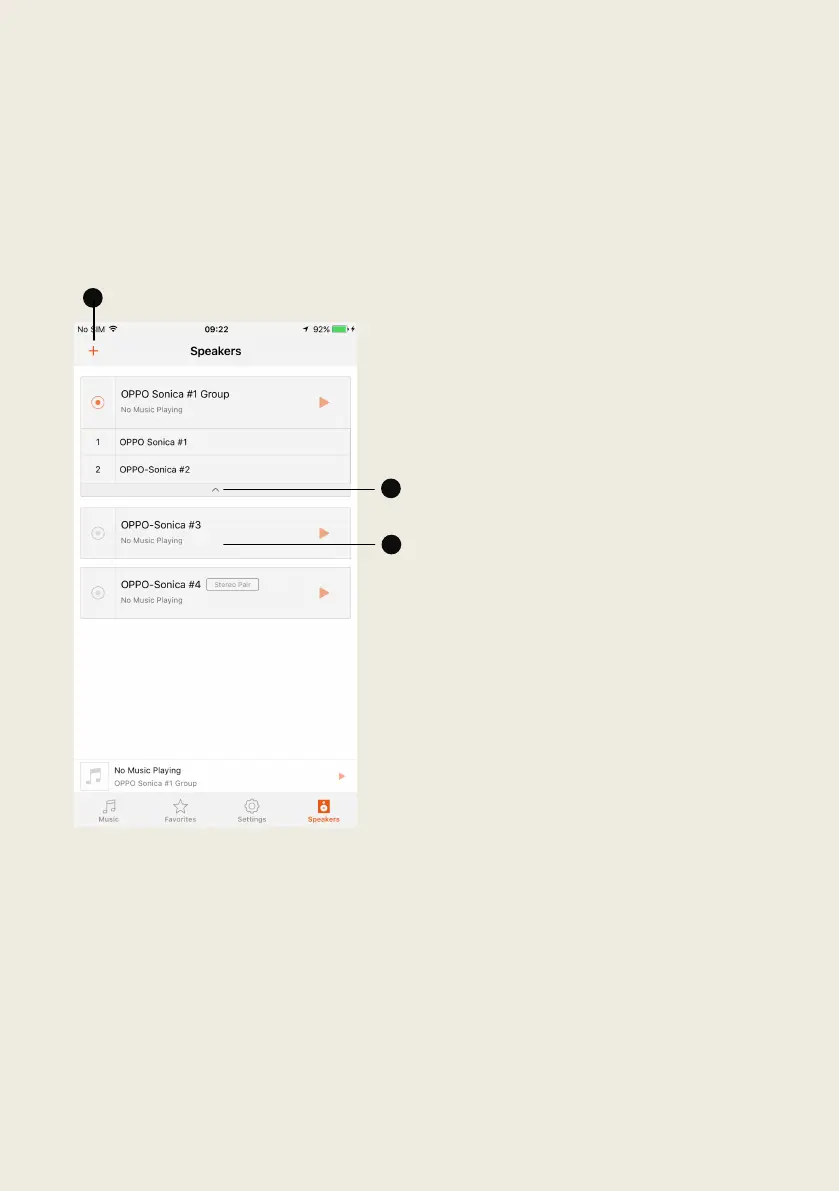
The" “Speakers”" page" will" display" a" list" of" Sonica" speakers" that" have" been"
successfully"con figured,"and"will"show"whether"they"are"currently"operating"
as"individu a l"sp e ak e rs"or"as"group"of"speakers."
1. Tap" the" “+”" to" add" additional"
speakers" to" the" system," create"
a" stereo" pair," or" stop" all"
speakers"from"playing."
2. Th e" name" of" each" Sonica"
speaker" and" stereo" pair" will"
appear" as" individual" speakers"
in" list," while" speaker" groups"
will" be" listed" by" group" name."
To"see"what"speakers"make"up"
a" particular" group," tap" the"
arrow" icon" located" below"
group"name."
3. Tapping" on" the" name" of" a"
speaker"or"group "w ill"allow"you"
to" enter"the" Speaker" Grouping"
menu" or" rename" the" speaker"
or"group."


 To Next Page