The Ingenico iWL250 is a portable point-of-sale (POS) terminal designed for secure and efficient payment processing in various retail and service environments. Its compact and ergonomic design makes it suitable for use at the counter, tableside, or on the go, providing flexibility for businesses that require mobile payment solutions. The device is equipped with a keypad and a display, allowing for user interaction and transaction visibility.
Function Description:
The primary function of the Ingenico iWL250 is to facilitate electronic payment transactions. It supports a wide range of payment methods, including credit cards, debit cards, and potentially other forms of electronic payments, depending on the specific configuration and merchant services. The terminal is designed to securely capture payment information, process transactions, and communicate with payment networks to authorize and settle payments.
Usage Features:
- Payment Processing: The iWL250 is capable of processing various card-based payments. Users can typically swipe magnetic stripe cards, insert EMV chip cards, or tap for contactless payments (NFC), offering a comprehensive set of options for customers. The device's secure architecture ensures that sensitive cardholder data is protected throughout the transaction process.
- Keypad and Display: The terminal features a tactile keypad with numerical and function keys, enabling merchants to enter transaction amounts, PINs, and navigate through menus. The display provides clear visual feedback, showing transaction details, prompts, and status messages to both the merchant and the customer.
- Portability: As a wireless terminal, the iWL250 offers significant portability. This feature is particularly beneficial for businesses such as restaurants, cafes, food trucks, or field service operations where payments need to be accepted away from a fixed counter. The wireless connectivity (e.g., GPRS, 3G, Wi-Fi, or Bluetooth, depending on the model and configuration) allows for transactions to be processed almost anywhere within the network coverage.
- User Interface: The device's interface is designed to be intuitive, guiding users through the payment process with clear prompts. This ease of use helps minimize training time for staff and reduces the likelihood of errors during transactions.
- Transaction Management: Beyond basic payment acceptance, the iWL250 often includes features for transaction management, such as voiding transactions, processing refunds, and generating end-of-day reports. These capabilities help merchants manage their sales and reconcile their accounts efficiently.
- Security: Security is a paramount feature of the iWL250. It is built to comply with industry security standards, such as PCI PTS, ensuring that cardholder data is encrypted and protected from fraud. This includes secure PIN entry and tamper-detection mechanisms.
- Integration: The iWL250 can often be integrated with existing point-of-sale systems or merchant accounts, allowing for seamless data flow and centralized management of sales and payment information.
Maintenance Features:
- SIM Card Installation: For wireless connectivity, the iWL250 requires a SIM card. The installation process typically involves accessing a compartment on the device, inserting the SIM card, and then configuring the network settings. This allows the terminal to communicate with cellular networks for transaction processing.
- Battery Management: As a portable device, the iWL250 relies on a rechargeable battery. Users need to ensure the battery is charged regularly to maintain operational readiness. The device usually provides indicators for battery status, and charging can be done via a dedicated power adapter or charging base.
- Software Updates: Like most electronic devices, the iWL250 may require periodic software updates to enhance functionality, improve security, or fix bugs. These updates are typically managed by the service provider or merchant services, ensuring the terminal remains compliant and performs optimally.
- Troubleshooting: The device includes basic troubleshooting indicators and messages on its display to help users identify and resolve common issues, such as network connectivity problems or transaction errors. For more complex issues, support from the OptConnect Customer Care Center is available.
- Cleaning: Regular cleaning of the device's exterior, including the screen and keypad, is recommended to maintain hygiene and ensure proper functioning. Care should be taken to use appropriate cleaning materials that do not damage the electronic components.
- Physical Handling: The iWL250 is designed for durability in a commercial environment, but proper physical handling is important to prevent damage. This includes avoiding dropping the device, exposing it to extreme temperatures or moisture, and ensuring that cables are connected and disconnected carefully.
- Network Configuration: Setting up the device for wireless communication involves configuring network parameters such as the Access Point Name (APN). This process ensures that the terminal can establish a secure and reliable connection to the payment network. Instructions typically guide users through menu navigation to input the correct APN details.
- Reset and Reboot: In cases where the device experiences minor software glitches or unresponsiveness, a simple reboot or reset procedure can often resolve the issue. This usually involves holding down a specific key for a few seconds to power cycle the device.
The Ingenico iWL250 is a robust and versatile payment terminal designed to meet the demands of modern businesses requiring flexible and secure payment acceptance. Its user-friendly design and comprehensive features make it a valuable tool for streamlining payment operations.

 Need help?
 General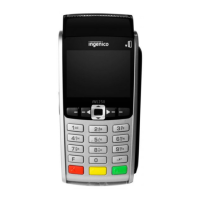

 To Next Page
