8 9
Installation for Internet and Phone
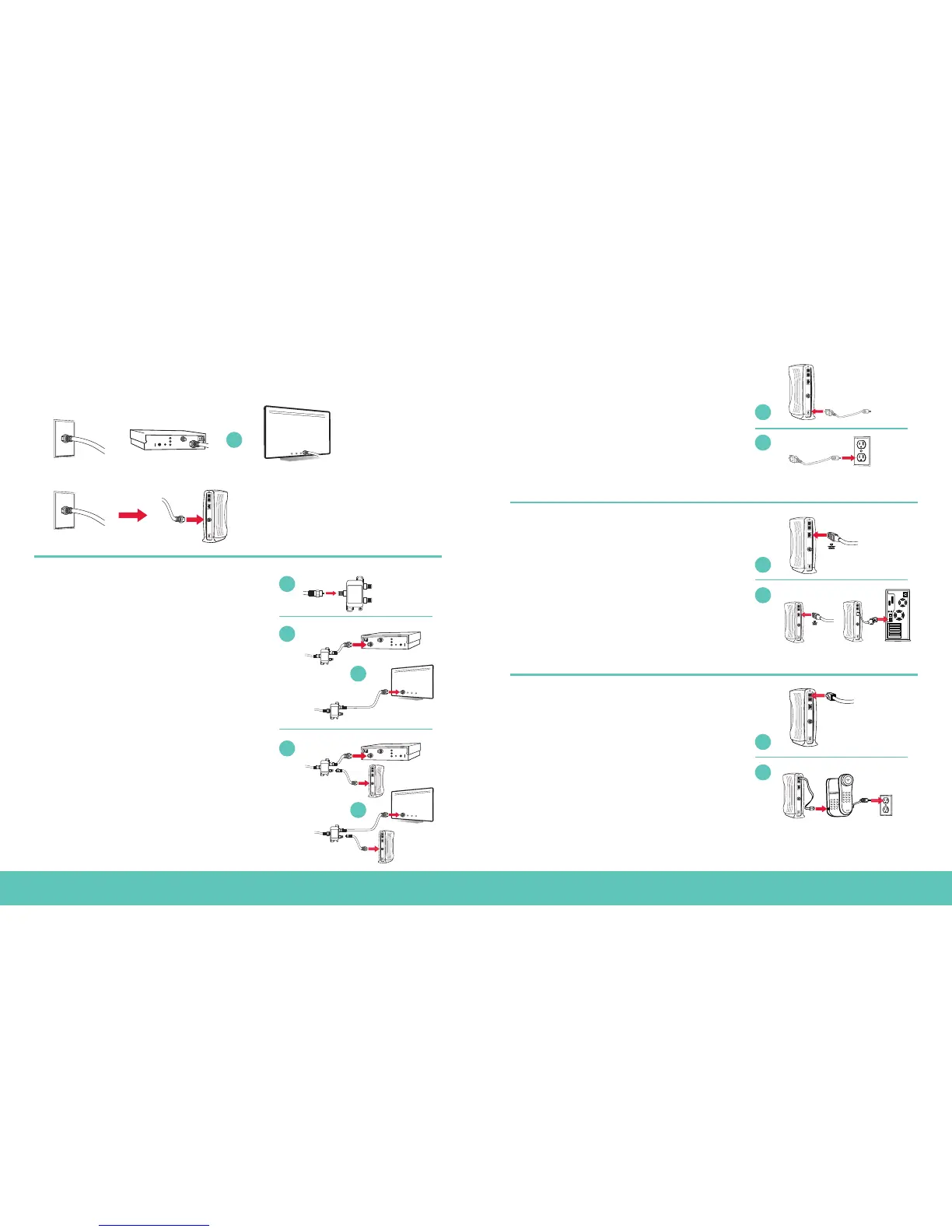
STEP 1
• find your main cable line
Note: Personal routers need to be installed after you’ve activated your account in Step 6.
STEP 2 • connect splitter, TV and modem
A Disconnect either the digital cable box, or the modem
from the main cable line. Leave the main cable line
connected to the wall outlet.
B Using either the 6' or 25' coaxial cable, connect one end
of the cable to one of the “out” ends on the splitter.
C Connect the other end of the coaxial cable to the back
of the TV or digital cable box.
D Connect the second coaxial cable to the remaining
“out” end on the splitter.
E Connect the open end of the coaxial cable to the
back of the modem.
STEP 3 • connect the power cord to the modem
A Plug the modem end of the power cord into the back
of the modem.
B Plug the electrical end of the power cord into the
electrical outlet or surge protector.
Note:
For added protection, purchase a surge protector.
STEP 4 • connect modem to computer using Ethernet cable
A Connect the Ethernet cable to the Ethernet port on the
back of the modem.
B Connect the other end of the Ethernet cable to the
Ethernet port on the back of your computer.
If you are connecting internet service only, skip
to Step 6 now.
STEP 5 • phone customers—connect modem to phone
A Connect the telephone cord to the port marked
“TEL 1” on the back of the modem. For two phone
lines, connect a second telephone cord to the port, “TEL 2”.
B Connect the other end of the telephone cord to
your phone.
C If your phone requires power, plug it in now. Remember to
let a new phone charge overnight before using.


 To Next Page
 Loading...