EasyManua.ls Logo

Optimus LAB-1100 - User Manual

Optimus LAB-1100
16 pages
Print Icon
To Next Page IconTo Next Page
Loading...
Cat. No. 42-2023
OWNER’S MANUAL
Please read before using this equipment.
LAB-1100
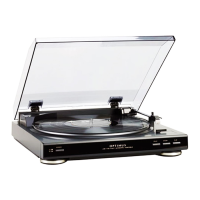
Fully Automatic Belt-Drive Turntable
42-2023.fm Page 1 Wednesday, August 11, 1999 2:50 PM

Questions and Answers

  • C
    Christopher BakerAug 3, 2025
    What to do if my Optimus Turntable has no sound?
    • T
      Taylor JonesAug 3, 2025
      If your Optimus Turntable produces no sound, first, ensure the receiver/amplifier volume isn't set to the minimum; adjust it as needed. Verify that the turntable is correctly connected to the receiver/amplifier by rechecking all connections. Also, check the LINE OUT ON/PHONO OUT OFF setting; if it's set to PHONO OUT OFF and the turntable is connected to the receiver's/amplifier's line-level input jacks, switch it to LINE OUT ON. Finally, the stylus may need replacing.
  • K
    kingelizabethAug 8, 2025
    Why my Optimus Turntable does not work when plugged into an AC outlet?
    • S
      sethrodgersAug 8, 2025
      If your Optimus Turntable isn't working, make sure the connected receiver/amplifier is turned on. Check the rubber drive belt to ensure it hasn't slipped, broken, or isn't mounted correctly. Also, examine the power cord and AC outlet for any power issues.
  • F
    franklinvirginiaAug 14, 2025
    How to fix scratchy sound on my Optimus Turntable?
    • R
      Raymond VelasquezAug 14, 2025
      If the sound from your Optimus Turntable is unclear or scratchy during play, start by cleaning the record. Next, clean the stylus with a soft brush. Check if the stylus is improperly installed and reinstall it if necessary, or if it's worn, replace it. Lastly, if the LINE OUT ON/PHONO OUT OFF is set to LINE OUT ON and the turntable is connected to the receiver's/amplifier's low-level phono input jacks, set it to PHONO OUT OFF.
  • N
    Natalie OsborneAug 21, 2025
    Why is my Optimus Turntable humming?
    • A
      Amanda KennedyAug 21, 2025
      If you're experiencing hum from your Optimus Turntable during play, check the stylus and reinstall it if necessary. Also, inspect the ground terminal and reposition the turntable away from other components to avoid induction hum. If the LINE OUT ON/PHONO OUT OFF is set to LINE OUT ON and the turntable is connected to the receiver’s/amplifier’s low-level phono input jacks, set it to PHONO OUT OFF.
  • E
    Elaine Moore DDSAug 27, 2025
    What to do if my Optimus Turntable has feedback?
    • R
      Robin KingAug 27, 2025
      If you're getting feedback or a howling sound from your Optimus Turntable during play, try repositioning the turntable away from the speakers. The turntable might be picking up sound pressure or vibrations from the speakers.

Summary

Turntable Features

FCC Compliance Information

Product Preparation and Setup

Unpacking the Turntable

Instructions for safely removing the turntable and its accessories from the packaging.

Assembling the Turntable

Step-by-step guide for assembling the turntable components, including the belt and platter.

Connecting to Audio Systems

Connecting Power Supply

Operating the Turntable

Using the Cue Button

Troubleshooting Common Issues

Care and Maintenance Guidelines

Record Care and Handling

Stylus Cleaning and Replacement

Instructions on how to clean or replace the stylus to ensure good sound and prevent record damage.

Technical Specifications

Limited One-Year Warranty Details

Optimus LAB-1100 Specifications

General IconGeneral
BrandOptimus
ModelLAB-1100
CategoryTurntable
LanguageEnglish