EasyManua.ls Logo

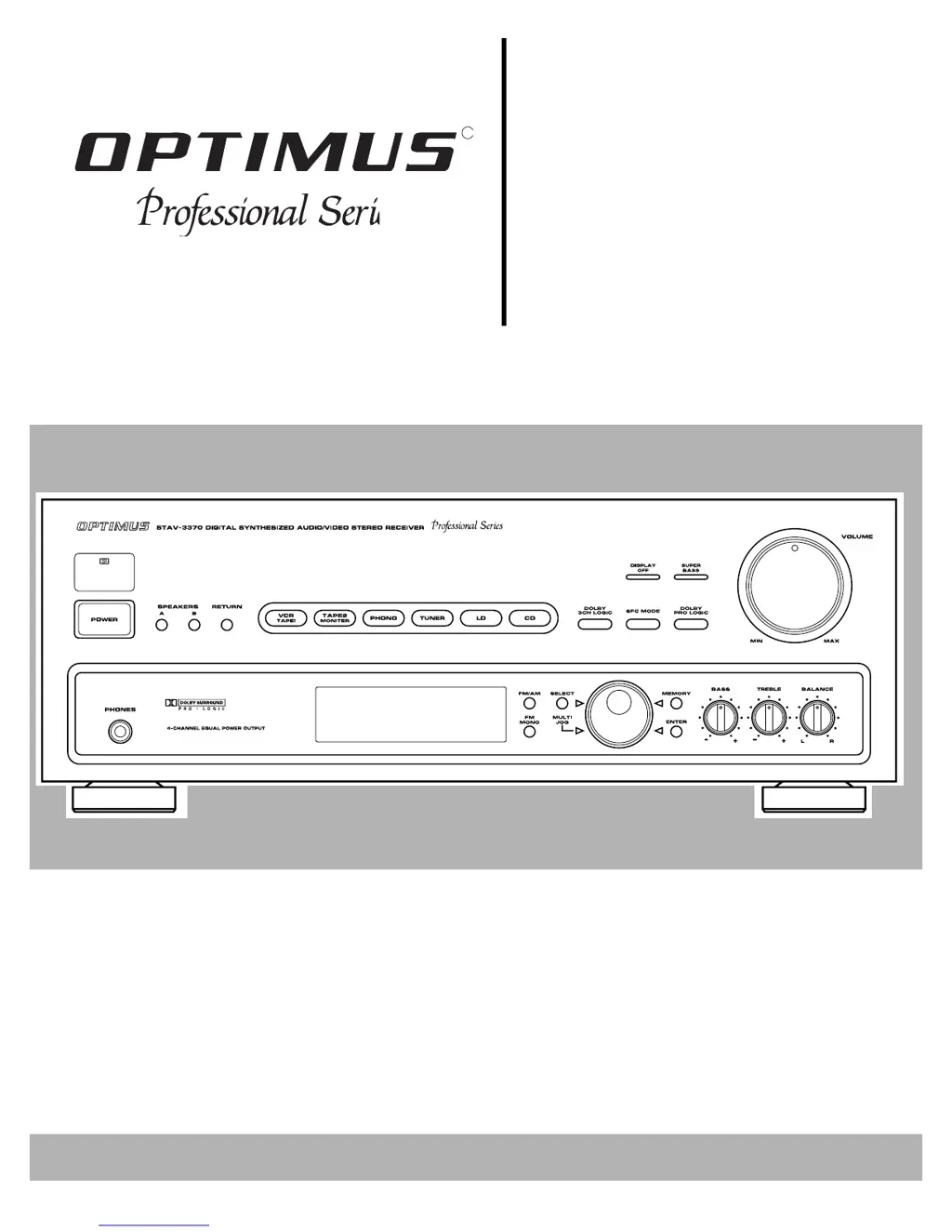
Optimus PROFFESIONAL SERIES STAV-3370 - User Manual

Optimus PROFFESIONAL SERIES STAV-3370
32 pages
Print Icon
To Next Page IconTo Next Page
Loading...
R
Digital Synthesiz
e
STAV-3370
Cat. No.
31-3032
Owner’s Manual
Please read before using this equipment.
Audio/Video
Surround Receiv
e

Questions and Answers

  • R
    Rhonda SuttonJul 28, 2025
    Why does my Optimus PROFFESIONAL STAV-3370 have no sound?
    • D
      Douglas HoodJul 29, 2025
      If your Optimus Stereo Receiver has no sound, there could be several reasons: * Incorrect connections: Ensure all connections are correctly made. * Mute function: Check if the mute function is activated and, if so, press the MUTING button. * Volume level: Make sure the volume isn't turned down; increase it. * Speaker wires: Verify that the speaker wires are properly connected. * Speaker selection: Confirm that either SPEAKERS A or B is selected.
  • T
    Timothy ThompsonAug 2, 2025
    How to fix Optimus PROFFESIONAL STAV-3370 when power does not turn on?
    • S
      Scott WoodsAug 2, 2025
      If your Optimus Stereo Receiver's power doesn't turn on, it might be due to: * Disconnected power cord: Ensure the power cord is properly plugged in. * Activated protection circuit: Unplug the power cord and then plug it back in to reset the protection circuit.
  • D
    Danielle FoxAug 6, 2025
    Why is there a high noise level on my Optimus Stereo Receiver?
    • A
      Angie HopkinsAug 6, 2025
      If you're experiencing a high noise level with your Optimus Stereo Receiver, consider the following: * Tuning: Ensure the station is correctly tuned. Try tuning to a stronger station. * Antenna connection: Make sure the antenna is properly connected. * FM antenna: If using an FM antenna, stretch it taut and reposition it for better reception. * AM loop antenna: Adjust the AM loop antenna. * Electrical interference: The noise might be coming from another electrical appliance. Consider using an AC line noise filter.
  • T
    Tamara ScottAug 10, 2025
    What to do if Optimus Stereo Receiver does not respond to button presses?
    • S
      suarezkarenAug 10, 2025
      If your Optimus Stereo Receiver isn't responding to button presses, it might be due to static discharge affecting the control. Try unplugging the power cord and then plugging it back in. If static electricity continues to be a problem, try to use the remote control as much as possible.
  • E
    Ethan WhiteAug 15, 2025
    Why is there no picture when I select a video source on my Optimus PROFFESIONAL STAV-3370?
    • S
      Sarah CannonAug 15, 2025
      If you're not getting a picture when you select a video source on your Optimus Stereo Receiver, it could be due to: * Incorrect video source setting: Ensure the selected video source is correctly set. * Incorrect connections: Verify and correct all video connections.
  • K
    Kevin HarperAug 19, 2025
    Why doesn't tuning automatically stop when searching for FM stations on my Optimus Stereo Receiver?
    • B
      Brenda ReynoldsAug 19, 2025
      If tuning does not automatically stop when searching for FM stations on your Optimus Stereo Receiver, it is likely because the stations are too weak. Using a better antenna can solve this problem.
  • S
    Stacy AndersonAug 23, 2025
    Why can't I make copies of video tapes with my Optimus PROFFESIONAL STAV-3370 Stereo Receiver?
    • J
      John MathewsAug 23, 2025
      If you cannot make copies of video tapes with your Optimus Stereo Receiver, it may be because the tapes are protected by a copy restriction method, which means you cannot make a good copy. Alternatively, the video connections may be incorrect; check and correct them.

Summary

Important Safety Instructions

General Safety Precautions

Covers precautions for use near water, accessories, ventilation, power, and electrical hazards.

Servicing and Component Safety

Details user servicing limitations, when to seek professional help, and component safety.

Environmental and Placement Guidelines

Advises on proper placement away from heat, moisture, and suitable operating environments.

Preparing Your Receiver

Positioning Speakers

Guidance on optimal placement of speakers for best sound quality and stereo effect.

Connecting Speakers

Instructions and guidelines for selecting and connecting speakers to the receiver.

Connecting Program Sources

Instructions for connecting external audio/video sources like turntables, cassette decks, and CD players.

Connecting the Antennas

Guidance on connecting indoor and outdoor AM and FM antennas for optimal reception.

Remote Control Setup and Use

Covers using one remote for multiple units and installing remote control batteries.

Power Connections and Outlet Usage

Details connecting the receiver to AC power and using its switched AC outlet.

Basic Operation

Receiver Power and Speaker Selection

Steps to turn on the receiver, select speakers, and adjust volume.

Program Source Selection

How to choose and listen to different audio/video sources connected to the receiver.

Tone and Balance Adjustments

Using Bass, Treble, Super Bass, and Balance controls for sound customization.

Tuning Radio Stations

Methods for tuning AM/FM stations, including manual, automatic, and memory tuning.

FM Mono and Display Control

Adjusting FM reception to mono and turning off the display for convenience.

Sleep Timer Function

Setting the receiver to automatically turn off after a specified time.

Cassette Deck;VCR Features

Using Tape Monitor Functions

How to use the VCR/TAPE 1 and TAPE 2 MONITOR buttons for playback and monitoring.

Recording Program Sources

Sending selected audio sources to tape decks for recording.

Dubbing Cassette Tapes

Instructions for copying cassette tapes between decks.

Playing and Recording Video Tapes

Connecting VCRs for playing and copying video cassette tapes.

Using Advanced Sound Options

Dolby Surround Sound Modes

Explains Dolby Pro-Logic, Dolby 3CH Logic, Studio Effect, and Simulated Surround modes.

Sound Mode Adjustments (Remote)

Remote control settings for Center Mode, Test Tone, Center/Rear Level, and Delay Time.

Using the Remote Control

Audio;VCR Switch and Component Control

Using the remote's switch to control audio/video components and specific button functions.

Receiver;Amplifier Section Controls

Detailed explanation of remote buttons for source selection, volume, sound modes, and power.

Tape;VCR Section Controls

Remote control functions for cassette decks and VCRs, including playback and recording.

Troubleshooting

Problem;Cause;Solution Chart

A guide to common receiver problems, their causes, and suggested solutions.

Returning Controls to Factory Defaults

Instructions on how to reset receiver settings to their original factory defaults.

Care and Maintenance

Cleaning and Handling Precautions

Guidelines for cleaning the receiver, handling it gently, and avoiding damage.

Environmental and Battery Care

Advice on operating environments, dust avoidance, and proper battery usage for the remote.

The FCC Wants You To Know

Radio and TV Interference

Information about potential interference and steps to eliminate or reduce it.

Specifications

Amplifier Specifications

Technical details of the amplifier section, including power output, sensitivity, and frequency response.

Video Section Specifications

Technical details for the video input/output, including sensitivity, level, and response.

FM Tuner Specifications

Technical details of the FM tuner, including frequency range, sensitivity, and signal-to-noise ratio.

AM Tuner and General Specifications

Technical details for the AM tuner, power requirements, dimensions, and weight.

Optimus PROFFESIONAL SERIES STAV-3370 Specifications

General IconGeneral
Frequency response20Hz to 20kHz
Total harmonic distortion0.08%
Output150mV (line)
Speaker load impedance8Ω to 16Ω
Dimensions430 x 140 x 350mm
Weight9.8kg

Related product manuals