EasyManua.ls Logo

Optimus SCT-56 - User Manual

Optimus SCT-56
20 pages
Print Icon
To Next Page IconTo Next Page
Loading...
R
High-Speed
SCT-56
Cat. No.
14-676
Owner’s Manual
Please read before using this equipment.
Dubbing Stereo
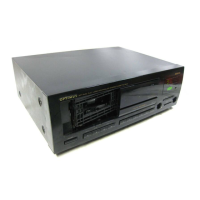
Cassette Deck

Questions and Answers

  • D
    Darryl MercadoSep 3, 2025
    Why are high-frequency sounds missing on my Optimus SCT-56?
    • D
      Diana RaySep 3, 2025
      If high-frequency sounds are missing from your Optimus Cassette Player, it could be because: * A tape recorded without Dolby NR is being played back with DOLBY NR set to B or C. Correctly set DOLBY NR. * The tape heads are dirty. Clean the tape heads.
  • J
    johnsoncharlesSep 1, 2025
    How to fix unstable sound on my Optimus SCT-56?
    • M
      Melissa ScottSep 2, 2025
      If the sound from your Optimus Cassette Player is unstable or interrupted, consider these solutions: * The heads, pinch rollers, capstans, or other tape-handling parts may be dirty. Clean all tape handling parts. * The tape might not be uniformly wound. Completely rewind then fast forward the tape.
  • K
    Kimberly WoodsAug 31, 2025
    What to do if the door of my Optimus SCT-56 does not close?
    • A
      Andrew BergerAug 31, 2025
      If the door of your Optimus Cassette Player won't close, it might be because the cassette is not properly loaded. Try removing and reinserting the cassette.
  • M
    Melinda NewmanAug 29, 2025
    Why does my Optimus Cassette Player tape immediately stop?
    • P
      Patricia GarciaAug 29, 2025
      If your Optimus Cassette Player tape stops immediately, it could be due to: * The tape reaching the end of that side. Play the other side or rewind the tape. * Too much slack in the tape. Take up the slack.
  • K
    Karen DavisAug 27, 2025
    Why is there too much noise when using my Optimus Cassette Player?
    • D
      david47Aug 27, 2025
      Excessive noise from your Optimus Cassette Player can stem from several factors: * You might be using a poor-quality tape. Try using a better-quality tape. * There could be a faulty connection. Check all connections. * The recording level may be too low. Increase the REC LEVEL and re-record. * The tape heads may be dirty. Clean the tape heads.
  • R
    Robert CarterAug 26, 2025
    What to do if the level meter doesn't work during recording on my Optimus SCT-56 Cassette Player?
    • M
      monica15Aug 27, 2025
      If the level meter isn't working during recording, or nothing is recording onto the tape, check the following: * The receiver/amplifier or audio signal source might not be sending a signal to the deck. Ensure the receiver/amplifier’s controls are correctly set. * The REC LEVEL control might be set too low. Turn up the REC LEVEL. * There could be connection problems. Check all connections. * The tape heads might be dirty. Clean the tape heads.
  • G
    George MillerAug 25, 2025
    Why is the sound distorted on my Optimus Cassette Player?
    • W
      Wanda MosesAug 25, 2025
      If the sound from your Optimus Cassette Player is distorted, consider these possibilities: * The recording level might be too high. Try turning down the REC LEVEL and re-recording. * The original signal could have been distorted. Try replacing the original recording source. * The heads might be dirty, so cleaning the tape heads is recommended.
  • C
    carrierossAug 22, 2025
    What to do if my Optimus SCT-56 power does not come on?
    • J
      Jennifer GallegosAug 22, 2025
      If your Optimus Cassette Player isn't powering on, check these potential causes: * The power cord may be unplugged. Ensure it is securely plugged in. * The component to which the power cord is attached might be turned off. Make sure that component is switched on.

Summary

Features

Key Playback and Recording Features

Highlights core functions like noise reduction, auto-reverse, dubbing, and selection finding.

Operational Controls and Indicators

Explains touch controls, level meters, and auto-rewind playback features.

Important Safety Instructions

General Safety Precautions

General advice on preventing fire, shock, and damage from moisture, heat, and misuse.

Ventilation and Power Safety

Guidelines for proper ventilation, power source, and plug usage to prevent hazards.

Lightning and Overloading Precautions

Precautions against lightning surges and overloading electrical outlets for safety.

Servicing and Replacement Parts Safety

Instructions on authorized servicing and using correct replacement parts.

Interference and Cable Usage

Information on FCC compliance, preventing interference, and using shielded cables.

Connections

Connecting to Receiver;Amplifier

Instructions for connecting the cassette deck to a receiver or amplifier.

Remote Control and Synchro Cable Connections

How to connect remote control and CD Synchro cables for integrated operation.

Connecting Power Cord

Procedure for plugging in the AC power cord and initial power-on.

Basic Operation

Loading and Playing Cassette Tapes

Step-by-step guide on loading, playing, and ejecting cassette tapes.

Dolby Noise Reduction (NR) Setup

Explanation of Dolby NR systems and how to set them for playback and recording.

Special Features

Navigation and Tape Control Features

Functions for fast-forwarding, rewinding, pausing, skipping blanks, and using the tape counter.

Automatic Search Music System (ASMS)

Locating desired selections on a cassette tape using ASMS.

Using Relay Play Feature

Instructions for playing two cassette tapes sequentially for continuous playback.

Rewind Auto Play and Demo Mode

Using Rewind Auto Play and activating the deck's demonstration mode.

Recording and Dubbing Cassette Tapes

Guidance on recording from external sources and dubbing cassette tapes.

Recording Blank Spaces and Copying Tapes

Creating blank spaces and detailed steps for dubbing cassette tapes.

CD-Deck Synchro Recording Procedure

Automated recording from CD player to cassette deck with synchro function.

Tape Hints

Tape Care and Protection Tips

Tips for maintaining tape quality, erasing, and using protection tabs.

Care and Maintenance

General Care and Cleaning Guidelines

Suggestions for keeping the deck dry, clean, and protected from damage and extremes.

Cleaning Tape-Handling Parts

Instructions for cleaning tape heads and other critical tape-handling components.

Troubleshooting

Troubleshooting Power and Door Issues

Solutions for power not coming on, doors not opening or closing, and tape stopping.

Troubleshooting Sound and Recording Level Problems

Addressing issues with level meters, no sound, record indicator, and recording levels.

Troubleshooting Tape Instability and Quality

Resolving unstable sound, missing/emphasized high frequencies, and distorted sound.

Troubleshooting Noise, ASMS, and Synchro Issues

Troubleshooting excessive noise, ASMS errors, and CD Synchro recording failures.

Specifications

Technical Specifications Overview

Detailed technical data including system, heads, motors, frequency response, and dimensions.

Radio Shack Limited Warranty

Warranty Terms and Conditions

Details of the product's one-year limited warranty from Radio Shack.

Optimus SCT-56 Specifications

General IconGeneral
BrandOptimus
ModelSCT-56
CategoryCassette Player
LanguageEnglish

Related product manuals