underline 3in1
High Definition Combo Receiver
For further information, please visit our website:
www.edision.gr
9
9
underline 3in1
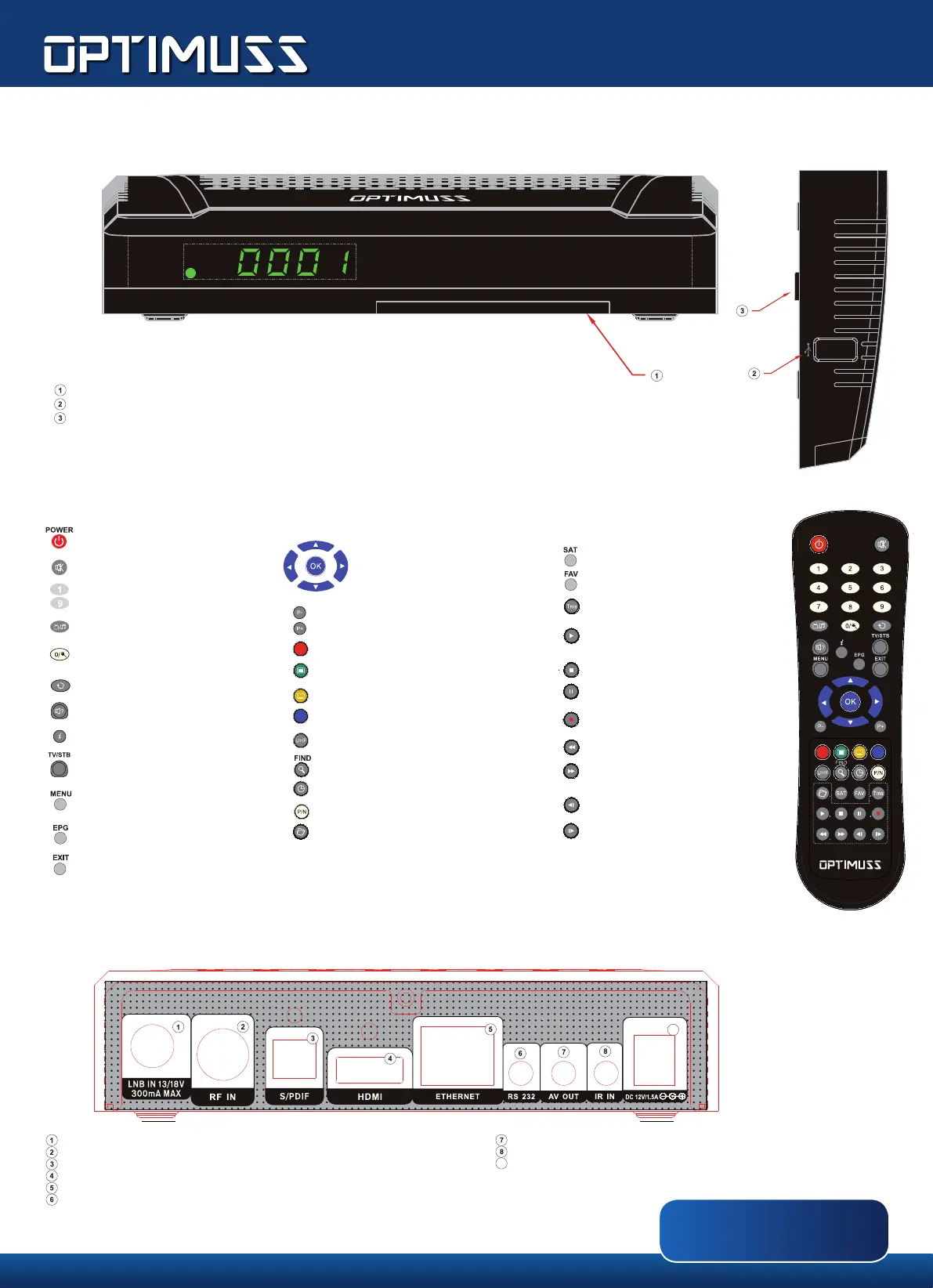
ON/OFF button
Sound ON/OFF
Number & letter character use in the Menus,
selection of TV/radio programs
TV/RADIO function selection
«0» number selection, zoom function
Last program recall
Menu Button Audio
Program Info window display
TV/AV picture choice
(not valid during use of HDMI)
Main Menu display
EDIVISION
program display
Closes a menu/dialog window
LNB IN: for connecting the coaxial cable from the LNB, using the proper plug
RF IN: Connect to coaxial cable or terrestrial signal cable
S/PDIF: Audio interface for amplier/audio console
HDMI: for connection to a TV set, using HDMI cable. For HD TV signals
ETHERNET (RJ45): for connection with LAN/INTERNET, for home use
RS 232: for connecting to a PC, using RS-232 cable, for receiver software update
AV OUT: For broadcasting video and sound signals
IR IN: Infrared connection port
Connect the receiver to the power supply via it’s PSU 12V/1.5A
List page scroll (back)
List page scroll (forward)
Goes to AUDIO menu
Multiple option button,for channels
where available
Moves to Subtitle/Videotext menu
Moves to multiple image function
(optional)
Off button
Program search in list
Auto StandBy mode Timer
Safely remove USB device
Displays a le list
Using the arrow buttons you can move
in the lists or change the volume level.
With «OK» you conrm your choice
in the menu or display the program list
Satellite list display
Favorites list display
(if congured)
Time Shift display
Playback start for Time Shift function
and from a recorded le.
Time Shift function stop, in record
or playback
Playback stop
Manual record
Jump to the beginning or the previous recording / image.
Go to the end or the next record / image.
Slow playback backwards (1/2-1/8)
from a recorded le
Slow playback forward (1/2-1/8)
from a recorded le
Note: Some buttons refer to optional functions or have more fuctions, as appear in the respective menus
Remote Control
Rear side
For more information, please visit:
www.edision.gr
Front panel
Embedded card reader
USB 2.0 port: for connecting external USB storage devices
Holder for installation on a vertical surface
(It has stickers on the rear side support / stabilization)


 To Previous Page
 Loading...