
 Need help?
Do you have a question about the Optiva Ultra-Bright LED OPEN Sign and is the answer not in the manual?
Important warnings regarding electrical shock, fire, injury, and proper usage environment.
Steps for hanging the sign, mounting, and connecting the power adapter.
Instructions for using the remote control to turn the sign on/off and replace the battery.
Instructions to extend warranty from 1 to 3 years by registering online with production lot.
Details the warranty period extension and conditions for validity, including registration.
Explains how to claim for repair or replacement and manufacturer obligations.
Outlines the extent of the manufacturer's liability for damages and warranties.
The device is an Optiva® Ultra-Bright LED OPEN Sign, designed for indoor use to clearly indicate that a business is open. It features ultra-bright LED illumination, ensuring high visibility even from a distance. The sign is intended for dry locations only and should not be used in damp or wet environments. It is crucial to avoid installing the product in areas where temperatures exceed 120°F (48.9°C) to prevent damage and ensure safe operation.
For proper and safe usage, the sign must be powered by the included power adapter. Using any other power adapter is strictly prohibited and could lead to electrical shock, fire, or injury. The sign should only be plugged into a properly grounded outlet that complies with all local and national electric codes. Extension cords or adapters should not be used. The operating voltage must match the specifications indicated on the product label.
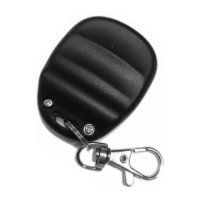
The sign comes with a remote control for convenient operation. The remote control, identified by Part #: 65-REM01-001-00 and FCC ID: 2AOS5-ILIGHT, allows users to turn the OPEN sign ON and OFF with dedicated buttons. This feature enhances user convenience, enabling control of the sign without needing to physically access the sign itself.
Installation of the sign is straightforward. First, an appropriate indoor location must be selected. The sign is designed to be hung, and the package includes hanging chains and "S" hooks. These components are to be attached to the hanger tabs located on the top of the sign. Once the chains and hooks are in place, the sign can be mounted securely to a surface using appropriate hanging hardware. It is essential to ensure that the chosen surface can fully support the weight of the sign.
When hanging the sign in a window, a minimum of 2 inches of space should be maintained between the front of the sign and the window. If mounting on a wall, a minimum of 1 inch of space between the wall and the sign is required. These clearances are important for proper ventilation and to prevent potential damage.
After mounting, the sign is powered by inserting the barrel plug of the included 12 VDC 1.0A power adapter into the power input port located at the back of the sign. Once connected, the sign can be illuminated by pressing the ON/OFF switch to the ON (I) position.
Maintenance of the sign is minimal. To clean the sign, it is important to first unplug it from the power source. Then, the surfaces should be gently wiped with a soft, dry cloth. Users are explicitly warned against using solvents or chemicals for cleaning, as these can damage the sign. Submerging the sign in any liquid is also prohibited. The device is not designed to be used with an external dimmer, and any attempt to disassemble or service the sign by unauthorized personnel is strongly discouraged. Such actions could void the warranty and potentially lead to damage or unsafe operation.
The remote control requires a 12V, size A23, replacement battery. To replace the battery, the key chain ring and two screws on the back side of the remote must be removed. The old battery can then be taken out, and the new battery should be inserted in the same position and orientation, ensuring correct polarity. For any questions regarding the remote control or battery replacement, users can contact Optiva Signs.
The device complies with Part 15 of the FCC Rules, indicating that its operation is subject to two conditions: it must not cause harmful interference, and it must accept any interference received, including interference that may cause undesired operation. This equipment has been tested and found to comply with the limits for a Class B digital device, providing reasonable protection against harmful interference in a residential installation. However, there is no guarantee that interference will not occur in a particular installation. If the equipment does cause harmful interference to radio or television reception, users are encouraged to try corrective measures such as reorienting or relocating the receiving antenna, increasing the separation between the equipment and receiver, connecting the equipment into an outlet on a different circuit, or consulting a dealer or an experienced radio/TV technician.
The product comes with a triple warranty, extending from 1 year to 3 years upon registration. The initial warranty period is one year from the invoice date of purchase. To extend the warranty to three years, users must successfully complete an online warranty registration form at www.SpellBrite.com/Optiva-V and enter the production lot number X3V1712. The warranty covers defects in material and workmanship under intended use and service, excluding normal wear and tear.
The Limited Product Warranty applies only when the product is used in accordance with the printed instructions. It does not cover misuse or abuse, acts of God or accidents, environmental conditions, defects resulting from improper installation, lack of proper maintenance, unauthorized repair, alteration or disassembly by unauthorized personnel, or operation by improper voltage or current, including power surges. Using components from other manufacturers will void the warranty.
In case of a defective product, claims must be made directly to iLight Technologies, Inc., prior to returning the product. Returns must be made within 30 days of submitting a claim and must include the product, original receipt, and the manufacturer's provided return material authorization number (RMA). The manufacturer will inspect and verify the claim and will correct the defect by repair or replacement, at its sole option. The manufacturer's obligation is limited to replacing or repairing the defective part or product that is determined to be defective and not damaged due to improper use. The warranty flows only to the purchaser and does not include shipping costs or expenses. If a product is discontinued or unavailable, the manufacturer may replace it with a comparable product.
The manufacturer's liability is limited solely to repair or replacement of products sold. In no event will the manufacturer be liable for any incidental, consequential, or special damages, including lost profits or revenues, whether arising from breach of contract, express or implied warranty, or in tort. No person is authorized to make any representation or warranty on behalf of the manufacturer except as expressly set forth in the warranty terms. The manufacturer makes no other warranty, express or implied, including any implied warranty of merchantability or fitness for a particular purpose. All questions concerning the meaning or applicability of this limited warranty are to be decided under the laws of the State of Illinois, and any claims or causes of action for defects or representations will be subject to the exclusive jurisdiction of the state and/or federal courts located in Chicago, Illinois.
 General
| Type | LED OPEN Sign |
|---|---|
| Brightness | Ultra-Bright |
| Color | Red |
| Usage | Indoor Use Only |
| Weight | 0.9 kg (2 lbs) |

 To Next Page