English
35
USING THE PROJECTOR
Image Warping menu
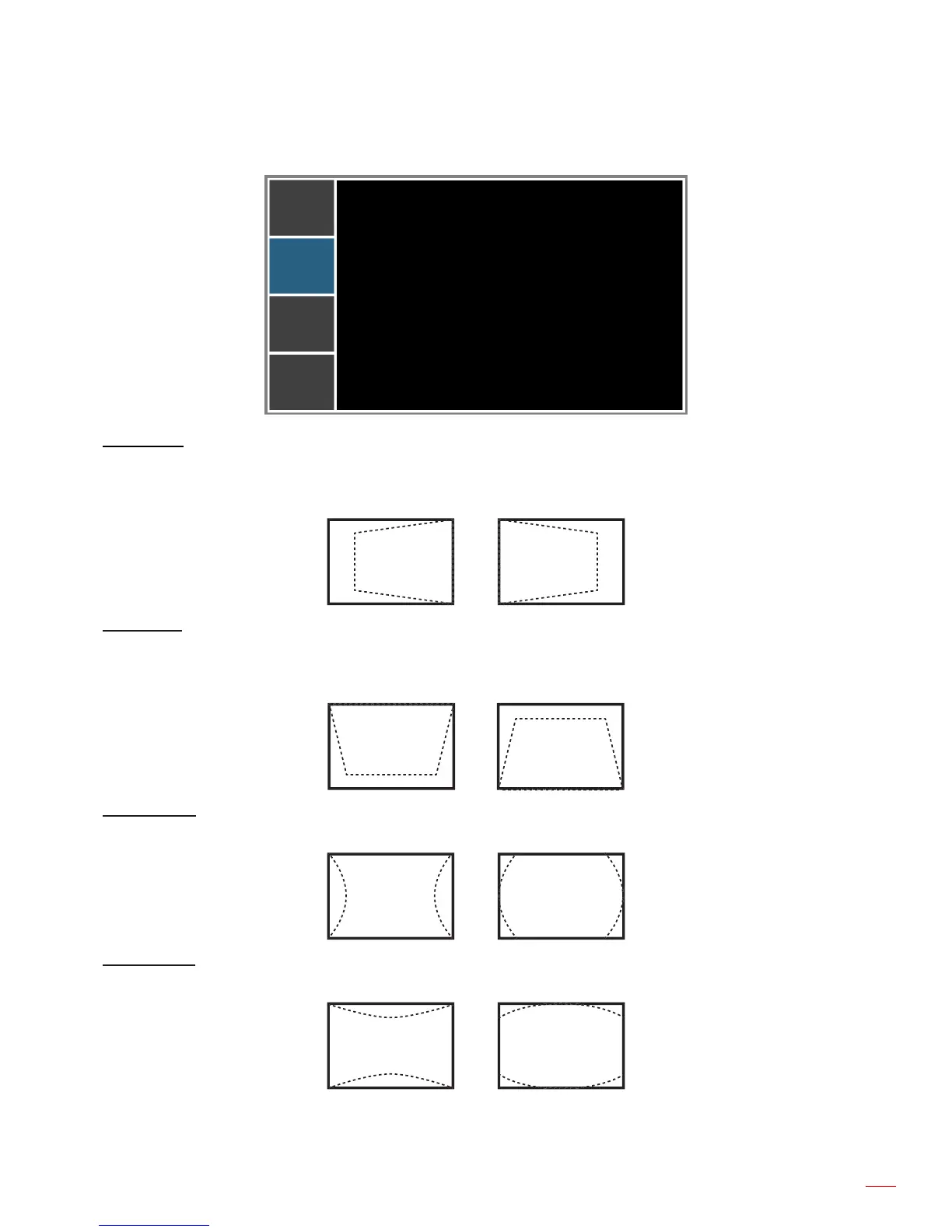
H Keystone
V Keystone
H Pincushion
V Pincushion
PICTURE
OUTPUT
SETUP
OPTION
Image Warping
20
20
50
50
H Keystone
Adjust image distortion horizontally and make a squarer image. Horizontal keystone is used to correct a keystoned
image shape in which the left and right borders of the image are unequal in length. This is intended for use with
horizontally on-axis applications.
V Keystone
Adjust image distortion vertically and make a squarer image. Vertical keystone is used to correct a keystoned
image shape in which the top and bottom are slanted to one of the sides. This is intended when for use with
vertically on-axis applications.
H Pincushion
Adjust the pincushion horizontally and make a more square image.
V Pincushion
Adjust the pincushion vertically and make a more square image.



 To Next Page