EasyManua.ls Logo

Opus BT-C2400 - User Manual

Opus BT-C2400
4 pages
Print Icon
To Next Page IconTo Next Page
Loading...
OPERATING INSTRUCTIONS
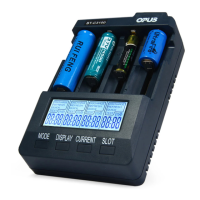
BT-C2400 V2.2 Battery Charger
1. Intended Use
The charger is intended to charge and discharge NiCd or
NiMH chemistry rechargeable batteries only. It provides four
independent charging slots for AA or AAA rechargeable
batteries. The charger can also test and optimize the
maximum capacity of the rechargeable batteries. Each
charging slot has its own display to show various information
such as, charging current, battery voltage, charged capacity,
discharged capacity, battery internal resistance and time.
Second generation hardware including 16 bit Delta-Sigma
ADC provides improved charging circuit performance and
thermal management.
The charger can charge or test batteries of different type,
different size, and different capacity at the same time. Each
charging slot may be programmed with a different working
mode and current parameters if desired. When charging is
complete FULL will show in that channel display then the
maintenance charge is started automatically.
This product fulfills European and national requirements
related to electromagnetic compatibility (EMC). CE conformity
has been verified and the relevant statements are available
upon request.
Unauthorized conversion or modification of the charger is
prohibited and voids the manufacturer's warranty. Any usage
other than described above is not permitted and can damage
the product and lead to associated risks such as short-circuit,
fire, electric shock, etc. Please read the operating instructions
thoroughly and keep them for future reference.
2. Safety Instructions
The manufacturer assumes no liability for damages to
property or personal injury if the product has been abused,
modified or damaged by improper use or failure to observe
these operating instructions.
2.1 Product Safety
The product must not be exposed to substantial
mechanical strain or strong vibrations.
Do not operate the charger if it appears damaged in any
way.
The product must be protected against strong
electromagnetic fields, static electrical fields,
extreme temperatures, direct sunlight and moisture.
The manufacturer’s instructions for the respective
batteries must be observed. Ensure the batteries can
accept the programmed charge and discharge rates
before attempting charging.
The product should not be connected immediately after it
has been brought from an area of cold temperature to an
area of warm temperature. Condensed water might
cause damage. Wait until the product adapts to the new
ambient temperature before use.
The product is to be used only in an indoor dry
environment.
Sufficient ventilation must be provided when operating
the charger. Never cover the ventilating slots of the
charger. Ensure adequate ventilation for the batteries
under charge. Do not place the unit on the carpet as this
can block ventilation slots on the charger body. Operate
only in a well ventilated area.
2.2 Battery Safety
Correct polarity must be observed while inserting the
batteries. Always insert the battery cells with the positive
tip facing the top of the charger.
Non-rechargeable batteries, rechargeable alkaline
batteries (RAM), alkaline batteries, lead acid batteries
and lithium batteries must not be charged with this
product. There is danger of fire or explosion!
Batteries should be removed from the device if it is not
used for a long period of time to avoid damage through
leaking. Leaking or damaged batteries might cause
chemical burns when in contact with skin; therefore use
suitable protective gloves to handle corrupted batteries.
Batteries must be kept out of reach of children and pets.
Batteries must not be dismantled, short circuited or
thrown into fire. Never allow battery contacts to become
shorted.
Use only NiMH or NiCd rechargeable batteries. Never
recharge non-rechargeable batteries due to risk of fire or
explosion of the batteries.
.
3. Delivery Contents
Battery Charger BT-C2400 1pc
Wall Power Adapter 1pc
Operation Instructions 1pc
4. Operating Elements
1. Power Jack
2. Battery Slots
3. Backlit LCD display
4. Buttons
1. Power Jack
Question and Answer IconNeed help?

Do you have a question about the Opus BT-C2400 and is the answer not in the manual?

Summary

Intended Use of Battery Charger

Safety Instructions

Product Safety Precautions

User must protect the product from physical strain, damage, extreme conditions, and observe battery guidelines.

Battery Safety Guidelines

Correct polarity, use of rechargeable NiMH/NiCd only, keep away from children, avoid shorting/fire.

Delivery Contents

Operating Elements Overview

Power Supply Requirements

Charger Operation

Mode Selection Process

How to select and change working modes (CHARGE, DISCHARGE, REFRESH, TEST, QUICK TEST).

Charge Mode Explained

Charges batteries to maximum capacity using a modified -dV algorithm and maintains charge.

Discharge Mode Explained

Discharges batteries to a preset voltage (0.9V) and terminates the process.

Discharge-Refresh Mode Explained

Discharges and recharges batteries repeatedly to optimize capacity, restoring old batteries.

Charge-Test Mode Explained

Quick Test Mode Explained

Current Selection

Display Selection

Slot Selection

Temperature Monitoring

Maintenance and Cleaning

Disposal Guidelines

Electronic Waste Disposal

Return unserviceable product to relevant facilities as per statutory regulations.

Used Battery Disposal

Regulations require proper disposal of rechargeable batteries; household waste is prohibited.

Technical Data

Overview

The BT-C2400 V2.2 Battery Charger is a sophisticated device designed for charging and optimizing NiCd and NiMH rechargeable batteries. It features four independent charging slots, accommodating both AA and AAA size batteries simultaneously. Each slot is equipped with its own display, providing real-time information such as charging current, battery voltage, charged capacity, discharged capacity, battery internal resistance, and elapsed time. The charger incorporates second-generation hardware, including a 16-bit Delta-Sigma ADC, which enhances charging circuit performance and thermal management.

This charger is versatile, allowing users to charge or test batteries of different types, sizes, and capacities concurrently. Each charging slot can be programmed independently with specific working modes and current parameters. Once a battery is fully charged, the display will indicate "FULL," and the charger will automatically initiate a maintenance charge to keep the battery at optimal capacity. The device complies with European and national electromagnetic compatibility (EMC) requirements, with CE conformity verified.

Function Description:

The BT-C2400 V2.2 offers several working modes to cater to various battery maintenance needs:

  • CHARGE Mode: In this mode, the battery is charged to its maximum capacity at a user-selected current. Charge termination is determined by a modified -dV (minus delta voltage) algorithm, ensuring accurate full charge detection even at low charge currents. After full charge, a maintenance charge process begins, supplying minimal current to keep the cell at full capacity. Notably, for high impedance cells, the charger will not reject them but will charge them at a reduced current, allowing for the charging of high resistance cells to improve their capacity and internal resistance.

  • DISCHARGE Mode: This mode discharges the rechargeable battery to a preset voltage of 0.9V. Once discharged, the current will show 0 mA, and the discharged capacity can be viewed by pressing the DISPLAY button.

  • DISCHARGE - REFRESH Mode: This mode is designed to optimize battery capacity by repeatedly discharging and then charging the battery. It is particularly useful for restoring old or long-unused rechargeable batteries. This process involves three complete discharge-charge cycles and can take many hours to complete, depending on the selected currents. Upon completion, "FULL" will be displayed, and the discharged capacity from each cycle can be accessed via the DISPLAY button.

  • CHARGE - TEST Mode: This mode assesses the current capacity of a rechargeable battery. It first fully charges the battery, then discharges it while measuring discharge current and time to determine its maximum capacity. Finally, the battery is recharged to full. The tested capacity is displayed in mAh or Ah, alternating with the "FULL" indication.

  • QUICK TEST Mode: This mode analyzes the dynamic internal battery resistance. It applies a load current and measures the voltage drop to determine resistance, displayed in milliohms within 10 seconds. For accurate results, only fully charged batteries should be tested. It's important to note that internal battery resistance measurements can vary by up to 20% due to contact resistance, especially with high capacity C and D cells using adapters, where contact resistance can significantly outweigh the cell's internal resistance.

Usage Features:

  • Power Supply: The charger operates with a 12Vdc, 1.0A wall power adapter, which has a coaxial DC power plug (5mm OD, 2.1mm ID, center positive). Only approved power supplies should be used.
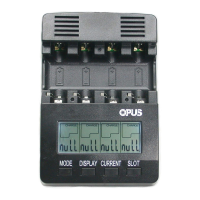
  • Initial Setup: Upon power application, the firmware revision level is displayed, followed by a full display segment test. A "null" icon then appears for all channels, indicating readiness.
  • Battery Insertion: When a battery is inserted, its instantaneous voltage is displayed for 3 seconds, followed by "CHARGE" and "400 mA" for another 3 seconds. If no button is pressed within these 6 seconds, charging begins at the default 400 mA. Pressing any button during this initial 6-second window will extend the setup time by 10 seconds before entering the working mode.
  • Mode Selection: To select a working mode, at least one battery must be inserted. Press and hold the "MODE" button for 2 seconds to initiate mode selection for the selected slots. Subsequent presses of the "MODE" button toggle through the available modes. The mode can be changed at any time by pressing and holding the "MODE" button for 2 seconds.
  • Current Selection: After selecting a mode, the "CURRENT" button allows users to toggle between available charge/discharge current selections. The default charge current is 400 mA, with options including 200 mA, 400 mA, 600 mA, and 1000 mA. If only slots 1 and 4 are occupied, charge currents of 1200 mA or 1400 mA become available. However, if batteries are then inserted into slots 2 and 3, the current in slots 1 or 4 will be reduced to 1000 mA maximum. Discharge current is automatically set to half of the charge current, with a maximum of 500 mA. If slots 2 and 3 are empty, discharge currents of 600 mA or 700 mA can be programmed.
  • Display Selection: The "DISPLAY" button cycles through various parameters: Voltage (instantaneous battery voltage), Current (instantaneous charge/discharge current), Capacity (accumulated charge or discharge capacity in mAh or Ah), Time (elapsed charging/discharging time), and Quick Test (measured internal battery resistance). "FULL" indicates a fully charged battery, with maintenance charging automatically initiated.
  • Backlight Function: The display backlight can be turned on continuously by pressing and holding the "DISPLAY" button for more than 5 seconds. To return to auto-off, press and hold the "DISPLAY" button for more than 5 seconds again.
  • Slot Selection: The "SLOT" button initiates a slot selection sequence: Slot 1, Slot 2, Slot 3, Slot 4, All 4 Slots, Exit. A flashing display segment indicates the selected slot. If all four segments flash, then mode and current selections apply to all four slots simultaneously.
  • Temperature Monitoring: The charger continuously monitors battery temperature and internal charger temperature. Operation will be suspended if battery temperature reaches 60°C (140°F) or controller board temperature reaches 77°C (171°F). Four batteries are individually monitored for temperature, and two controller board sensors monitor internal charger temperature. If over-temperature is detected, current will be suspended for the affected channels. Charging/discharging will only resume once temperatures drop below 40°C (104°F) for batteries or 50°C (122°F) for the controller board. High battery temperature can also trigger charge termination as a full charge event.

Maintenance Features:

  • Cleaning: The device is maintenance-free but should be cleaned occasionally. Before cleaning, the charger must be disconnected from any power source. Use only a dry, soft cloth to clean the housing; do not use abrasive cleaners or solvents.
  • Repairs: Any repairs or modifications must be performed by authorized repair stations. Unauthorized repairs or modifications will void the manufacturer's warranty.
  • Disposal: The charger and batteries must be disposed of properly according to statutory regulations. The crossed-out wheeled bin symbol indicates that the product should not be disposed of as municipal waste. Used batteries, especially those containing hazardous substances, must be returned to authorized recycling stations or battery collection centers. Never dispose of batteries in a fire due to the risk of explosion and personal injury.

Safety Instructions:

  • The charger is intended for indoor use in a dry environment with sufficient ventilation. Never cover the ventilating slots or place the unit on carpet, which can block airflow.
  • Always insert batteries with the correct polarity, positive tip facing the top.
  • Never charge non-rechargeable batteries, rechargeable alkaline batteries (RAM), alkaline batteries, lead-acid batteries, or lithium batteries, as this poses a risk of fire or explosion.
  • Remove batteries from the device if it will not be used for a long period to prevent damage from leaking. Handle leaking or damaged batteries with protective gloves to avoid chemical burns.
  • Keep batteries out of reach of children and pets.
  • Do not dismantle, short-circuit, or throw batteries into fire.
  • Ensure batteries can accept the programmed charge and discharge rates.
  • Avoid exposing the product to substantial mechanical strain, strong vibrations, strong electromagnetic fields, static electrical fields, extreme temperatures, direct sunlight, or moisture.
  • Do not operate the charger if it appears damaged.
  • If the charger has been in a cold environment, allow it to adapt to room temperature before use to prevent damage from condensation.

Opus BT-C2400 Specifications

General IconGeneral
Battery Sizes SupportedAA, AAA
Number of Slots4
DisplayLCD
Refresh FunctionYes
Capacity TestYes
Operating Voltage12V DC
Input Voltage12V DC
Charging Current200mA, 500mA, 700mA, 1000mA
Battery Types SupportedNiMH, NiCd
Operating ModesCharge, Discharge, Refresh, Test

Related product manuals