
 Need help?
Do you have a question about the orangemarine VHF WP 200 and is the answer not in the manual?
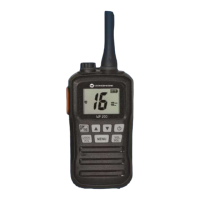
The Orange Marine VHF WP 200 is a multifunction marine radio designed for reliable communication on the water, even in challenging conditions. Its robust construction and IPX7 waterproofing technology ensure it can withstand immersion in up to 1 meter of water for 30 minutes, making it suitable for use in rough seas.
The primary function of the VHF WP 200 is two-way radio communication on marine VHF channels. It allows users to transmit and receive messages, ensuring safety and coordination with other vessels or shore stations. The device supports American, Canadian, and international channel groups, providing flexibility for operation in various regions.
A key safety feature is the dedicated channel 16 access, which is the international distress, urgency, and safety channel. Users can quickly select channel 16 for immediate communication in emergencies. The radio also includes 10 weather channels, allowing users to stay informed about weather conditions and receive weather alerts.
The VHF WP 200 offers a scan function to monitor multiple channels. This feature can be configured to prioritize channel 16, ensuring that important distress calls are not missed. Additionally, the Dual Watch and Triple Watch functions allow simultaneous monitoring of the operational channel, channel 16, and the calling channel, enhancing situational awareness.
For personalized communication, the device supports a "TAG" function, enabling users to select specific channels for scanning, in addition to channel 16. This is useful for monitoring frequently used channels without having to manually switch between them.
The radio operates with a selectable output power of 3W or 1W, allowing users to conserve battery life when high power is not required. The compact design and included belt clip make it easy to carry and access during marine activities.
Operating the VHF WP 200 is intuitive, with clearly labeled buttons for essential functions. The [PTT] button is used for transmitting, while releasing it allows for reception. The [ON/OFF] button powers the device on or off with a 2-second press.
Channel selection is managed using the [▲] and [▼] buttons in standby mode. For quick access to channel 16, the [C/16] button is available. Holding [C/16] for 1 second selects the calling channel, and holding it for 3 seconds allows users to program a custom calling channel.
The [LOCK/HL] button serves a dual purpose: a short press toggles between high and low power modes, while a 1-second press activates or deactivates the button lock function, preventing accidental changes to settings.
The [MENU] button provides access to various settings and functions. A short press enters the menu, where [▲] and [▼] buttons are used to navigate. A 1-second press of [MENU] adds or removes a channel from the TAG list.
Volume and squelch adjustments are made using the [VOL/SQL] button. Pressing it adjusts the volume, and pressing it again adjusts the squelch. Holding [VOL/SQL] for 1 second activates the monitoring function, which can be set to either "Push" (momentary open squelch) or "Hold" (continuous open squelch until another button is pressed).
The menu system allows for customization of several features:
The device features an antenna connector for the included 50 Ω antenna and a multi-purpose jack ([SP/MIC/CHR]) for connecting the charging cable or an optional hands-free kit. It is crucial to ensure the waterproof cap for this jack is properly closed to maintain the device's waterproofing.
Proper maintenance is essential to ensure the longevity and performance of the VHF WP 200. After exposure to seawater, the device should be thoroughly cleaned with fresh water and dried to prevent salt crystallization, which can impair button functionality and internal components.
The waterproofing integrity is critical. Users must regularly check that the battery cover, antenna, and all jack covers are securely closed before using the VHF on the water. Any suspicion of compromised waterproofing, such as cracks in the casing or detached covers, means the device should not be submerged. Dropping the device can also damage the casing or seals, potentially compromising its waterproof rating.
Recharging the VHF is straightforward, using either the USB charger, cigarette lighter charger, or mains charger. The radio indicates charging status by illuminating the keypad display. Charging times vary depending on the battery type, with an estimated 10 hours when the VHF is off and 18 hours when on. It is recommended to charge the VHF while it is switched off to optimize charging efficiency and prevent damage. A critical precaution is never to charge the VHF with non-rechargeable batteries inserted, as this can damage both the batteries and the radio.
The device also includes a unique water drainage vibration function. If the radio is dropped in water, this feature helps remove water from the speaker, improving sound quality. Activating this function through the menu ([MENU] then [ON/OFF]) will cause the speaker to vibrate for 10 seconds. During this process, the VHF cannot be used for communication.
Regular checks of the antenna, hands-free kit, and battery are advised to ensure they are dry before attachment to the VHF. Any water ingress into these connections can seriously damage the radio. Always confirm that the charging socket and hands-free kit socket are fully closed and waterproof to prevent water damage.
 General
| Waterproof | Yes |
|---|---|
| Waterproof Rating | IPX7 |
| Battery Life | Up to 10 hours |
| Battery Type | Li-Ion |
| Display | LCD |
| Additional Features | Dual Watch, Triple Watch |
| Channels | All international channels |

 To Next Page