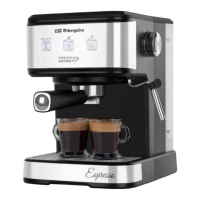
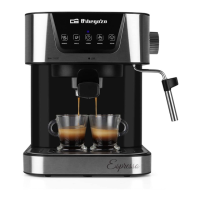
EX 6000
15
MAKE AN ESPRESSO COFFEE
1. Place filter in filter-holder. Fill filter with coffee powder (7-10 gr.) and distribute and compact it a bit with
spoon/tamper.
2. Place filter-holder in coffee maker from “Insert” position, turn right until “Locked” position”.
3. Leave the cup below filter-holder and press POWER button to start preheating process.
4. Once coffee maker is ready (indicator light doesn’t flash) press SINGLE DOUBLE o MANUAL
button depending on kind of coffee you want to brew (for 1 cup of italian espresso we recommend
program SINGLE).
5. With SINGLE y DOUBLE buttons coffee maker will stop automatically because they are pre-
programmed function. If you want a specific quantity of coffee press MANUAL button, then you can
stop coffee brew when you desire, pressing again MANUAL button.
Notice: we recommend pay attention to coffee maker while it is working to avoid any problem.
6. When you finish of brewing coffee, leave coffee maker cools down for 5 minutes and then you will be
able to remove filter-holder and throw coffee waste.
7. We recommend you cleaning filter and filter-holder after each use with fresh water to avoid obstruction.
You can clean main body and drip tray with damp cloth.
Description of functions:
- DOUBLE : coffee maker will stop automatically after 40 seconds.
- SINGLE : coffee maker will stop automatically after 20 seconds.
- MANUAL : manual mode, coffee maker has to be stopped by user, it will work for 80 seconds at
most.
- When you don’t use coffee maker, it will turn off after 20 minutes with no use.
Amend programming of SINGLE y DOUBLE : programming of these modes can be amended by
user. Inicial program is 20 second for function SINGLE and 40 seconds for DOUBLE. If you want to change
them, do as follow: hold pressed SINGLE or DOUBLE button for 3 seconds, release and pump start
working; press again SINGLE or DOUBLE button when it reach your desire time. Take into account
that max working time is 80 seconds. Next time you choose amended function, will work by your new
programming. This coffee maker has memory function, therefore your new program will be saved although
you turn off or unplug coffee maker. If you want to restore initial factory setting, when you turn on coffee
maker, press buttons SINGLE y DOUBLE at the same time for more than 3 seconds, all indicator
lights will flash 3 times and initial setting will be restored.
IMPORTANT: to avoid splashes, do not remove filter-holder while coffee maker is brewing coffee..


 To Next Page
 Loading...