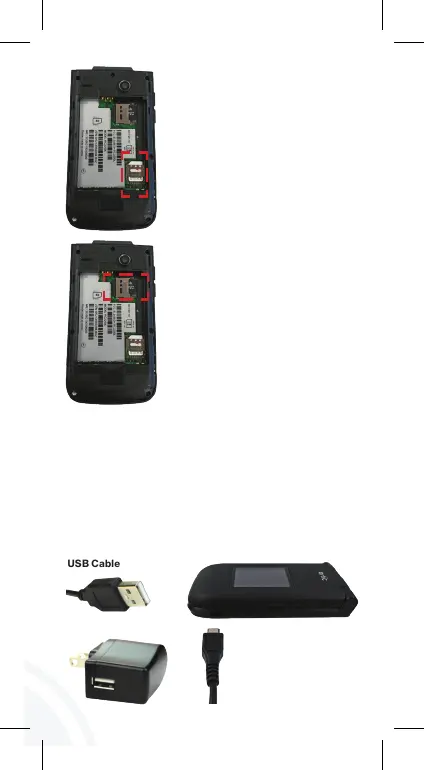
Before turning on the phone, charge it fully. Insert
the battery, making sure the gold contacts line up.
Push in and press down gently to secure. Place the
back cover over the back of the phone and then press
down along the edges to secure. Insert the small end
of the USB cable into the phone. Insert the larger end
into the charger and plug the charger into an outlet.
Locate the slot for the SIM card
and gently slide the SIM card
tray down to unlock the tray.
Place the SIM card with the gold
contacts facing down. Gently
slide the SIM card tray up to
lock tray.
MicroSD card is sold separately.
If you have a SD card, remove
the back cover (as demonstrated
in the previous instructions).
Position the microSD card with
the label side facing up and the
gold contacts toward the slot
(at the upper-right side of the
phone), carefully slide the SD
tray to the right to unlock it, then
place the SD card in place and
lock the tray by sliding left.
USB Cable
Charger Adapter
Charge the Battery
WARNING: Use only approved chargers
with your phone. Incompatible
chargers or tampering with the
charging port could damage your
phone and void the warranty.
You can navigate within your phone’s software by
pressing the key that corresponds with the action
you want to take or using the Navigation key
to
scroll and the OK key
to select a highlighted item.
For example:
• Press the Left soft key to select the item
displayed at the bottom left of the screen.
• Press the Right soft key
to select the item
displayed at the bottom right of the screen.
• Press the keypad key that corresponds to the
item you want in a displayed list.
• Press the top, bottom or sides of the Navigation
key to move the cursor, then press the center
of the Navigation key (the OK key) to select the
item displayed at the bottom center of the screen.



 To Next Page