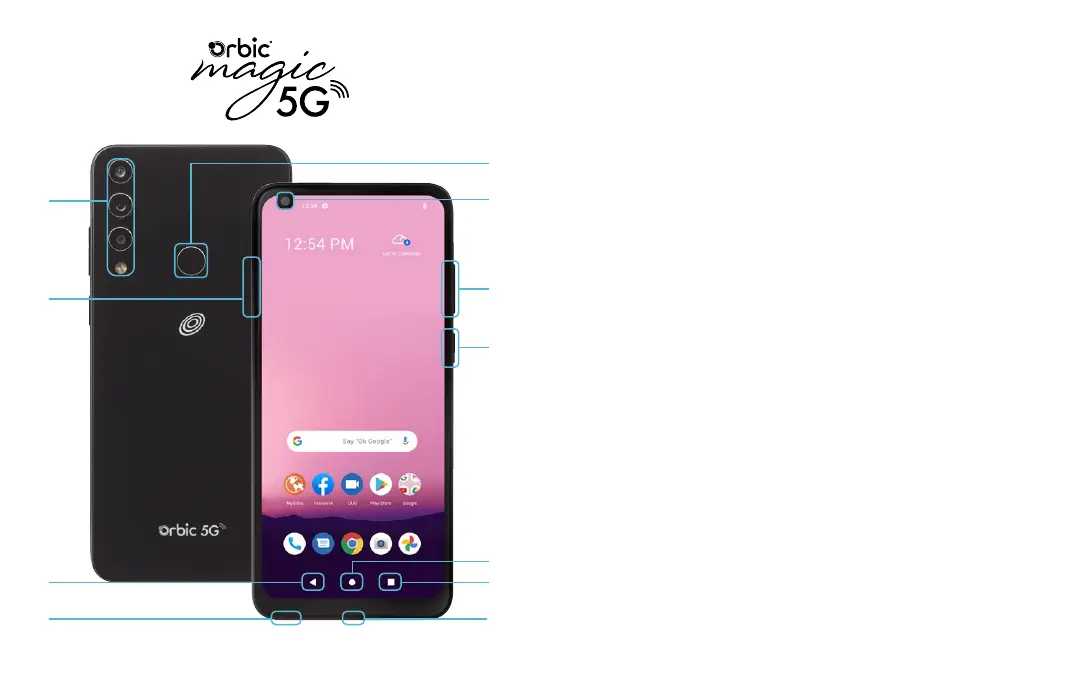
1. MAIN CAMERA / ULTRA-WIDE / MACRO / FLASH
2. SIM / MEMORY CARD TRAY
3. BACK: Return to previous creen, menu or option.
4. HEADSET JACK
5. FINGERPRINT SENSOR
6. FRONT CAMERA
7. VOLUME
8. POWER / LOCK
Wake up or lock the screen with a quick press.
• Press and hold for additional options:
»Emergency »Powero »Restart
9. HOME
• Press to access the Home screen.
• Press and hold to open Google Assistant.
10. RECENT APPS
• Press to open the recently used applications.
• Split screen view: Tap the recently-used applications icon.
Tap the icon located at the top of the app you want to
open. Tap Split Screen icon. To open another app, tap it.
The apps will appear on the top and bottom of the screen.
11. USB / CHARGING PORT
1
2
7
6
5
8
10
11
9
3
4
TM



 To Next Page