English
- 44 -
Orus Programmable Thermostat User Manual
- 45 -
Orus Programmable Thermostat User Manual
MANUAL OPERATION
•
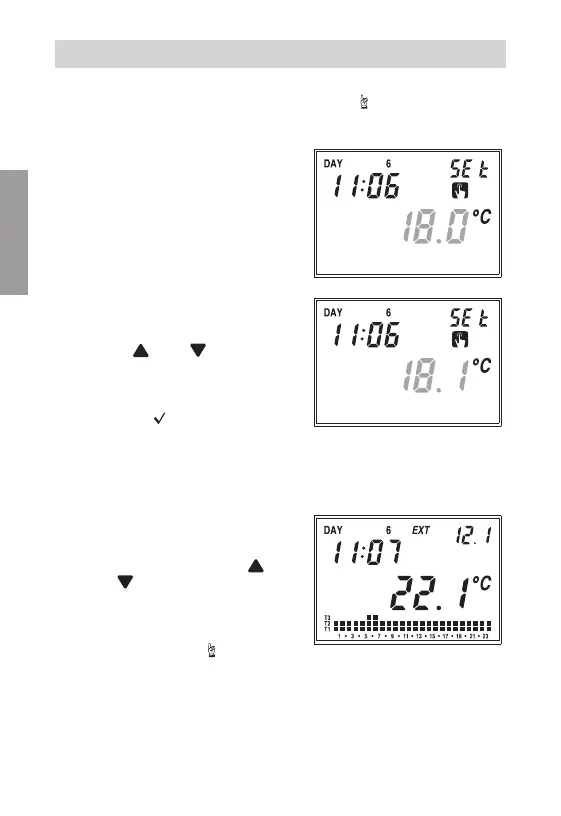
During automatic operation, when pressing the
” ”
key, the system will
act as a normal thermostat with operating temperature Tm.
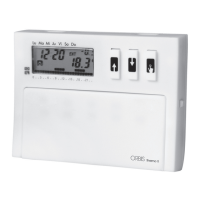
Field
(22)
will show the current time.
Field
(14)
will show the current date.
Field
(15)
will display the writing
“SEt"
.
The symbol
(18)
will appear.
Field
(17)
will disappear. On field
(16)
the set manual temperature
value will flash.
With the
“ ” and “ ”
keys, it is
possible to change the value from
2.0°C to 35°C.
Pressing the
“ ”
key
or after 45
seconds from the last operation,
field
(16)
will display the value of
the environment temperature, while
field
(15)
will display the external
temperature value (if probe is
connected).
At any time, it is possible to verify the
set temperature pressing the
“ ”
key
or the
“ ”
key; pressing one of the 2
keys again will allow modification of
the temperature setting. To move from
the manual program to the automatic
one, simply press the
“
”
key again
for at least 3 seconds.


 To Next Page