To Set Watering Cycles:
Multiple watering cycles is simply the where the sprinkler timer
will cycle.
Using multiple watering cycles is ideal for reducing runoff and
standing water. This sprinkler timer allows program A or B
(or both) to be repeated on the days programed.
When extra watering is needed, Program A or B (or both) can
be set to repeat the set watering durations up to 10 times a day.
In order to maximize absorption and prevent runoff, you may
set a specific number of minutes or hours between the start of
one cycle and the start of the following cycle. This is called the
“cycle delay” and can be set from 0 minutes to 90 minutes in
10-minute increments, and from 2 hours to 23 hours in
one-hour increments.
• From the HOME/AUTO screen, press PROG. A
q
B to enter
the program review screen. Toggle to desired program.
• Press CYCLES.
• Press or to select the desired number of watering
cycles. Press ENTER.
• Press or to select the desired number of minutes or
hours (from 0 minutes to 23 hours) between the start time of
one cycle and the start time of the following cycle.
Press ENTER.
• Repeat this procedure for the other program, if desired.
To Change Settings From the
HOME/AUTO Screen:
Orbit
®
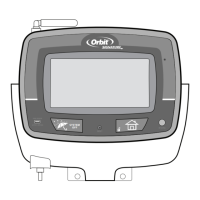
has simplified the way to make modifications to
your timer. Just tap the setting you want changed in the
HOME/AUTO screen.
• Tap the date to change the current date
• Tap the time to change the time of day
• Tap the NEXT START to change the time of day you want
to water
• Tap the station number to modify the watering durations
• Tap PROG to modify the Watering Days
• Tap CYCLES to modify the number of watering cycles
• Press the HOME/LOCK button at any time to return to the
HOME/AUTO screen.
To Water in Manual Mode:
• To manually water one, some or all stations, press MANUAL
at the top right of the HOME/AUTO screen.
• The first screen MANUAL - ALL will allow you to water all
stations with the same duration (1 to 240 minutes). Select
the desired duration, then press ENTER.
• Or, press NEXT for MANUAL - SELECT watering. This
screen allows you to select any single station or a group of
stations each with individual durations (1 to 240 minutes)
using and or the Quick Touch buttons. Select the
desired stations and durations then press ENTER.
• Or, press NEXT again for MANUAL - PROG A watering. This
07WTM004225 57932-24 rE.indd 6 5/2/07 4:39:23 PM




 To Next Page