EasyManua.ls Logo

Orbit Clear Comfort 83501 - User Manual

Orbit Clear Comfort 83501
10 pages
Print Icon
To Next Page IconTo Next Page
Loading...
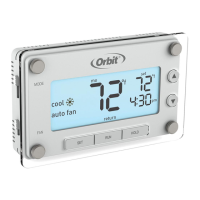
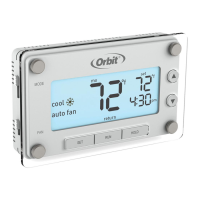
THERMOSTATFEATURES
THERMOSTATINSTRUCTIONS/MODEL
Thank you for purchasing the Clear Comfort™ thermostat from
Orbit™. We are excited to provide a long-lasting thermostat that
blends style with function.
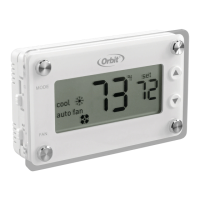
LCD
Mode Switch:
Heat/O/Cool
Fan Switch:
Auto Fan/Fan On
Room Temperature–Actual temperature of the room
Set Temperature–Desired room temperature
Fahrenheit/Celsius Indicator
Indicates scale in which temperature is displayed
Mode Indicators–Indicates which mode the system is in: Heat/Off/Cool
Heat IconSystem is in Heating Mode to reach set temperature
Cool IconSystem is in Cooling Mode to reach set temperature
Fan IndicatorsIndicates which mode fan is in: Auto Fan/Fan On
Fan IconIndicates the fan is energized
Low Baery Indicator–Reminder to change thermostat baeries.
If the baeries are not changed within 7 days aer the Low Baery
Indicator appears on the display, the set temperature will offset by +/- 10°F
as a further reminder. Aer 90 days or less, depending on the condition
of the baeries, the system will turn off and the Low Baery Indicator will
flash on the display.
Temperature Offset–Offset the temperature by +/- 9° F or +/- 4.5° C
Mounting Your Clear Comfort™ Thermostat to the Wall
1. Remove the thermostat body from the base by gently pulling them apart.
2. Place the base flat against the wall by feeding the wires through
the opening below the wiring terminal.
3. Level the base and mark the holes for the mounting screws with a pencil.
4. Remove the base and drill holes at marked positions;
insert the provided wall anchors.
5. Feed wires back through the opening and aach the base to the wall
with the two screws provided.
SYSTEMTYPE
This thermostat is compatible with 1-stage gas furnaces with electric or gas
fan, 1-stage oil systems, 1-stage heat pumps, and 1-stage cooling systems.
Note: This thermostat is not compatible with base board heaters (or other line
voltage heating), multi-stage heating or cooling systems, or 3-wire hydronic systems
INSTALLATION
Tools required for installation:
Phillips screwdriver
Wire cuers/strippers
Drill with / in. (4.8 mm) drill bit
• Level
Tips for Thermostat Location
When replacing an existing thermostat, place your new
Clear Comfort™ thermostat in the same location as the old one, unless
the conditions below suggest otherwise. For a new installation, follow
these guidelines for placement:
Place the thermostat in a room or hallway that is used oen; position on
an inside wall about 5 . (1.52 m) from the floor.
Avoid installing the thermostat in unusually heated areas (e.g., near a
television, lamp, radiator, or fireplace), in direct sunlight, or on a wall
that has hot water pipes or that is opposite a stove.
Avoid installing the thermostat in unusually chilled areas, such as in
a dray area (e.g., stairwell, door, or window), on a wall separating an
unheated room, or where air circulation is poor (e.g., in a corner or
behind a door).
Avoid installing the thermostat in unusually damp areas as this can lead
to corrosion.
DO NOT install the thermostat until construction work is complete, dust
free, and painting has been completed.
If the thermostat housing is cold, wait for it to reach room temperature
before installing.
Removing the Old Thermostat from the Wall
WARNING: Switch off electricity to both the heating (furnace) and cooling
(air conditioner) equipment before proceeding with the following steps:
1. Remove the front cover from the old thermostat.
2. Before removing wires from the old thermostat terminals, take note
of the leers printed near each of the wire terminals.
3. Aach a wiring label (included) to its corresponding wire,
so as to identify the wires’ leer; not the wire color.
4. Aer labeling the wires, remove them from the old thermostat
terminals (usually by releasing clamps or undoing terminal screws
5. Remove the old base from the wall (usually by removing screws).
0/B
Y W
RC
R
G
0/B
Y W
RC
R
G
Note: While labeling the individual
wires, DO NOT let the wire fall
back inside the wall, as they can be
difficult to retrieve.
0/B
Y W
RC
R
G
0/B
Y W
RC
R
G
Temperature
Adjustment
Buttons
f
c
˚
set
fan on
auto fan
heat
off
cool
offset
MODE
FAN
Heat Icon F
/
C Indicator
Set
Temperature
Low
Battery
Indicator
Temperature Offset
Cool Icon
Mode
Indicators
Fan
Indicators
Fan Icon
Room Temperature

Questions and Answers

  • M
    melaniemcintyreJul 26, 2025
    Why does my Orbit Clear Comfort 83501 heat/cool system not respond immediately?
    • J
      Jonathan SchneiderJul 26, 2025
      To protect your compressor, the Orbit thermostat is designed to wait five minutes before responding to changes. If the heat or cool system doesn’t respond immediately, allow the thermostat to wait for at least five minutes. If the issue continues, try replacing the batteries.
  • L
    Linda WeaverJul 30, 2025
    What to do if my Orbit Clear Comfort 83501 Thermostat display is blank or shows a low battery indicator?
    • K
      ksmithJul 31, 2025
      If your Orbit thermostat displays a blank screen or shows a low battery indicator, the first step is to replace the batteries. Also, check for any loose or crossed wiring in the thermostat wiring terminal.
  • R
    rachaelconleyAug 4, 2025
    How to troubleshoot no heating/cooling system activation on my Orbit Thermostat?
    • U
      ukingAug 4, 2025
      If your heating or cooling system isn't activating with your Orbit Thermostat, here are a few things to check: * Ensure the Mode Switch is set to the correct Heat or Cool Mode. * Replace the batteries if needed. * Make sure the set temperature is appropriately adjusted: above room temperature for Heat Mode, and below for Cool Mode. * Confirm that the Heating/Cooling power switch is on. * Check the circuit breaker to ensure it hasn’t tripped. * Verify the furnace door is securely closed. * Inspect the thermostat wiring terminal for loose or crossed wires. * Make sure no copper wires are exposed and touching other wires.
  • J
    Jessica ThompsonAug 8, 2025
    What to do if my Orbit Clear Comfort 83501 Thermostat is not reaching set temperature?
    • K
      Katie ThompsonAug 8, 2025
      If your Orbit Thermostat is not reaching the set temperature, consider the following: 1. Make sure the Mode Switch is in the correct Heat or Cool Mode. 2. Verify that your Heating/Cooling systems are functioning correctly. 3. Check for any loose or crossed wiring in the thermostat wiring terminal. 4. Examine the Temperature Offset. 5. Ensure the thermostat is not placed in a drafty or heated area. 6. Confirm that the wall hole for wires is properly insulated.
  • C
    Courtney JonesAug 12, 2025
    Why does the fan run continuously on my Orbit Thermostat?
    • J
      Jerry BarnettAug 13, 2025
      If the fan runs continuously on your Orbit Thermostat, try these steps: * Allow the thermostat to sit undisturbed for 30 minutes to stabilize the temperature. * Check that the G wire in the thermostat wiring terminal is properly connected. * Ensure the Heating/Cooling power switch is not off. * Verify the circuit breaker hasn’t tripped. * Confirm the furnace door is securely closed. * Inspect the thermostat wiring terminal for loose or crossed wiring. * Make sure no copper wires are exposed and touching other wires.
  • T
    Tabitha PerezAug 16, 2025
    What causes an incorrect room temperature reading on my Orbit Thermostat?
    • K
      Kelly LewisAug 17, 2025
      If your Orbit Thermostat displays an incorrect room temperature, allow the thermostat to sit undisturbed for 30 minutes. Also, check the thermostat's placement to ensure it's not in a drafty or heated area, verify the wall hole for wires is insulated properly, and check the Temperature Offset.
  • K
    Kimberly FieldsAug 21, 2025
    Why does my Orbit Clear Comfort 83501 Thermostat system turn on too frequently?
    • T
      Timothy SimonAug 21, 2025
      The Orbit Clear Comfort thermostat employs smart logic, which turns on once every cycle period to maximize comfort and temperature stability. To adjust the cycle period, see the “Minimum Cycle Period Adjustment” section under “Additional Thermostat Settings.”

Summary

Installation and Location

Optimal Thermostat Placement

Provides guidelines for choosing the best location to avoid environmental interference.

Removing the Old Thermostat

Outlines safety precautions and steps for disconnecting the previous thermostat.

Connecting Wires

Wire Terminal Identification

Explains the purpose of each terminal connection on the thermostat.

Wiring Procedures

Step-by-step guide for stripping wires and connecting them to terminals.

Completing Installation and Basic Operation

Troubleshooting

No Heating;Cooling System Activation

Solutions for when the heating or cooling system does not turn on.

No Fan Runs Continuously

Troubleshooting steps for when the fan does not operate as expected.

Orbit Clear Comfort 83501 Specifications

General IconGeneral
BrandOrbit
ModelClear Comfort 83501
CategoryThermostat
LanguageEnglish

Related product manuals