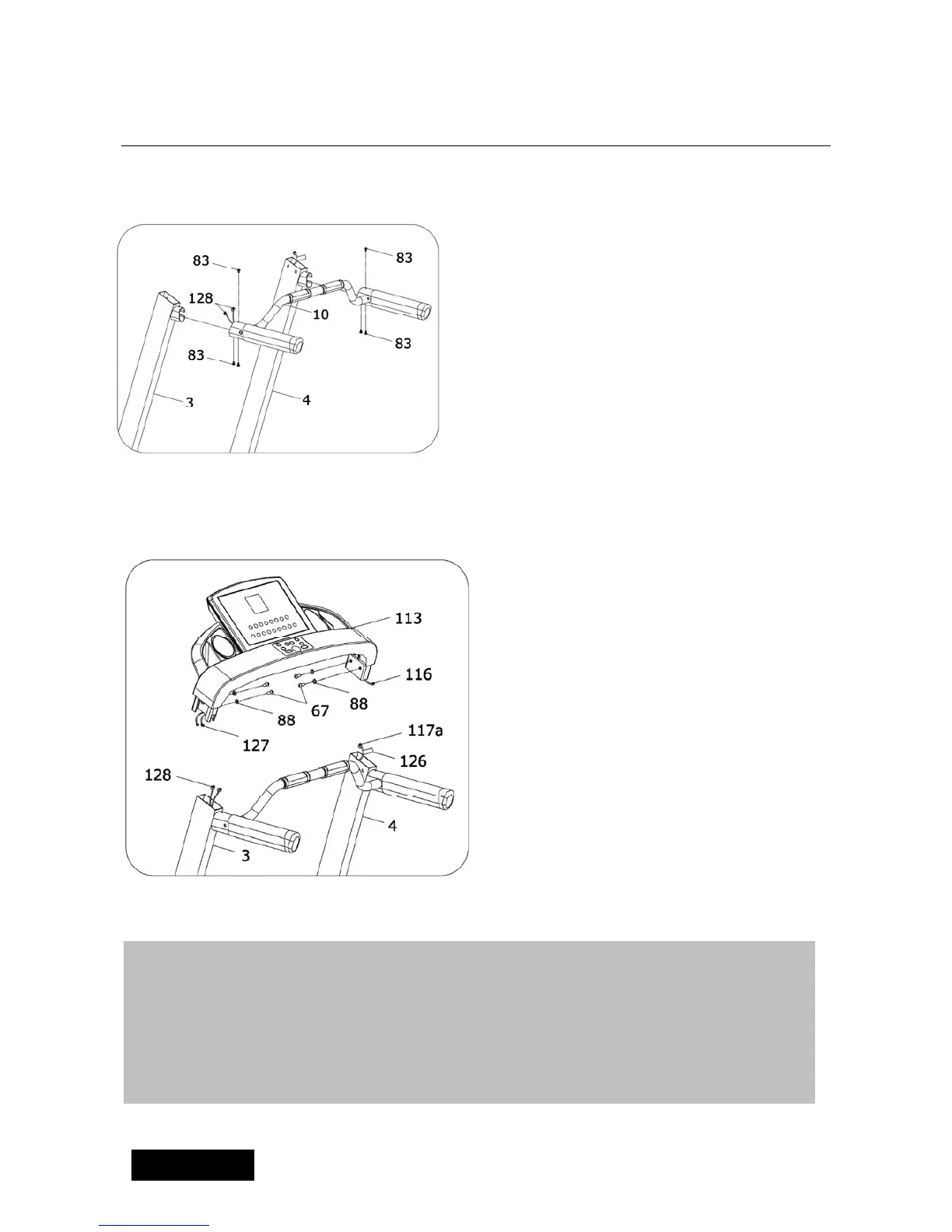
ASSEMBLY STEP 4:
5
Pull through the computer middle
wire of Handle bar tube(10) from
the left and right Upright(3,4).
Then insert the handle bar tube
into left and right upright;
2、Fix the handle bar tube(10) and
left/right upright with screw driver
and M6*16 sheet metal screw(83)
1.Connect the computer upper
wire(116,127,134,135) with
computer middle wire(117a) out of
the Left/Right Upright(3,4).
ASSEMBLY STEP 5:
Warning: Please make sure note
not to damage the wires. The
connect method is shown on
lable(126)
2.Use wrench, M10*20 screw(67)
and washer(88) to fix the
computer (113) to the left/Right
Upright(3,4)
ATTENTION:Please complete all assembly instruction before tightening
and checking all bolts. Do the following operation after checking
everything is OK. Before you use the treadmill, pls read the instruction
carefully.



 To Next Page