8
PROGRAM SLIDE SWITCHES
The Program Slide Switches allow you to select a program (A, B or
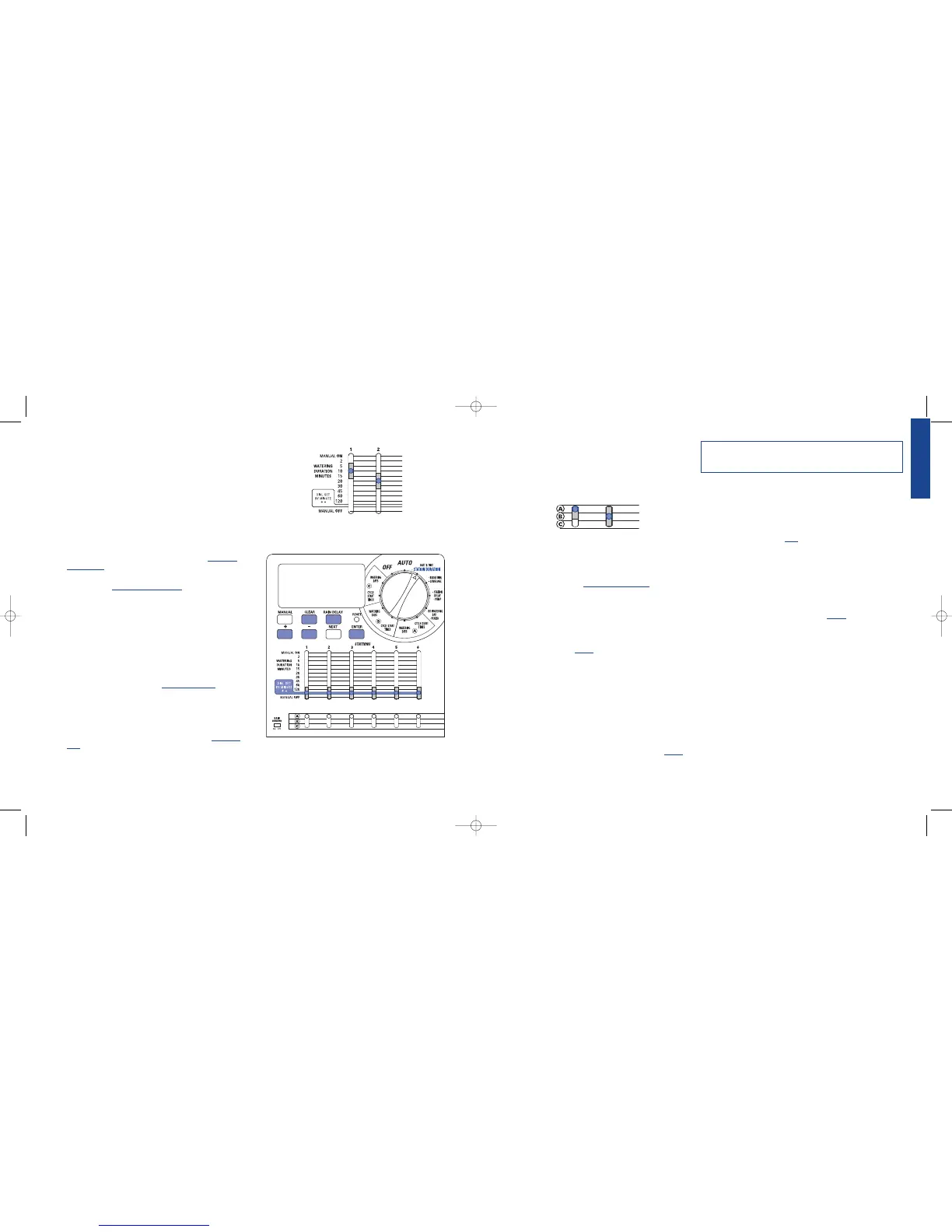
C) for individual stations. [See Figure 12]
Using information collected in "Establishing a Water Plan" on page
5, select program “A”, “B” or “C” for each station.
REVIEWING AND CHANGING YOUR PROGRAM
The Orbit
®
sprinkler timer allows an easy to review watering plan.
For example, to review Program “A” watering cycle start times, simply
turn the rotary selector to the
CYCLE START TIMES position in
Program “A” and check the times that have been entered. Using the
NEXT button, you can advance through the schedule without fear of
disturbing any programming.
If you want to change the cycle start times, watering days, or watering
intervals, simply follow the directions for that program modification.
After reviewing or changing a watering schedule, remember to turn
the rotary selector back to
AUTO if you want the sprinkler timer to
automatically follow your plan.
Section 4: Automatic Operation and
Commonly Used Features
Caution: This appliance is not intended for use by young children or
infirm persons without supervision. Young children should be supervised to
ensure that they do not play with the appliance.
Ready for Automatic Operation
After programming is complete, turn the rotary selector to AUTO.
The sprinkler timer is now fully programmed and ready to use in the
automatic mode. In automatic mode, each station will operate
sequentially, starting with Program A.
IMPORTANT: This timer contains a Rain Sensor Bypass Switch.
If the rain sensor switch is in the “on” position and no sensor is
connected the sprinkler timer will not operate.
Station Advance
When the sprinkler timer is operating, press NEXT to end watering
at the current station and move on to the next station.
Timer Off
Turn the Rotary Dial to the OFF position. This prevents the sprinkler
timer from watering in Automatic and Manual modes.
Rain Delay
Rain delay allows you to delay your sprinkler timer from watering
for a set period of time. Delay settings are 24, 48, and 72 hours and
from 4-99 days.
ACTIVATE THE "RAIN DELAY" FUNCTION:
1. Ensure the rotary selector is on the AUTO position
2. Press the RAIN DELAY button to automatically delay water-
ing for 24 hours. [See Figure 13]
3. If a longer Rain Delay is desired, use the + or - button to
increase or decrease the setting.
4. Press
ENTER or wait 30 seconds and the selected Rain Delay
will begin.
5. The CLEAR button stops the Rain Delay and scheduled water-
ing will resume.
At the end of the selected Rain Delay amount of time, automatic
watering resumes.
Note: Manual watering will override Rain Delay. When manual watering
is complete, the Rain Delay will resume.
While in rain delay mode, the sprinkler timer will display the
remaining hours. No other buttons, besides CLEAR, will be accepted
while the sprinkler timer is in the rain delay mode.
Figure 12: “Program Slide Switches” set on program A and B
3. Set Watering Durations
This sprinkler timer allows 2 ways to set water duration for each station.
SLIDE SWITCH
• Slide each Water Duration Slide Switch to its desired time
(from 2 to 120 minutes) for each station. [See Figure 10]
DIAL SET BY MINUTE
A watering duration can be set in one minute increments. To do so
you must use the Dial Set by Minute function. The “Dial Set by
Minute” station duration can be set for each individual station.
• Slide the Watering Duration Slide Switch to the DIAL SET
BY MINUTE position (indicated by the solid white bar) for
each station. [See Figure 11]
• Turn dial to the •STATION DURATION.
• Press RAIN DELAY button to access the Station Duration
function.
• The LCD will allow you to set the watering duration for station 1.
• Using the
+ or – enter the watering duration for station 1 and
press ENTER to save.
• Proceed and enter watering durations for the remaining stations.
• To delete the water duration for a station, press ENTER until
the station appears in the LCD then press
CLEAR.
Important: If the slide switch is not in the “Dial Set By Minute” position,
the timer will not use the entered duration.
Note: The watering duration setting will be used by programs A, B and C.
You cannot enter different watering durations for program A, B and C.
TIP:
• To inactivate a station, move the slide switch to the MANUAL
OFF position.
Figure 10: “Slide Switch durations” set at 10 minutes and 20 minutes



 To Next Page