EasyManua.ls Logo

Orca 500 - Page 11

Orca 500
Print Icon
To Next Page IconTo Next Page
To Previous Page IconTo Previous Page
Loading...
11
3
Knopf “BACKWARD
Manuelle Rückwärtsfahrt
4
Knopf “LEFT”
Manuelle Wende nach links
5
Knopf “RIGHT”
Manuelle Wendung nach
rechts
6
Knopf “STOP”
Stop
Bemerkung: Anwender müssen” or ”” gedrückt halten, um eine Wendung oder Kurve zu
erzielen.
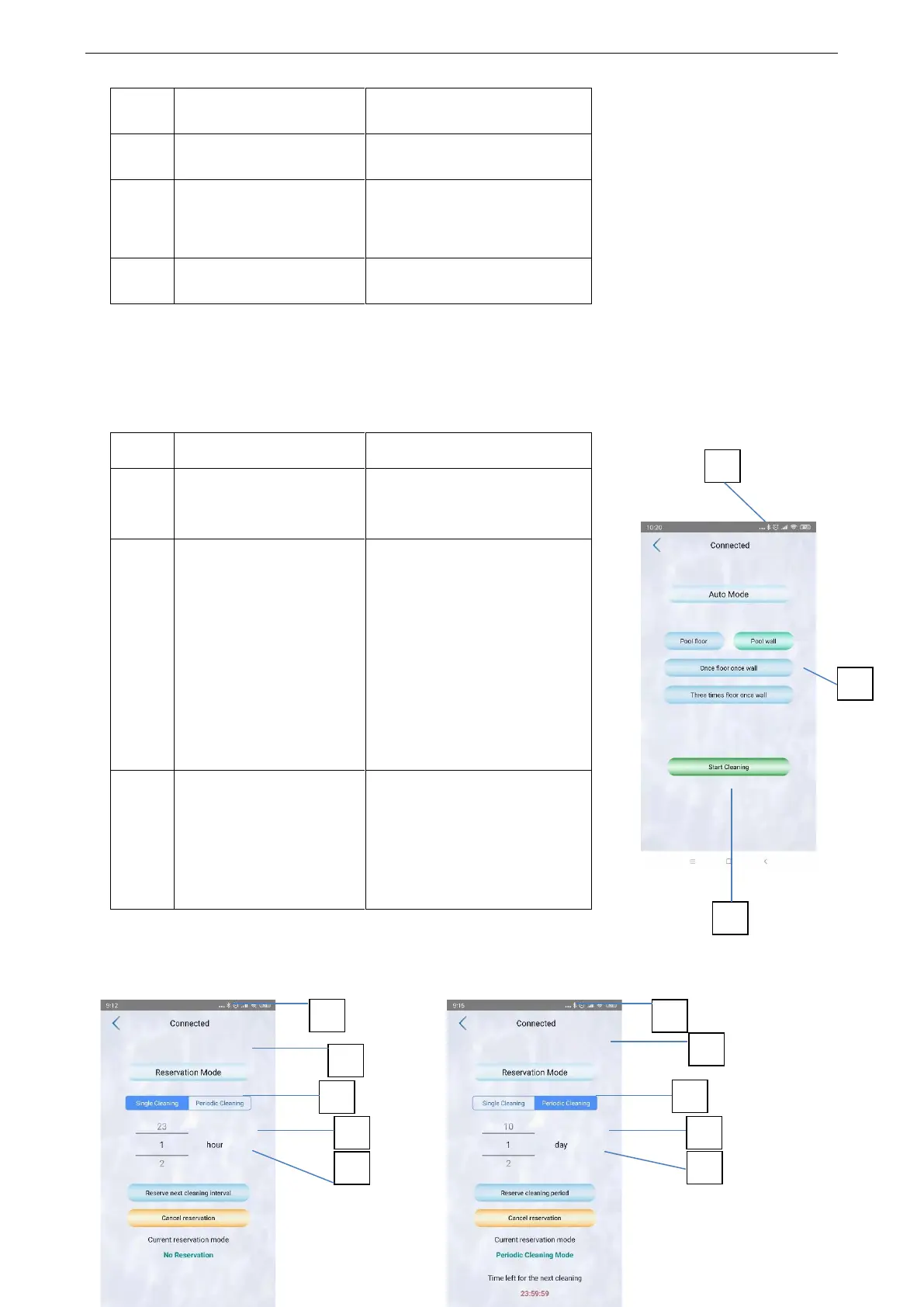
Interface der automatischen Bedienung
No.
Zeichen
Funktion
1
Verbindungsstatus
● Disconnected
● Connected
2
Auto mode
● Pool floor – reinigt nur
den Boden
● Pool wall – reinigt nur die
Wand
● Once floor once wall – 1x
Boden 1x Wand
● Three times floor once
wall 3 x Boden 1x Wand
3
Start Cleaning
● Auto Play: arbeitet
automatisch entsprechend
Ihren Einstellungen
● Stop: stoppt die
automatische Arbeit
Interface des “Auto Start”
1
2
3
1
2
3
6
7
4
1
5
5
4

Related product manuals