EasyManua.ls Logo

Orca 500 - Page 42

Orca 500
Print Icon
To Next Page IconTo Next Page
To Previous Page IconTo Previous Page
Loading...
42
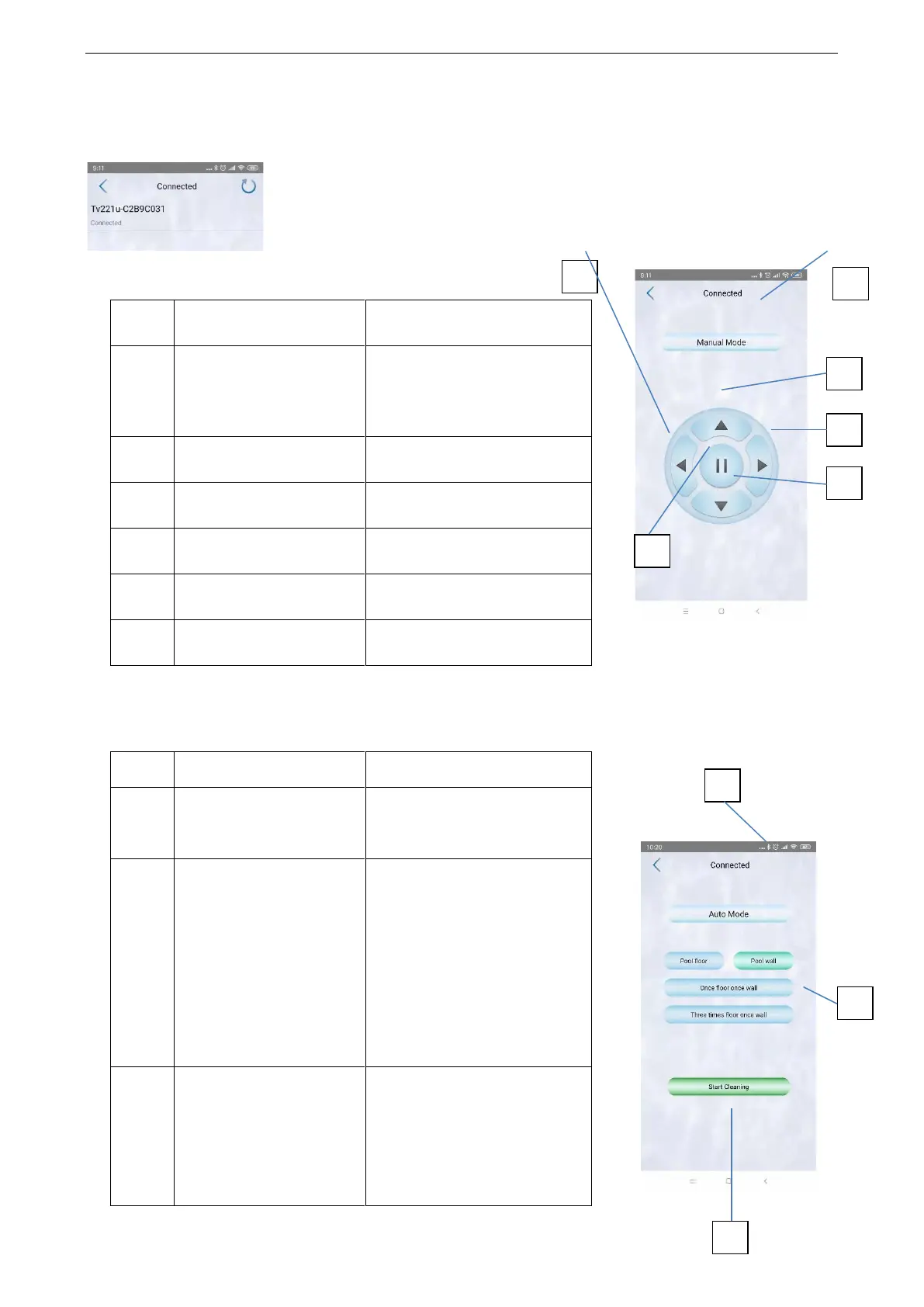
Open the app and connect with the cleaner
Interface of manual operation
No.
Illustration
Function
1
Connection status
Disconnected
● Connected
2
Button “FORWARD”
Manual -- Walk forward
3
Button “BACKWARD”
Manual -- Walk backward
4
Button “LEFT”
Manual -- Turn left
5
Button “RIGHT”
Manual -- Turn right
6
Button “STOP”
Stop
Note: Users have to press “” or ” all the time to achieve left or right turning.
Interface of automatic operation
No.
Illustration
Function
1
Connection status
● Disconnected
● Connected
2
Auto mode
● Pool floor - cleaning floor
only
● Pool wall – cleaning wall
only
● Once floor once wall
● Three times floor once
wall
3
Start Cleaning
● Auto Play: work
automatically according to
your settings
● Stop: stop automatic
working
5
4
3
1
1
1
6
2
3

Related product manuals