All ORCA products are manufactured in accordance with the highest quality standards. ORCA guarantees this product to be free from defects in materials or workmanship for 60
days from the original date of purchase verified by sales receipt. This limited warranty does not cover damages resulting from abnormal wear, misuse or improper maintenonce of
the product.
To avoid unnecessary service and mailing charges, always eliminate all other possibilities and check all components for malfunctions before sending in your unit for repair.
Products sent in for repair that operate perfectly will be charge a service fee.
When sending in the product, always pack carefully and include the original sales receipt, a description of the problem encountered, your return address and contact information.
Since we do not have control over the installation and use of this product, we cannot accept any liability for any damages resulting from the usage of this product. Therefore,
using this product is at your own risk, and the user accepts all resulting liability from installing and using of the product.
Copyright@2021 . All Rights Reserved.
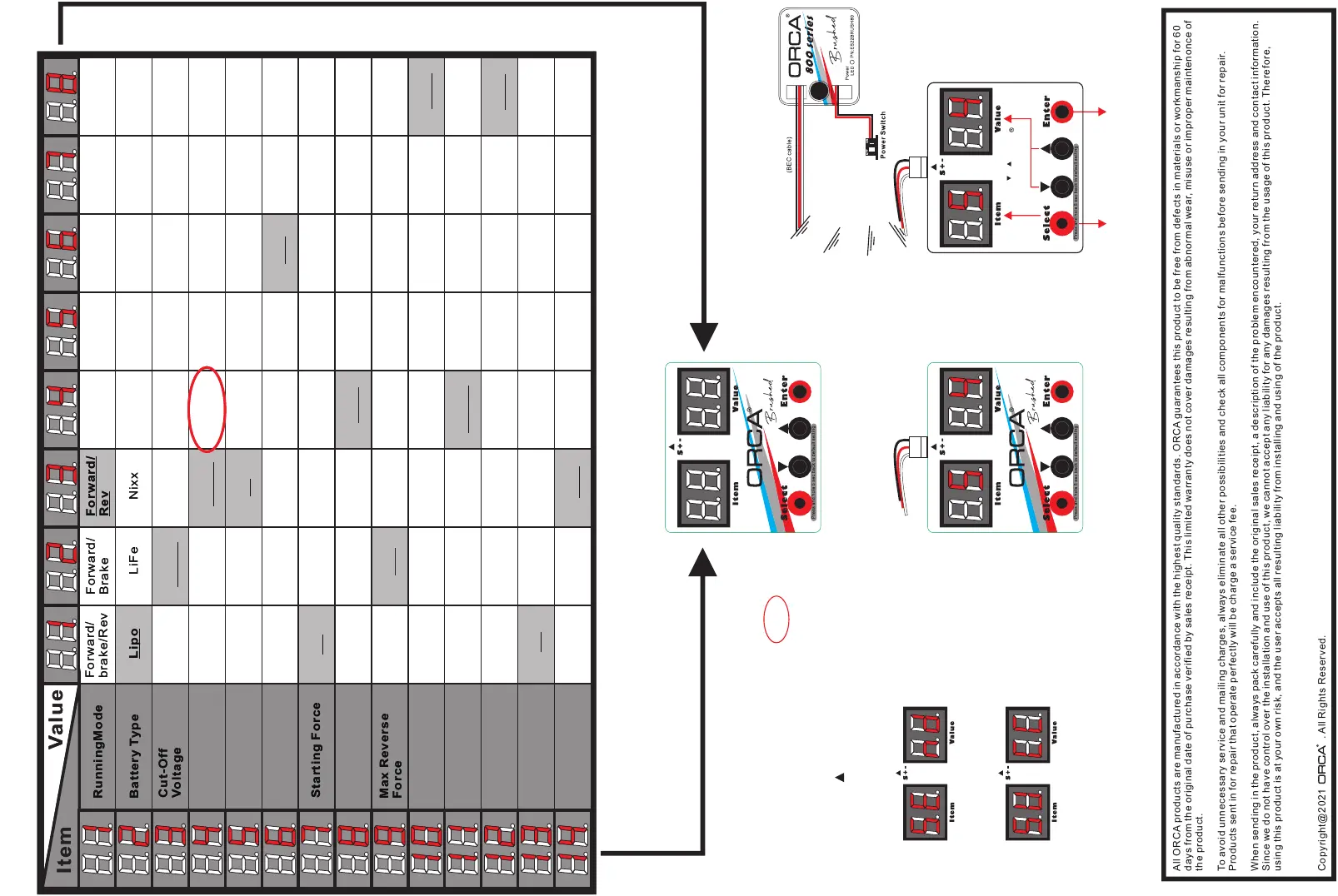
How to used the LED Program Card
to setup the ESC.
Refer to here
Lipo LiFe NixxLipo LiFe Nixx
Forward/
Brake
Forward/
Brake
Forward/
Rev
Forward/
Rev
Forward/
brake/Rev
Forward/
brake/Rev
ItemItem
ValueValue
RunningMode
Battery Type
RunningMode
Battery Type
Cut-Off
Voltage
Cut-Off
Voltage
Starting Force
Starting Force
Max Reverse
Force
Max Reverse
Force
Setting by LED Program CardSetting by LED Program Card
Low Middle High Disable Low Middle High Disable
1% 3% 6% 9% 12% 15% 18% 1% 3% 6% 9% 12% 15% 18%
1K 4K 8K 12K 16K 24K 1K 4K 8K 12K 16K 24K
Level1 Level2 Level3 Level4 Level5 Level1 Level2 Level3 Level4 Level5
25% 50% 75% 100% 25% 50% 75% 100%
Refer to here
Press and hole 5 sec
back to default setting.
Double-press the “Enter” button
will succeed in your programming.
Initial Brake
Force
Initial Brake
Force
25% 50% 75% 100% 25% 50% 75% 100%
0% 15% 30% 45% 60% 75% 90% 100% 0% 15% 30% 45% 60% 75% 90% 100%
Level1 Level2 Level3 Level4 Level5 Level6 Level1 Level2 Level3 Level4 Level5 Level6
0% 5% 10% 20% 40% 60% 80% 100% 0% 5% 10% 20% 40% 60% 80% 100%
0% 5% 10% 15% 20% 25% 30% 35% 0% 5% 10% 15% 20% 25% 30% 35%
Bec cableBec cable
For example: Now set the Punch to Level4
1) Plug “BEC” cable to the program card.
2) Esc connect the battery and then turn it on.
3) Press the “Select” button one by one until
the “Item” no. up to “5".
4) Press the “ “ button one by one until the
“Value” no. up to “4".
5) Press the “Enter” button and then, the card
will show “ SE” and “nd”, now; all data are
ready to send but not successful.
6) Press the “Enter” button again, and then the
card will show “SU” and “CC”, now the
programming are succeeful.
7) , You must restart the ESC after change the setup
otherwise the ESC will stop to run.
“Select” bu tton
control
Item No.
“ “ “ “ button
control
Value No.
Max Forward
Froce
Max Forward
Froce
15us 30us 45us 60us 75us 90us 105us 15us 30us 45us 60us 75us 90us 105us
Punch Level
PWM
Max Brake Force
Brake Punch
Drag Brake
Neutral Range
Punch Level
PWM
Max Brake Force
Brake Punch
Drag Brake
Neutral Range
Throttle
compress
Throttle
compress
0% 10% 15% 20% 25% 30%



 To Previous Page
 Loading...