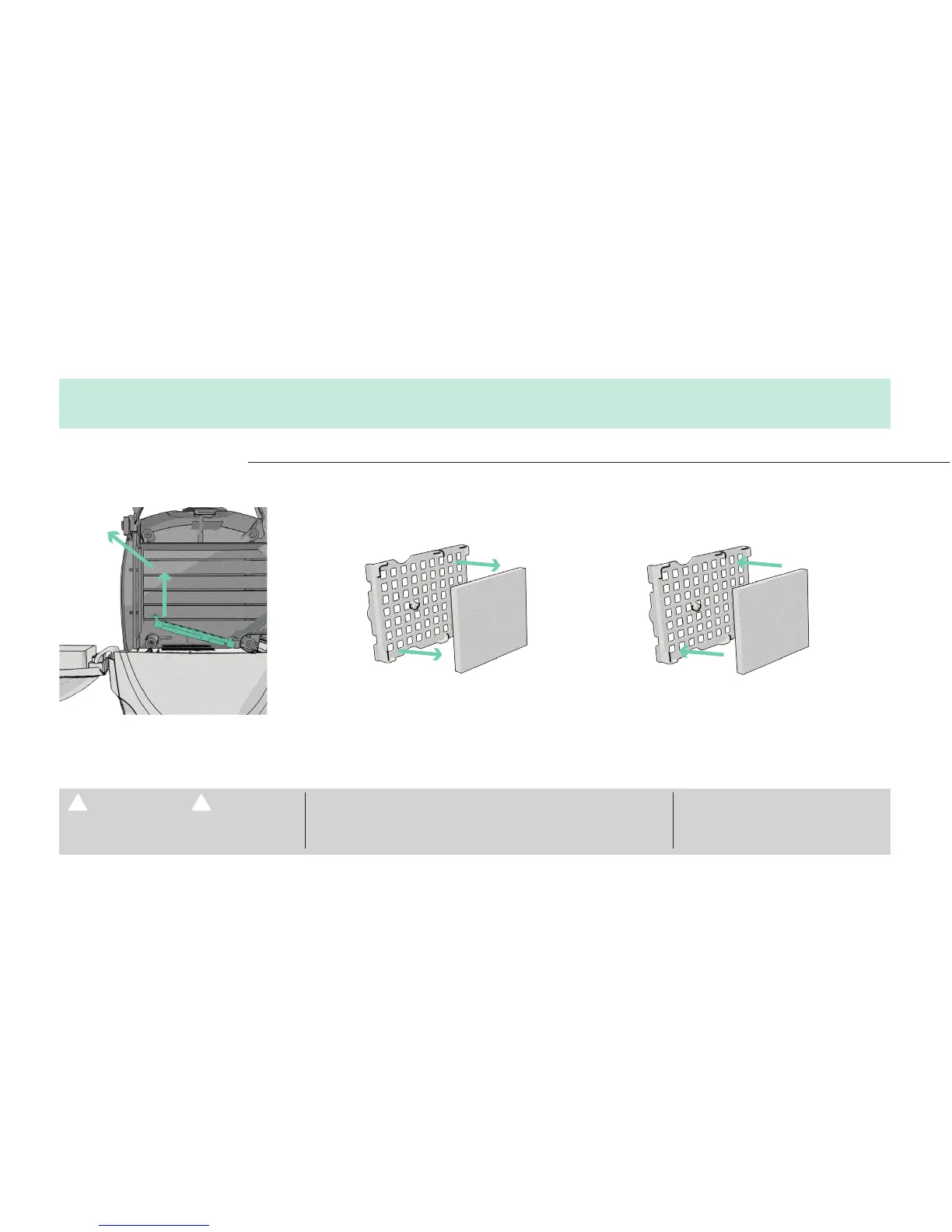
REPLACING THE MICRO FILTER
4. MAINTENANCE
Lift up on the finger tab and pull out. Remove the Micro Filter from the frame. Replace by pressing a new Micro
Filter onto the tab located on the
underside of the frame.
Important: Never remove the white gasket surrounding the inner bag opening. The vacuum will leak air and not run properly.
TO REDUCE THE RISK OF PERSONAL INJURY–
UNPLUG BEFORE CLEANING OR SERVICING.
IF APPLIANCE IS NOT WORKING AS IT SHOULD, HAS BEEN DROPPED,
DAMAGED, LEFT OUTDOORS, OR DROPPED INTO WATER, TAKE IT TO A
SERVICE CENTER PRIOR TO CONTINUING USE.
ANY OTHER SERVICING SHOULD BE
DONE BY AN AUTHORIZED SERVICE
REPRESENTATIVE.
WARNING!





 To Next Page