C8266B-PD09535M (DCF) -EN Size: A4
EN
RADIO CONTROLLED
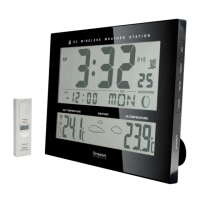
WIRELESS WEATHER STATION
MODEL:JW102
USER MANUAL
BRIEF INTRODUCTION
Thank you for your purchase of this delicate Wireless
Weather Station. The utmost care has gone into the
design and manufacture of your clock. Please read
these instructions carefully and keep the manual well
for future reference.
The multifunctional weather station is equipped with
many functions providing thorough weather information
to you. The receiver unit has a clear, easy-to-read
display that shows the indoor temperature, moon phase,
time, month, date as well as the temperature measured
and transmitted from the remote sensors. It is able to
receive and display readings from up to 3 remote
sensors.
The 433 MHz technology means no wire installation is
required and you can place the sensors anywhere you
like.
With radio controlled function, the current time and
date are automatically synchronized with the time signal
transmitted from Germany(DCF).
MAIN FEATURES:
WEATHER STATION
1. CLOCK WINDOW:
• Displays time, year, signal strength indicator,
daylight savings time (DST), alarm icons
.
2. CALENDAR AND MOON PHASE WINDOW:
• Displays the month, date, day of the week, alarm
time as well as the moon phase.
3. WEATHER FORECAST AND TEMPERATURE
W INDOW:
• Shows the current indoor & outdoor temperature,
the maximum/minimum temperature as well as
the current channel.
4. TIME key:
• In normal time mode, press it to enter alarm1
and alarm2 time mode.
• Press and hold it for 2 seconds to enter the
normal time setting mode.
• In normal time setting mode, press it to step the
setting items.
5. CHANNEL key:
• Press it to switch among channel 1, 2 and 3.
• Press and hold it for 2 seconds to show the
channels automatically, and press it once again
to exit the automatic display mode.
6. MAX/MIN key:
• Press it to show the maximum and minimum
temperature records.
• Press and hold it for 3 seconds to delete the
max. and min. records.
7. SNOOZE key:
• Press it to stop the current alarm when it is
sounding.
8. ALARM ON/OFF
key:
• In normal time mode, press it to turn on/off alarm1
& alarm2.
• In alarm time mode, press it to turn on/off alarm
and temperature pre-alarm.
• In alarm time mode, press and hold it for 2
seconds to enter the alarm time setting mode.
• In alarm time setting mode, press it to step the
setting items.
• Press it once to stop the current alarm when it is
sounding.
9. RESET key:
• Press it to reset all values to default values.
• In case of malfunction, the unit may be required
to reset.
10. UP key:
• In normal time mode, press it to switch between
M-D (Month-Date) and D-M ( Date-Month)
formats.
• In time setting mode, press it to increase the
setting values.
• Press and hold it for 3 seconds to receive the
RC signal for reception testing.
11. DOWN key:
• Press it to switch 12/24-hour format.
• In time setting mode,
press it to decrease the
setting values.
12. SYNC key:
• Press and hold it for 3 seconds to turn on/off the
signal reception of transmitter (433 MHz)
manually.
13. °C/°F key:
• Press it to switch between Celsius and Fahrenheit.
14. WALL-MOUNTING HOLDER:
• Use it to support the main unit in the wall
mounting.
15. BATTERY COMPARTMENT:
• Accommodates 4 AA size batteries.
16. TABLE STAND:
• Use it to stand the clock on the desktop.
TRANSMITTER
1. LCD indicator:
• Displays the current temperature monitored by
the remote unit.
2. CHANNEL slide switch:
• Assign the transmitter to Channel 1, 2 or 3.
3. RESET key:
• Press it to restart the transmitter and return all
values to default values.
4. °C/°F key:
• Switches between Celsius and Fahrenheit.
5. BATTERY COMPARTMENT:
• Accommodates 2 AA size batteries.
6. BATTERY DOOR
7. WALL-MOUNTING HOLDER:
• Use it to support the transmitter on the wall.
8. TABLE STAND:
• Use it to stand the transmitter on the desktop.
RECEPTION OF TRANSMITTER SIGNAL
OPERATING THE WEATHER STATION
1. Remove the battery door and insert 4 AA size
batteries into the battery compartment as per
the polarity information marked on the battery
compartment.
2. Replace the battery door.
3. Press “RESET” key to restart the clock.
4. Press “CHANNEL” key to set the desired
channel.
Note:
1. When the transmitter signal is received, the
icon “
” will be shown and flash for 3 times.
2. The building material and position of receiver
and transmitter affect the effective range. So
try various locations to obtain the best result.
3. Place the units away from metal objects and
electrical appliances to minimize the interference.
Position the receiver within the effective
transmission range: 30 meters in usual
circumstances.
OPERATING THE TRANSMITTER
1. Remove the transmitter from the stand and
open the battery door.
2. Insert 2 AA size batteries into the battery
compartment as per the polarity information
marked on the battery compartment.
3. Slide “CHANNEL” switch to synchronize the
channel with receiver.
4. Press “RESET” key individually by a pin to
confirm the channel setting.
5. Press “°C/°F” key to select the temperature
unit.
6. Replace the battery door.
Note:
1. To receive the transmitter signal, the channels
of receiver and transmitter must be
synchronized.
2. The icon “
” will flash for 3 times when the
signal is being transmitted.
3. Once the channel is assigned to a transmitter,
you can only change it by removing the batteries
or resetting the unit.
RECEPTION OF RADIO CONTROLLED
TIME SIGNAL
The time and date are radio-controlled. The current
time and date are automatically synchronized with the
signal transmitted from Germany (DCF).
When used for the first time (after inserting the
batteries or pressing “RESET” key), the clock will start
to receive the signals and the reception display will
flash in 8 seconds.
DAYLIGHT SAVINGS TIME (DST)
The clock has been programmed to automatically
switch when the daylight savings time is in effect.Your
clock will show “DST” during the summe.
SIGNAL STRENGTH INDICATOR
The signal indicator displays signal strength in 4 levels.
Wave segment flashing means time signals are being
received. The signal quality could be classified into 4
types:
Note:
1. The unit will automatically search for the time
signal at 2:00 (3:00 or 4:00 is also available if
the signal was not
received at 2:00), 8:00, 14:00
and 20:00 each day.
2. Always place the unit away from interfering
sources such as TV set, computer etc.
3. Avoid placing the unit on or next to metal plates.
4. Closed area such as airport, basement, tower
block or factory is not recommended.
5. Do not start reception in moving articles such
as vehicles or trains.
TIME AND CALENDAR MANUAL SETTING
If you are out of reach of the Radio Controlled
transmitter or if the reception is not reachable, the
time and calendar can be set manually. As soon as the
signal of transmitter is received again, the clock will
automatically synchronize with the exact time and
calendar.
1. Press and hold “TIME” key for 2 seconds until
the Year digit flashes.
2. Press “UP” or “DOWN” key to change its value.
3. Press “TIME” key once until the Month digit
flashes.
4. Press “UP” or “DOWN” key to change its value
.
5. Repeat the above operations (point 3, 4) to set
the below items in this order: Date > Hour >
Minute > Second > Day language > +/-23 hours
time difference.
6. Press “TIME” key to save and exit the setting
mode, or let it exit automatically 30 seconds
later without pressing any key.
Note:
1. Through “+/-23 hours time difference” setting,
the precise time of another area will be shown.
2. The 5 languages weekday settings are
represented by the below abbreviations:
GB=English FR=French DE=German
ES=Spanish IT=Italian.
ALARM TIME SETTING
1. In normal time mode, press “TIME” key to enter
the alarm1 (alarm2) time mode.
2. Press and hold “ALARM ON/OFF” key for 2
seconds until the alarm Hour digit flashes.
3. Press “UP” or “DOWN” key to change its value.
4. Press “ALARM ON/OFF” key once until the alarm
Minute digit flashes.
5. Press “UP” or “DOWN” key to change its value.
6. Press “ALARM ON/OFF” key to save and exit
the setting mode, or let it exit automatically 30
seconds later without pressing
any key.
Note:
1. The alarm will be automatically turned on when
you set the alarm time.
2. The dual-alarm (alarm1 & alarm2) design of this
unit provides you with more convenience, and
you can set two-alarm time if needed.
USING ALARM & TEMPERATURE
PRE-ALARM FUNCTIONS
1. Set the alarm time as the above section with
alarm1 (alarm2) turned on when you set the alarm
time.
2. In alarm1 (alarm2) time mode, press “ALARM
ON/OFF” key once to turn on the temperature
pre-alarm with the icon “
” displayed.
1
2
3
UP
SYNC
DOWNUP C / FSYNC
O O
9 10 11 12 13
3
2
5
1
4
433 MHz
THERMO SENSOR
433 MHz
THERMO SENSOR
No signal quality
Acceptable signal quality Excellent signal quality
English
SON
MON
DIE
MIT
DON
FRE
SAM
German
DIM
LUN
MAR
MER
JEU
VEN
SAM
French
SUN
MON
TUE
WED
THU
FRI
SAT

 Need help?
 General



 To Next Page