8
General Use
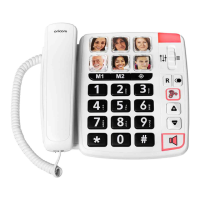
Set handset volume and audio-boost
Duringhandsetconversation,2modesofamplificationareavailable:
• Standard mode
Press
or to increase or decrease (4 levels).
• Audio boost mode (extra strong up to + 30dB)
Duringhandsetconversation,pressthe
key. Press this button again to stop
amplification.
A slider on the back of the phone (AMPLIFY) is used to always activate the
audio boost function. By default, the position is "OFF" If it is in the "ON" position,
the audio boost will be automatically activated at each call.
Handset receiver equalizer adjustment
Slidetheswitchtoadjustthehandsetreceiversoundfrequencypitch(bassor
treble)
.
Programming
Program memory keys (SOS, photos and M1, M2)
1) Pick up the handset.
2) Press
.
3) Dialthephonenumbertobestored,eg0612345678.
4) Press the memory key dedicated to this number (SOS, Photos, M1 orM2).
The SOS number is the one you want to reach in case of emergency.
5) Hang up the handset. It is advisable to make a test to verify the registered
number is correct.
6) To change the number, repeat the procedure from 1.


 To Next Page